
 Models
 Materials
 HDRIs
HDRIs
 Scenes
 Brushes
 Node Groups
 Printables
 Creators
 Creations
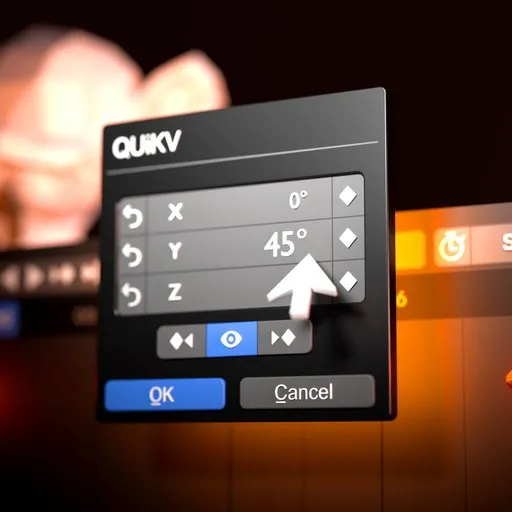
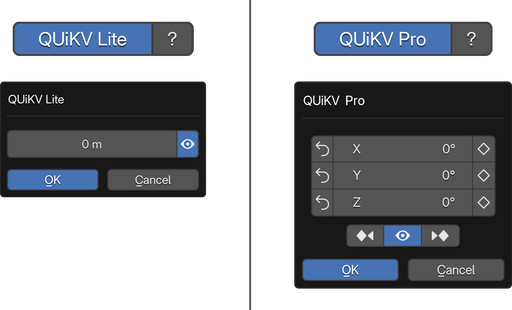
QUiKV PRO — Quick Keyframe Value | Animation
 add-on
Quick Keyframe Value
Double-click any keyframe. Instantly edit its exact value — without touching the playhead. The fastest way to precision-animate in Blender.
New v1.4.0 Update:
Now with intelligent popup positioning, playhead sync, enhanced visual feedback and Multi-channel bone properties.
TROUBLESHOOTING
Q: Popup doesn't appear when double-clicking?
A: - Make sure a keyframe is selected (highlighted)
-
Check that QUiKV is enabled in header
-
Verify the F-Curve is not locked or muted
-
Try clicking on the keyframe itself, not just the curve
Q: Multi-channel editing not working?
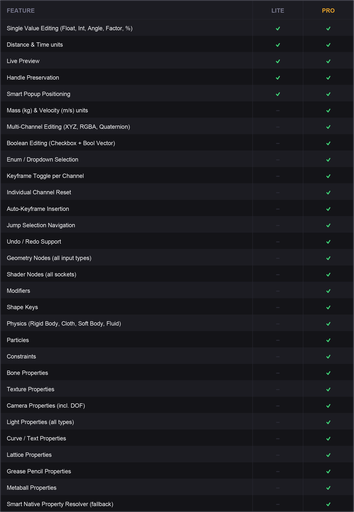
A: This is normal for certain property types. Not all properties have
multiple channels. Single-value properties show single-channel UI.
Q: Preview is slow or laggy?
A: Turn off live preview (eye icon) for complex scenes with many objects,
modifiers, or geometry nodes. Edit, then click OK to apply once.
Q: Handles changed after editing?
A: This shouldn't happen. QUiKV preserves handle offsets for all
channels. If it occurs, please report the bug with your .blend file.
Q: Geometry Node input not detected?
A: Make sure you're double-clicking on a keyframe on the Geometry Nodes
modifier property, not on a node inside the node editor.
Q: Enum/Menu showing wrong options?
A: QUiKV reads enum items from RNA. If they appear wrong, this may
be a Blender API issue or custom property setup.
Q: Shape key value not updating?
A: Ensure the shape key exists and is not locked. Check that the data
block (Mesh/Lattice/Curve) has shape keys enabled.
Q: Physics property not editable?
A: Verify the physics system is enabled (Rigid Body, Cloth, etc.) and
the property is keyframable in Blender.
Q: Keyframe toggle button not working?
A: The property must be keyframable. Some properties don't support
keyframe_insert/keyframe_delete via RNA.
Q: Reset button doesn't restore deleted keyframe?
A: QUiKV tracks deletions made during the current edit session.
Keyframes deleted before opening the popup cannot be restored.
Q: Property not detected correctly?
A: v1.3.0 includes improved detection systems. If a property still isn't
detected, it may be a very specialized or custom property type. Check
console output for detection information.
Q: Jump Selection not working?
A: - Ensure there are multiple keyframes on the F-Curve
-
The primary channel must have keyframes to navigate
-
If only one keyframe exists, navigation buttons will be inactive
KNOWN LIMITATIONS
-
Some custom properties may not be fully detected
-
Nested modifier properties may require specific selection
-
Array properties larger than 4 elements show limited UI
-
Jump Selection requires keyframes on the primary channel
PERFORMANCE NOTES
-
Live preview may be slow with:
-
Complex Geometry Nodes setups
-
Heavy modifier stacks
-
High-poly meshes
-
Multiple particle systems
-
Solution: Disable live preview, make edits, click OK once
-
Multi-channel editing is optimized to update all channels efficiently
-
Jump Selection maintains edit history - very long navigation sessions
may accumulate memory (automatically cleaned up on popup close)
WHAT'S NEW IN v1.4.0
-
POPUP OPENS NEAR YOUR CURSOR
The edit popup now appears right next to where you double-clicked, no more dialog jumping to the center of the screen. Position adapts to which quadrant you clicked in, the estimated dialog height, and screen boundaries. -
KEYFRAME STATE INDICATORS
Reset and Keyframe Toggle buttons now visually highlight when a keyframe exists at the current frame. Instant visual feedback without reading the timeline. -
PLAYHEAD NAVIGATION
Next/Prev keyframe buttons now correctly move the playhead to the target frame in all cases. -
POSE MODE MULTI-CHANNEL FIX
Bone rotation and location properties now correctly display all channels in Pose Mode. Previously, a gap in the property detector could cause these to resolve as single-axis.
COMPATIBILITY
Blender Version: 3.0.0 and above
(Note: Full UI support including Cancel button requires Blender 4.1+)
Tested on: Blender 3.6, 4.0, 4.1, 4.2, 4.3, 4.4, 4.5, 5.0
OS Support: Windows, macOS, Linux


![AnimTex - Animate Texture Transitions [BETA]](https://public.blenderkit.com/thumbnails/assets/b4b2eba28e0741768c4faa3072aa5363/files/thumbnail_8c69b4bc-abf4-432d-81d3-d88d138f8e1c.png.1024x1024_q85_crop-%2C.jpg.webp?webp_generated=1767519976)


