Blendkit for Unreal 🔗
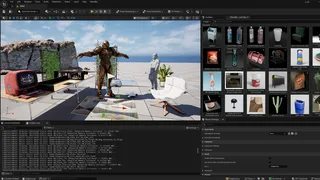
With our new free plugin, you can enjoy the Blendkit asset library directly in the Unreal Editor. Simply search and browse assets, and place them in your level without leaving your project. Use your Blendkit Plan to find what you desire.
The open-source plugin is in its early pre-alpha stage. Feel free to experiment, and please share your feedback!
Requirements 🔗
- Unreal Engine 5.6 or newer
- A C++ toolchain compatible with your Unreal Engine installation
- Blender 5.0 or newer (latest version highly recommended)
How to install 🔗
- To use Blendkit in Unreal, you will need to install Blender (available for free). Blendkit uses Blender in the background to convert files.
- Download the plugin from the GitHub and extract the ZIP and copy the Blendkit folder into your project's Plugins folder.
- Open the project and allow Unreal Engine to compile the plugin's native module. If prompted, install the C++ toolchain required by your Unreal Engine version.
- In Unreal Editor, enable Blendkit, Python Editor Script Plugin, and the Editor Scripting Utilities. Enable USD Importer for USD imports, then restart the editor.
- Use Blendkit Free Plan or Full Plan, or sign in with your existing account.
How to use 🔗
In Unreal, use the Blendkit asset bar to search for models, materials, and scenes. When something catches your eye, right-click it to open the detail view for a larger preview and more information. Then, simply drag your chosen assets into the viewport. You can also bookmark favorites as you browse.
Use the mouse wheel to rotate the asset around the surface normal before dropping it into place. Placement now detects objects beneath the cursor and aligns the preview to their surface angle—including slopes and walls.
Surface detection currently relies on Unreal’s collision geometry, so objects without collision may be ignored, with placement falling back to the ground plane. The plugin is still evolving, but building up your scene is becoming a much more natural drag-and-drop experience.
Note: For assets that start as .blend files, Blendkit uses Blender to convert them to USD for Unreal. Custom MaterialX conversion helps carry materials across that journey, though complex materials may not look exactly the same in both applications.
Share feedback 🔗
Found a bug? Have a feature you wish to request? Please share input directly from Unreal or use the GitHub issue tracker. Thanks!
Need help? Email us for support.
New to Blendkit? Read all about it.
Enjoy :-)