Blendkit for Rhino 🔗
With our new free plugin, you can now enjoy the Blendkit asset library in Rhinoceros!
Directly in Rhino, the Blendkit asset bar offers more than 100K free and paid models, materials and HDRIs. Filter by category, ratings, or bookmarks to find exactly what you need. Then, simply drag and drop or use point-based placement to insert any asset.
Your chosen asset will be downloaded in .blend format and converted in the background into a .glb file. Upon import, materials are automatically converted to Rhino's native PBR materials.
Rhino uses Cycles but does not support full Cycles node graphs, so materials may look different than in Blender. Because Rhino handles mesh data slowly, we recommend using lower-polygon meshes. You can also opt to strip materials from assets in the plugin settings, which applies a default white material to all downloads.
Our open-source plugin is currently in its early alpha stage. Please experiment and share your thoughts!
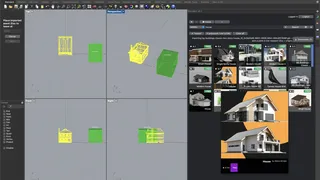
How to install 🔗
- To use this plugin, you must install Blender. While you do not need to run Blender yourself, the plugin requires it to convert files. You can download Blender for free.
- Run Rhino 8 on Windows or macOS (Apple Silicon supported).
- In Rhino, run the PackageManager command (or go to Tools ▸ Package Manager).
- Search for Blendkit.
- Select it, click Install, and then restart Rhino.
- Open the panel: run the Blendkit command, or select it under Panels ▸ Blendkit.
- Click Login in the panel to connect your Blendkit account, and authorize the connection via your browser.
Your feedback matters 🔗
If you find a bug or want to share your feedback, please use our GitHub issues channel. This helps us continue to improve the plugin. Thank you!
Need help? Email us for support.
New to Blendkit? Read all about it.
Enjoy :-)