Blendkit for Maya 🔗
Are you an Autodesk Maya artist looking for a massive asset library? We've got you covered!
With our new free plugin, you can browse the Blendkit library directly in Maya, drag and drop any asset into your viewport, and have your scene ready in no time.
If you have a Full Plan subscription, you can use it in both Blender and Maya. Full Plan gives you access to the complete Blendkit database—including more than 100K assets—while supporting asset creators and open-source development.
Please note that the plugin is in its early alpha stage. Feel free to experiment and we would love to hear your thoughts.
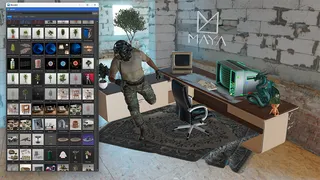
How to install 🔗
- Install Blender 5.0+ for free. Although you won’t be actively using it, the plugin needs it to convert the source .blend assets to USD format in the background.
- Download the latest plugin .zip fromGitHub Releases.
- Unzip it into a Maya modules directory.
- Restart Maya.
- Open Windows → Settings/Preferences → Plug-in Manager, find maya_plugin.py, and tick Loaded (and Auto load to keep it on).
- A new Blendkit menu will appear in the main menu bar. Done!
Stay up to date 🔗
The plugin checks for new releases automatically. By default, it notifies you about stable releases; if you like living on the edge, enable "Also offer alpha (pre-release) builds" in Blendkit → Settings → Updates to get the newest features first. You can also trigger a check anytime via Blendkit → Check for Updates…
Share feedback 🔗
Found a bug? Have a feature you wish to request? Please let us know in the issue tracker. We appreciate your input!
Need help? Email us for support.
New to Blendkit? Read all about it.
Enjoy :-)