
 Models
 Materials
 HDRIs
 Scenes
 Brushes
 Node Groups
 Printables
 Creators
 Creations

ARKit to MetaHuman - Shape Keys
 add-on
Rename ARKit 52 facial shape keys to MetaHuman Live Link curve names
Introduction
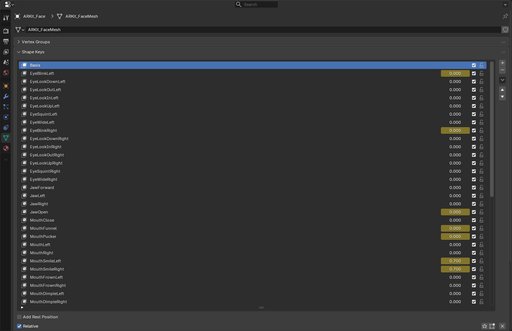
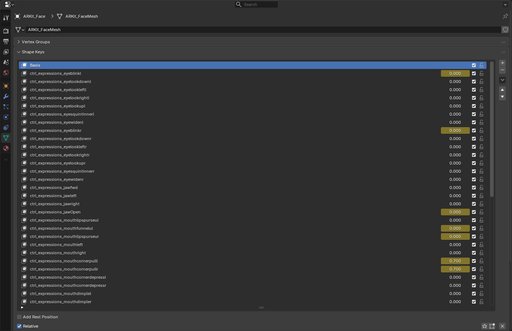
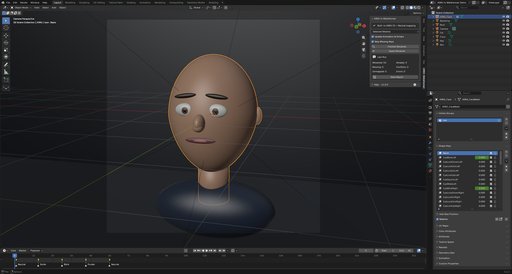
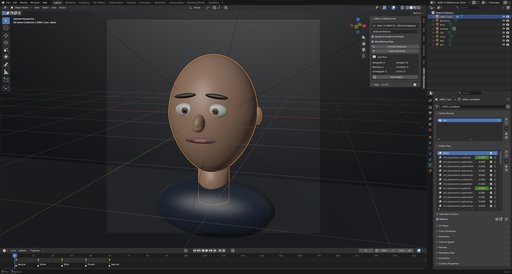
ARKit to MetaHuman is a Blender add-on that renames the 52 ARKit facial shape keys to the MetaHuman Live Link curve names used by Unreal Engine. The mapping is built in, every rename can be previewed first, and values, sliders, key order, animation and drivers are preserved.
It is made for facial rigs that were authored with ARKit names but need to drive a MetaHuman. No new shape keys are created, no mesh data is edited, and no expressions are changed.
Features
- Built-in corrected 52-pair ARKit mapping, plus Neutral to Default.
- Preview every rename before changing the file.
- Detects missing sources, existing targets and case-insensitive collisions.
- Never lets Blender append .001; conflicts are skipped and reported.
- Preserves values, sliders, mute states, vertex groups, relative keys and key order.
- Rewrites shape key F-curves, NLA strips and drivers after the rename.
- Processes the active mesh, selected meshes, or all meshes in the view layer.
- Renames shared shape key data once, even when several objects use it.
- Writes a full report to the Text Editor and can save it as a text file.
- No CSV, JSON or external mapping file to load or maintain.
How It Works
- Select the mesh or meshes with ARKit shape keys.
- Open the 3D Viewport sidebar with N and choose the ARKit tab.
- Choose the scope and click Preview Renames.
- Review the report, then click Apply Renames.
- Optionally click Save Report to export the last report as a .txt file.
Applying the operation twice is safe. Keys that already have their target name are reported as Already Renamed.
Mapping
The mapping is built in and applied verbatim, including case. A sample:
| ARKit | MetaHuman Live Link |
| --------------- | ----------------------------------- |
| EyeBlinkLeft | ctrl_expressions_eyeblinkl |
| EyeLookInLeft | ctrl_expressions_eyelookrightl |
| JawOpen | ctrl_expressions_jawOpen |
| MouthClose | ctrl_expressions_mouthlipspurseul |
| BrowInnerUp | ctrl_expressions_browlaterall |
| Neutral | Default |
Several names are deliberately asymmetric and are not "fixed": MouthClose and MouthPucker use the purse targets, BrowInnerUp maps to browlaterall, CheekPuff maps to mouthcheekblowl, and the eye In/Out targets follow the supplied list.
Animation & Drivers
The add-on rewrites shape key animation in the active action, every action used by NLA strips, and drivers attached to the shape key data-block. It supports legacy and layered actions and warns when an action is shared by other data-blocks.
Object-level drivers that reference key_blocks[...] outside the shape key data-block are not rewritten and should be checked manually.
Why Rename Manually?
| Task | ARKit to MetaHuman | Manual rename |
| ----------------------------------- | ------------------ | ---------------------- |
| 52 names applied consistently | Yes | Error-prone |
| Preview before applying | Yes | No |
| Missing keys and conflicts reported | Yes | Manual check |
| Values and sliders preserved | Yes, verified | Easy to miss |
| Animation, NLA and drivers updated | Yes | Manual path editing |
| Shared shape key data handled once | Yes | Easy to repeat or miss |
| Report for review | Yes | No |
Options
| Setting | Description |
| -------------------------- | --------------------------------------------------------------------------------------------------------------- |
| Scope | Active Mesh, Selected Meshes or All Meshes. Default: Selected Meshes. |
| Update Animation & Drivers | Rewrite shape key animation, NLA paths and drivers. Enabled by default. |
| Skip Missing Keys | Apply available renames and report missing sources. Disable to cancel the whole run when any source is missing. |
Report
Every run writes ARKit2MH_report to Text Editor > Text and shows the counts in the sidebar:
- Renamed — the key was renamed.
- Already Renamed — the target already exists; no change.
- Missing Sources — the ARKit key is not present.
- Conflicts — the target exists; the source is left untouched.
- Unmapped Keys — existing keys outside the mapping; left untouched.
- Read-Only Data — linked-library keys that cannot be edited.
- Errors — Blender refused the rename or verification failed.
Limits
- Existing object shape keys only. The add-on does not create keys or edit mesh data.
- Pose-bone rigs and other rig controls are out of scope.
- Linked-library keys are read-only.
- A target that exists in any letter case is a conflict. The add-on never overwrites, merges or auto-suffixes keys.
- The mapping is built in; it is not edited from the panel.
Compatibility
- Blender 3.3 or newer for a legacy add-on install.
- Blender 4.2 or newer for an extension install.
- No external dependencies.
Support
Join our Discord server to stay updated.


