Add-ons
 Models
 Materials
 HDRIs
 Scenes
 Brushes
 Node Groups
 Printables
 Creators
 Creations
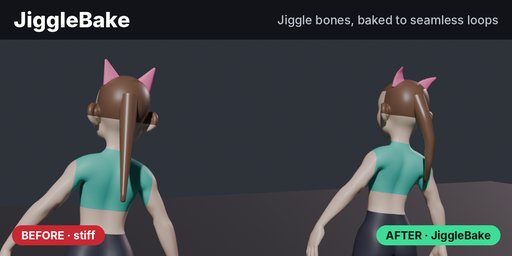
JiggleBake Lite is free spring jiggle for bone chains in Blender. Hair, ears, tails and straps follow your animation, and the bake writes ordinary rotation keys you can render or export. Every image on this page is a real JiggleBake bake.
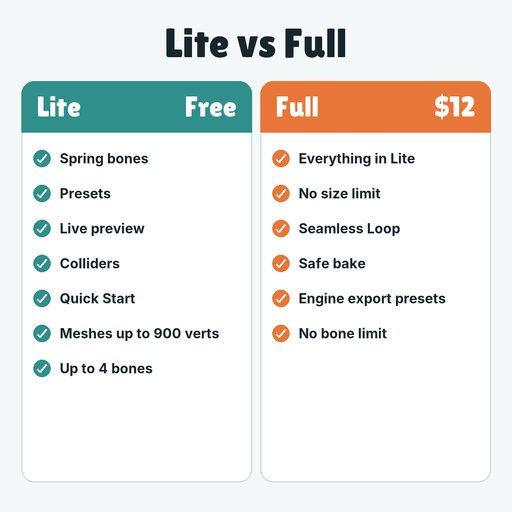
WHY FULLLite stops at 4 jiggle bones and 900 vertices. Full has no bone limit (60 bones over 250 frames bake in a few seconds) plus Seamless Loop, whose first and last frames match to under 0.00001 degrees, and engine export presets ($12).
Remove Lite, install Full, done.
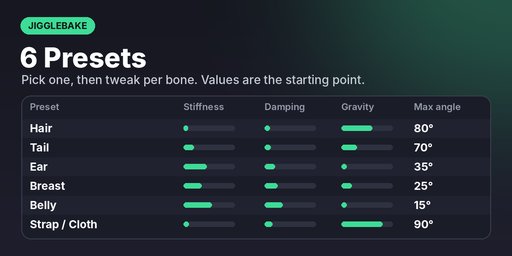
- Spring bones: stiffness, damping, gravity, collision radius and max angle per bone
- Presets: Hair, Tail, Ear, Belly, Strap / Cloth, Breast
- Live preview while the timeline plays
- Colliders: spheres parented to bones, plus a floor height
- Bake up to 4 jiggle bones on meshes up to 900 vertices (the demo size) into a copy of your action; the original is untouched
- Quick Start: one click adds a rigged demo mannequin with a ponytail and ears, already set up
- Install: Edit › Preferences › Get Extensions › Install from Disk, and pick the zip.
- Press N in the 3D viewport and open the JiggleBake tab. Click Add Demo Rig.
- Tick Live Preview and press Play.
- On your own rig: select bones in Pose Mode, click Enable on Selected, pick a preset, then Bake Jiggle.
- Preroll settles the chain before frame 1, so the bake doesn't start with a snap.
- Raise Stiffness or lower Max Angle if a preset swings too far.
- Blender 4.2 LTS to 5.2; Windows and Linux tested, macOS not tested
Lite stays free. The full JiggleBake is a separate paid add-on; search JiggleBake under Add-ons here on Blendkit.
- No bone limit
- Seamless Loop for idles and walk cycles: the last frame flows into the first
- Engine export presets: Unity, Unreal, Roblox (FBX) and Godot (.glb)
Remove Lite before installing the full version.
Demo character in the images: Blender Studio Human Base Meshes (CC0).