
 Models
 Materials
 HDRIs
 Scenes
 Brushes
 Node Groups
 Printables
 Creators
 Creations
VecFlow - Particles, Liquids, Smoke, Fire and Destruction
 add-on
One simulation system for Blender: particles, liquids, smoke and fire, destruction, cloth, sand and flocks, built in a node Flow editor and baked by a fast engine on the CPU or an NVIDIA GPU, with the same result on any machine.
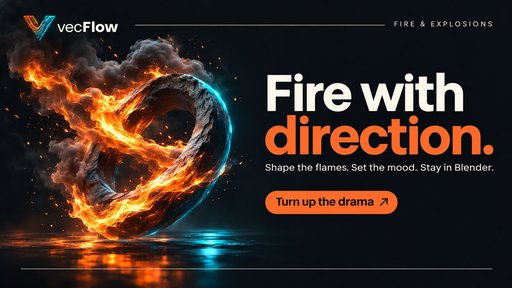
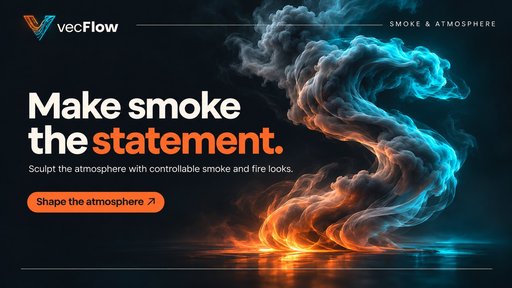
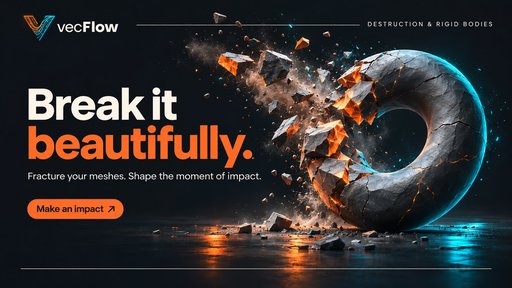

VecFlow is one complete simulation and effects system that lives inside Blender. Sparks and snow, sand and swarms, cloth and collapsing walls, honey, whitewater, smoke and rolling fireballs: all built the same way, all baked by one fast engine, and all yours to direct, down to the last particle.
Early access: help shape VecFlow
VecFlow is early in its development. That makes this the best time to get involved: your bug reports, ideas and feature requests will directly shape what gets built next.
Buying VecFlow now means more than getting a tool. You get a say in where it goes. If something breaks, confuses you or falls short on a real shot, we want to hear about it. If there's an effect you wish it could do, tell us that too.
- Report a problem. Tell us what you did, what you expected and what happened. A screenshot or a small .blend file helps us fix it faster.
- Request a feature. Missing an operator, a preset or a control? Describe the shot you're trying to make. Real shots help us decide what to build next.
- Share your feedback. Tell us what works and what doesn't, send us what you make, and leave a rating to help other artists find VecFlow.
Ready to take part? Write to the contact email on your purchase receipt with any problem, question or idea. To see what's already known, read Messages and Limits and known gaps.
Every effect. One way of working.
Think about a single shot. A wrecking ball hits a wall. Bricks fly, dust hangs in the air, a pipe bursts and water runs across the floor while sparks fall from a torn cable. In most setups that one idea means several separate tools, several sets of rules, and a lot of hoping that the pieces line up in the final render.
VecFlow was built to end that. Everything is a particle, and every particle follows a flow you can see. A brick, a drop of water, a grain of sand, a vertex of a curtain and a puff of burning fuel are all driven by the same system, in the same editor, with the same controls for baking, retiming and playback. Learn it once and you have learned all of it.
That is what you are really buying: not a pile of features, but the freedom to stop asking which tool can do this, and start asking what the shot should do next. Sparks can ride the heat of a fire, crates can float in the water that smashed them loose, and a single flow can hold the whole idea from the first frame to the last.
- Direct, don't just simulate. Decide what happens when something hits, ages, slows down or reaches a place. A drop can turn red and burst. A brick can sit still until it is struck. Your rules, drawn as nodes.
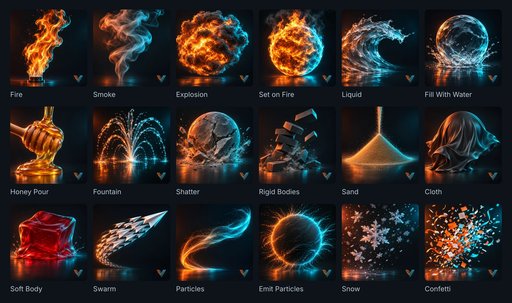
- Start in one click. Eighteen ready-made starters give you a working effect immediately. They are not locked presets: each one is ordinary VecFlow that you can open, read and change.
- Stay in the creative loop. Draft bakes, Auto Bake, background bakes and re-baking from any saved frame keep you trying ideas rather than waiting for them.
- Change the look after the bake. Retime, freeze, reverse, add trails, multiply particles and restyle materials, all without baking again. The shot stays alive until the moment you deliver it.
The Flow editor: your effect, drawn as a plan
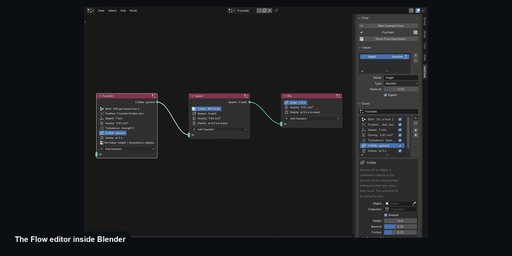
The heart of VecFlow is the Flow, a node tree in Blender's own node editor. Each node is an event: a list of operators that run from top to bottom on the particles inside it. Wires carry particles from one event to the next. That is the entire idea, and it scales from a simple fountain to a full destruction sequence.
Look at the Fountain flow in the pictures above. Drops are born in one event. A Collide sends any drop that lands to a second event, Splash. There, it changes colour and throws off three smaller bits, which fall into a third. No scripting, no expressions, no guessing what the system is doing behind your back.
37 operators, grouped the way you think- Birth: streams, bursts, every vertex of a mesh, every shattered piece, liquid filling a shape, or sparks born right inside burning gas.
- Forces: Gravity, Drag with wind, Turbulence, Swirl for tornadoes and whirlpools, Attract, Surface Force, Flock, Follow Curve and Goal.
- Physics: Liquid, Rigid Body, Particle Physics, Bind for cloth and ropes, Collide, Pin, Smoke Source, Smoke Force and Whitewater.
- Looks: Colour, Scale, Rotation, Spin, Shape and Set Value.
- Tests: Age, Speed, Distance, Value, Chance, Group and Struck, each one able to send particles down a wire to whatever happens next.
Every particle can also carry values you name yourself: a bounce count, a temperature, a personal weight. Use them to steer behaviour in the flow, then read them in your shaders. Want a ball that turns red on its third bounce, or embers that dim as they leave the fire? It takes a few nodes, and the recipes are in the guide. Flow settings can be keyframed too, so an effect can build, peak and fade exactly on your beat.
Liquids with real presence
VecFlow liquids are particles that hold their volume. They fill containers, slosh, pour and splash, and every frame the bake builds a smooth surface mesh ready to render. There is no box to set up and no resolution to guess. Pick a Spacing, from a rough 5 cm test to millimetre detail for a pour into a glass, and go.
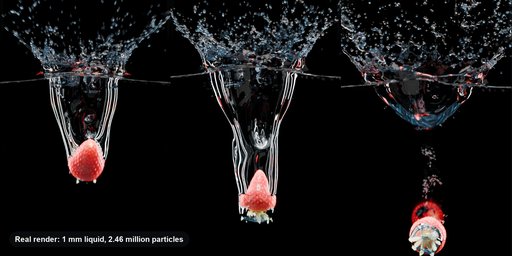
Our own hero test drops a 3.5 cm strawberry into a tank at 1 mm spacing: about 2.46 million liquid particles, a crown that tears into drops, and a cavity that pinches off into a trail of bubbles. That is the level of close-up, advert-style detail the engine is built to reach.
- A real material library. Presets set viscosity, density and surface tension for water, milk, oils, syrups, honey, chocolate, lava and more. Viscosity is in real units, so a number means something.
- Pastes that stand up. Yield Stress lets ketchup sit in a heap, toothpaste keep its ribbon and wet cement slump only so far. Presets include mayonnaise and thick paint.
- Stretchy and stringy. Elasticity, Memory and Tear At give you slime, putty and egg white. Stringiness draws cheese and honey into threads that hold, then snap.
- Two liquids at once. Oil floats on water and honey sinks through milk. Interface Tension keeps them in round blobs, Mix lets colours bleed, and each can have its own mesh and material.
Keep Sheets holds thin sheets and streams together so a crown stays a crown rather than collapsing into beads. Fine controls decide exactly where sheets survive and where they tear into drops. The Crown operator kicks up the ring round a falling drop, spikes and all, Vorticity Boost puts back the curls a coarse bake would smooth away, and Trapped Air keeps air pockets that hold their volume and push back, so an upturned cup behaves like an upturned cup.
Water that touches the world- Two-way bodies: wood floats, stone sinks, the liquid carries them off and they push it back.
- Cloth in the water: cloth bound along its edges holds liquid and is pushed by it.
- Moving walls: a paddle stirs, a tipping bucket pours, a hull pushes a wake.
- Stickiness and friction: honey clings to a spoon, and a Stick Map paints exactly where.
- Wet maps: colliders remember where liquid touched them, then dry over time, with a waterline attribute for stains. They even play back without VecFlow, on a render farm.
Choose from four meshing methods: Fast, Smooth, Sheets and Filled. Hold the smoothing within a band so drops keep their size. Use Wet Objects to close the tell-tale gap between water and glass, Clip to Camera to mesh only what the lens sees, and Mesh Values to carry colour or temperature onto the surface for dye and glowing lava.
Whitewater adds spray, foam, bubbles and fine mist from the crashing water, each as its own event that you control. Kinds turn into one another as they should: spray lands and becomes foam, foam is pushed under and becomes bubbles. Foam on Water then turns patches of the surface white, so foam reads as lace rather than grains. Dive deeper in the Liquids guide and the Whitewater guide.
Smoke and fire you can art direct
VecFlow's gas solver works only where there is gas, so a plume costs what it fills, not the size of the space around it. Forget fitting your shot into a box. Particles act as the source, which means any moving thing can give off smoke, heat or fuel: a chimney, a rocket, a burning mesh, debris trailing smoke from an explosion.
Then comes the part artists actually care about. Most fire tools give you a few sliders and a lot of luck. VecFlow gives you the controls that decide how a fire reads on screen:
- Flames with structure. Needs Air burns fuel in thin sheets round its edge, so you get tongues of flame rather than a soft orange blob. Flame Cutoff ends them crisply, and Disturbance shreds them into licks.
- Fireballs that roll. Burn Limit keeps a core burning as it rises. Edge Swirl billows the outside, Shrink draws air back in as it cools, and Soot Below Heat wraps a dark skin round the glowing core.
- Detail where it counts. Sharpness goes from Fast to Extreme. Curl, Value and Cellular turbulence, swirl that rises in heat or flame, and Fine Mixing to clear unwanted vertical streaks.
- Colour without limits. A flame ramp read in kelvin, with Fire, Candle, Blue Gas, Green and true Blackbody sets. Gas can carry its own colour, so burners of different colours mix where they meet.
Six built-in looks (Campfire, Candle, Fireball, Thick Smoke, Steam and Wisps) set everything at once, and you can save your own. The render look, including brightness, flame curve, smoke masking and crease masking, changes immediately with no new bake.
Gas also goes properly round obstacles, closely enough for smoke to curl round a statue or slip under a door, and moving obstacles push it. Sparks can be born inside the fire, ride its curls and dim as they cool. Everything saves as standard OpenVDB with density, temperature, fuel, flame and velocity grids, so your bakes also work in other programs that read VDB.
Need raw speed for a big loose cloud? Pick NVIDIA Flow as a second solver on Windows and Linux, with the same particles, sources and render setup. See the Smoke guide and Fire and explosions.
Destruction, bodies, cloth and crowds
Everything else a physics shot asks for lives in the same flow, with no extra add-ons and no new way of working.
- Rigid bodies. Bricks, crates, rocks and dice that tumble, stack and settle. Choose Box, Ball, Hull or fully Concave shapes, with real density, so a big rock is heavy and a pebble is light. Join them with hinges and sliders.
- Destruction. The Fracture tool cuts any closed mesh into pieces, smaller near the impact if you wish. Glue breaks by impact, load or torque, so a wall gives way where it's hit and a long beam fails under its own weight.
- Cloth, ropes and soft bodies. Flags, curtains, ropes, jelly and sticky goo, built on your own mesh and played back with its UVs and materials intact. Pin it to a pole or a character's shoulders. Let it tear.
- Sand and grains. Grains pour, roll and build real cone-shaped heaps with Static Friction and Rolling. Add Cohesion for wet sand that holds a castle's walls, and a clod that breaks off whole.
- Flocks and schools. Each creature steers by its nearest neighbours, just as starlings do. Birds wheel, fish school, and everyone turns aside from obstacles and banks into turns.
- Particle effects. Sparks, dust, magic, snow, rain and confetti, as points, spheres or any model you make. Mix models, spin them and read per-particle colour, speed and random values in your shader.
Bodies can stay perfectly still until something hits them: a Struck Test knocks single bricks out of a wall or sets off a chain reaction. Kinematic bodies follow your animation, so a wrecking ball or a bulldozer blade shoves everything aside on your exact timing.
And everything respects your scene. Emitters, colliders, forces, curves and goals can all be keyframed, parented, rigged, or deformed with modifiers and shape keys. A character can walk through falling snow and push it aside, and a rippling Wave modifier can toss sand. Start with Destruction, Cloth and ropes and Flocks and schools.
Motion design that goes beyond physics
Not every shot wants realism. Sometimes the brief is a logo in 40 seconds and a client who wants it to feel expensive.
- Goal sends each particle to its own spot on a mesh, text or curve, arriving exactly on the frame you choose, then staying attached as the shape moves. Perfect for logo reveals and shapes that assemble from dust.
- Follow Curve runs particles along paths, text and hair curves, either exactly or steered with forces. Add Turn Round for spirals, or a Sweep so that a line draws itself on.
- Image-driven birth reads a picture through a UV map, so a logo on a plane can pour liquid in its own shape.
- Trails turn sparks into streaks and magic into drawn lines, with thick heads and tapered tails, and an attribute for fading them in your shader.
Because this is the same flow as your physics, particles can assemble into a logo, hold, and then shatter under gravity. See Curves and shapes.
A bake workflow that respects your time
A great simulation tool is one that lets you make twenty attempts instead of three. VecFlow is designed around that one fact.
- Draft. One switch gives a quick preview of smoke and liquids at an eighth of the cells or particles, and the status box says Draft so it can never be mistaken for your final.
- Auto Bake. Change a setting and VecFlow re-bakes up to your frame by itself. Tuning a small effect feels live.
- Bake in Background. A separate, windowless Blender does the work while yours stays light. Keep modelling, lighting or animating in the same file.
- Bake All. Every simulation in the scene goes into a queue, one per NVIDIA card, with clear status for each and a single Stop All.
- State saves. Stop any time and Continue later, with frames identical to a straight bake, so there is never a seam to fix.
- Re-bake From. Moved a collider at frame 180? Keep everything before it and bake only the end of the shot.
Every simulation bakes on the CPU, on Windows, Linux and Apple silicon Macs. On Windows and Linux, an NVIDIA graphics card bakes big simulations far faster, and Auto chooses for you. If a job doesn't fit on the card, the bake moves to the CPU and tells you why, in plain words.
Own two cards? VecFlow can solve one big liquid or smoke across both, so larger shots fit, or mesh the liquid's surface on the second card so the simulation never waits. Background bakes spread across your cards automatically.
The same result, everywhereThis one matters more than it sounds. A VecFlow bake gives the same result every time, on any computer, on the CPU or the GPU. Look-dev on a laptop, then bake the final on the workstation or in the cloud and your approved shot stays approved. The only exception is the optional NVIDIA Flow gas solver, which depends on the card. Read more under Compute and Performance.
The shot isn't finished when the bake is
Because a bake is written to disk, scrubbing is instant and a render shows exactly what you saw in the viewport. Better still, a lot can still change without baking again:
- Retime anything: slow motion, freeze frames, reverse playback and keyframed speed ramps, with the surface mesh, smoke and motion blur all following. Ease into slow motion exactly as the wave crashes.
- Render Multiply: show each particle as several. A bake of 50,000 particles can render as half a million, at no bake cost, for sparks, dust, snow and spray.
- Trails: add them, lengthen them and taper them after the fact.
- Shapes and materials: swap the models your particles show, or restyle water, fire and smoke, and see it at once.
- Viewport Share: show a tenth of the particles while you work, while renders still show them all.
Motion blur is handled too, for spheres, shapes, liquid surfaces and smoke volumes, with streaks of the correct length even as particles are born and die between frames. When it is time to deliver, Collect for Render gathers the file and its bakes into one folder that renders on any computer with Blender, even one without VecFlow installed. Your render farm needs nothing extra, retiming included. See Rendering and Retiming.
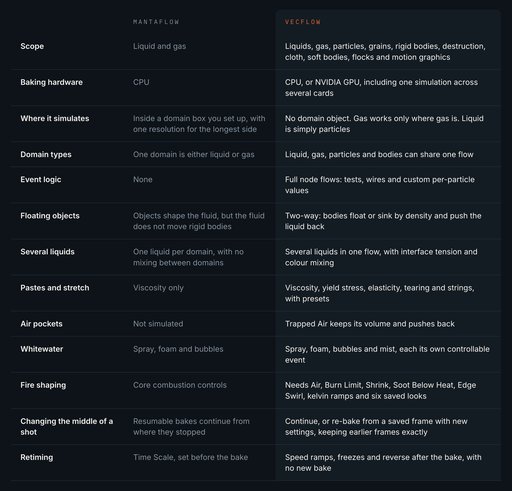
VecFlow and Mantaflow, side by side
Mantaflow is Blender's built-in fluid solver. It is free, it has produced beautiful work, and if you only need occasional smoke or a simple liquid it may be all you need. We would rather tell you that than pretend otherwise.
But Mantaflow is a fluid solver, and VecFlow is a complete effects system. The comparison picture above shows where you will feel the difference. Its Mantaflow column comes from Blender's own source code and settings.
You don't have to choose forever, either. VecFlow installs beside Blender's own tools, so you can keep using Mantaflow wherever it already works for you, and reach for VecFlow when the shot needs to go further.
Made for people who ship shots
- Product and advert artists. Fruit into water, pouring chocolate, honey on a spoon, foam, steam. Close-up liquids with sheets, drops and bubbles that sell a product.
- Motion designers. Logo reveals, particle choreography and stylised simulation, delivered with art direction and timing you control.
- Indie filmmakers and VFX artists. Fire, smoke, destruction and water in a single tool, on your own machine, without a pipeline team behind you.
- Game and cinematic artists. Trailers, cutscenes and pre-rendered sequences. Bake once, and hand over standard meshes, point data and VDB volumes.
- Studios and freelancers. Repeatable results across machines and a render farm that doesn't need the add-on make handing work between people far easier.
- Curious Blender users. If you love making things move, the starters and step-by-step guides will have you baking your first simulation in about five minutes.
What you get
- The VecFlow add-on in one file that installs on Windows, Linux and Apple silicon Macs.
- 18 one-click starters, from the sidebar or the Add menu, four of them made straight from your selected mesh.
- The full Flow system, with 37 operators, custom values and keyframable settings.
- Liquid and gas presets: real-world values for real liquids, plus six fire and smoke looks that you can add to.
- NVIDIA Flow as an optional second gas solver on Windows and Linux.
- The documentation site: 106 pages and over 60,000 words.
Select a mesh and four starters adapt to it: Emit Particles, Set on Fire, Fill With Water and Shatter. In a couple of clicks your own model is burning, full of water, or in pieces.
Documentation
Powerful tools are only worth what you can get out of them. VecFlow comes with a full documentation site written in plain language: what each setting does, what to try first, and what to do when something goes wrong. Almost every guide ends with a list of common problems and their fixes, and every setting in the add-on explains itself when you hover over it. Clear messages tell you what a problem is, in words.
Start here: What VecFlow is · Requirements and install · Your first simulation · Interface tour · All starters
Guides: Choose an approach · Shot ideas · Liquids · Fire and explosions · Destruction
Reference: Flows · All operators · Baking · Limits and known gaps · Messages
Yes, we publish our limits. We would rather you buy with your eyes open. The docs are free to read right now, so look around before you decide.
What you need
- Blender: 5.2 or newer.
- Windows: 64-bit. Linux: 64-bit, glibc 2.28 or newer, which covers most distributions from 2019 on.
- Mac: Apple silicon (M1 and newer), macOS 11 or newer. Macs bake on the CPU. Intel Macs aren't supported.
- For GPU baking: an NVIDIA RTX 20 series or newer, or a GTX 16 series, with a 580 series driver or newer, on Windows or Linux.
- AMD and Intel graphics cards aren't used for baking yet. Those computers bake on the CPU, with the same results.
- Good to know: paste and stretchy liquid settings currently bake on the CPU. Half the Spacing is about sixteen times the bake, so very fine liquids are best suited to a strong NVIDIA card.
Questions, answered
Do I need an NVIDIA graphics card?
No. Everything bakes on the CPU, with the same result. An NVIDIA card simply makes big liquid and smoke simulations far faster.
Is it hard to learn?
The first result takes one click and a press of Bake. The flow editor rewards curiosity: open any starter, read its events top to bottom, and change one thing. The guide to your first simulation takes about five minutes.
Can it replace Mantaflow?
For many artists, yes, and it also covers particles, destruction, cloth and much more. But the two sit happily side by side, so you never have to give anything up.
Which render engines does it work with?
Bakes play as ordinary Blender geometry and volumes, and you can render them in Cycles or EEVEE. Liquid surface and smoke motion blur are made for Cycles.
Can I render on a farm?
Yes. Collect for Render makes a folder that renders on any computer with Blender, even without VecFlow installed.
Do different simulations interact?
Each simulation object bakes on its own. For things that should touch, put them in one flow: water, floating crates and cloth can share one simulation.
What if my scene is very large?
Simulations bake to disk frame by frame, so you can stop, look, and carry on. Start with a coarse test, and raise the detail once the motion feels right.
Can I work on a laptop and finish on a stronger machine?
Yes. Use Draft and Auto Bake while you find the look, then bake the final wherever the power is. The result stays the same.
Can I export to other programs?
Gas is written as standard OpenVDB, which other programs can read. Liquid surfaces and particles live in Blender as normal objects, ready for your usual export path.
Add VecFlow to your Blender for $129. Open a starter, press Bake, and watch your first effect come to life. Then open the flow and make it yours.


