
 Models
 Materials
 HDRIs
HDRIs
 Scenes
 Brushes
 Node Groups
 Printables
 Creators
 Creations
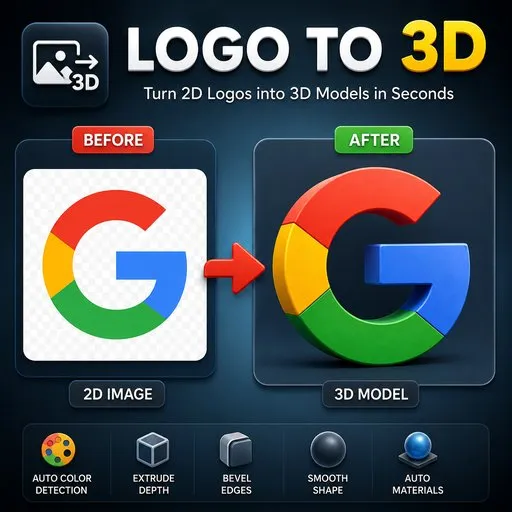
[Fixed] Logo to 3D
 add-on
"Converts any logo or image into clean 3D meshes. Detects every visible color and turns each one into its own object with automatic materials. Adjustable extrude, bevel, smoothing, and color tolerance. Fast, lightweight, and beginner-friendly."
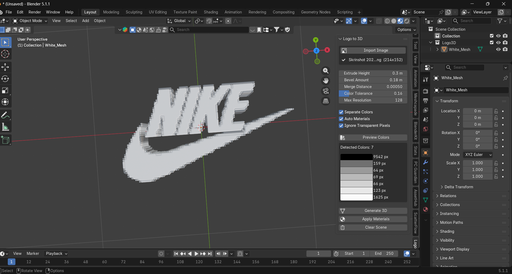
Logo to 3D is a Blender addon designed to quickly transform 2D logos, icons, emblems, and images into customizable 3D models — directly inside Blender.
Instead of manually tracing a logo, creating geometry, separating colors, adding materials, and extruding the shape, you can let Logo to 3D handle the process for you.
Simply select your image, adjust a few settings, and click Generate 3D.
The addon analyzes your image, detects its colors, generates 3D geometry, and can automatically create materials based on the detected colors.
🚀 Turn Your Logo into 3D
Have a flat 2D logo that you want to use in a 3D project?
With Logo to 3D, you can quickly turn it into a 3D object that can be edited, scaled, rotated, beveled, and customized directly in Blender.
2D Logo → Logo to 3D → Editable 3D Model
This makes it useful for game assets, branding, animations, product visualization, YouTube graphics, intros, decorative objects, and much more.
🎨 Automatic Color Detection
Logo to 3D can automatically analyze your image and detect its main colors.
For example, if your logo contains:
Red + White + Black
the addon can identify these colors and use them to create the corresponding parts of your 3D model.
The Color Tolerance setting lets you control how similar colors should be before they are treated as the same color.
You can also preview the detected colors before generating the model.
🧱 Customize the 3D Depth
Control how thick your logo should be using Extrude Height.
Create anything from a thin badge to a deep 3D logo.
You are always in control of the final appearance and can adjust the settings until the model looks exactly the way you want.
✨ Add Smooth, Professional Edges
Use Bevel Amount to soften the edges of your generated model.
A small bevel can make a simple logo look much better in renders by creating realistic highlights along the edges.
You can also use the Smooth Shape option to reduce harsh or pixelated shapes and create a smoother result.
🎭 Automatic Materials
Creating materials for every color manually can take unnecessary time.
With Auto Materials, Logo to 3D can automatically generate Blender materials based on the detected colors and apply them to the generated geometry.
This gives you a ready-to-edit colored 3D logo without having to set up every material yourself.
🧩 Two Generation Modes Separate Objects
Generate each detected color as a separate Blender object.
This is useful when you want to:
- Move individual parts
- Change specific materials
- Edit different colors independently
- Create layered logo effects
- Adjust individual sections of the model
Generate the logo as a single mesh.
This is useful when you want a cleaner scene structure or prefer working with one combined object.
🖼️ Supported Image Formats
Logo to 3D currently supports:
- PNG
- JPG / JPEG
- WebP
Transparent pixels can also be ignored, making transparent PNG logos especially useful.
🎮 Perfect for Many Projects
Logo to 3D can be useful for:
- 🎮 Game development
- 🧩 Game assets
- 🏷️ Logos and branding
- ▶️ YouTube intros and graphics
- 🎬 Motion graphics
- 📦 Product visualization
- 🖥️ 3D presentations
- 🏆 Badges and emblems
- 🎨 Decorative 3D elements
- 🖨️ 3D printing projects
- 🏢 Business and company branding
Whether you're creating a game, animation, advertisement, product presentation, or simply want to turn your own logo into a 3D object, Logo to 3D can help speed up the process.
⏱️ Save Time on Repetitive Work
Creating a 3D logo manually can involve several steps:
Trace → Create geometry → Separate colors → Extrude → Bevel → Create materials → Adjust
Logo to 3D combines much of this workflow into a simple process:
Import → Configure → Generate 3D
You can then continue editing the generated model using Blender's standard tools.
⚙️ Main Features
- Convert PNG, JPG/JPEG, and WebP images into 3D
- Automatic color detection
- Color tolerance control
- Transparent pixel support
- Adjustable extrusion depth
- Adjustable bevel amount
- Shape smoothing
- Automatic material generation
- Separate objects for individual colors
- Single mesh generation
- Adjustable maximum resolution
- Fully editable Blender geometry
📦 Requirements
Blender 4.2.0 or newer
Create 3D Logos Faster
Stop rebuilding simple logos from scratch.
With Logo to 3D, turn your existing 2D graphics into editable 3D models and get back to creating.
Import your logo. Adjust the settings. Generate your 3D model.
![[Fixed] Logo to 3D](https://public.blenderkit.com/thumbnails/assets/00b334b892024ead829c5880fad5f907/files/thumbnail_eefbf681-b415-4bcd-bb6e-d37faa262085.png.1024x1024_q85_crop-%2C.jpg.webp?webp_generated=1786360298)


