
 Add-ons
 Models
 Materials
 HDRIs
HDRIs
 Scenes
 Brushes
 Node Groups
 Printables
 Creators
 Creations
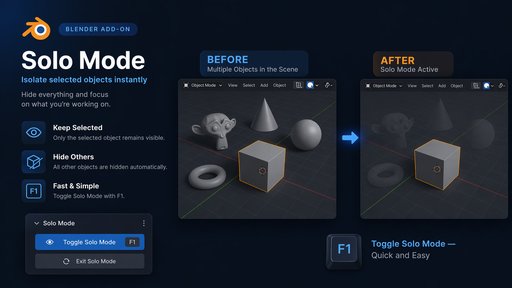
Solo Mode — Blender Add-on
Features
Solo toggle — select object(s), press Enter Solo. Press again to restore the full scene.
Multi-object solo — select multiple objects, solo them all at once.
F1 shortcut — fastest way to toggle. Auto-skips binding if F1 is already in use.
All Parents Connected — optionally include the full parent chain of selected objects.
Collection — optionally include all objects that share a collection with selected objects.
Header button — eye icon button lives in the 3D Viewport header for quick access.
Non-destructive — only hides objects that were already visible. Your manually hidden objects stay hidden.
Installation
Download solo_mode.zip
Open Blender → Edit → Preferences → Add-ons → Install
Select solo_mode.zip — do not unzip it
Enable Solo Mode from the add-ons list
Open the N-Panel (press N in the 3D Viewport) → go to the Solo tab
How to Use
Basic Solo
Select the object(s) you want to isolate
Click Enter Solo in the N-Panel or press F1
Only selected objects remain visible
Press F1 again (or click Exit Solo) to restore everything
Switch to a Different Set
While in Solo Mode, exit first (F1)
Select new objects
Press F1 again to solo the new selection
Multi-object Solo
Select multiple objects with Shift+Click before pressing F1 — all selected objects will be isolated together.
Buy me a Coffee :D
visit my website https://www.vincentilagan.com
paypal:[email protected]


