
 Add-ons
 Models
 Materials
 HDRIs
HDRIs
 Scenes
 Brushes
 Node Groups
 Printables
 Creators
 Creations
Why DRH - Object Layout Studio Lite
Get the essential object-layout tools without the advanced geometry workflow.
Lite focuses on the alignment, distribution, arrangement, move, and rotation tools used most often during everyday Blender work.
Free for everyone on BlendKit.
Key Features
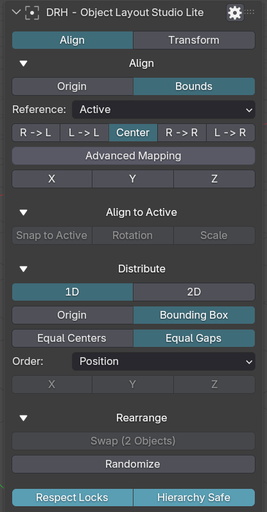
- Align objects by origin or evaluated bounds
- Active, Selection, 3D Cursor, and World references
- Flexible X, Y, and Z alignment
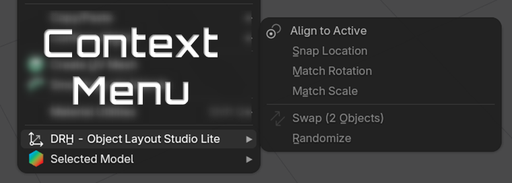
- Match location, rotation, or scale to the active object
- Equal-center distribution
- True equal-gap distribution
- Fast 1D and 2D grid layouts
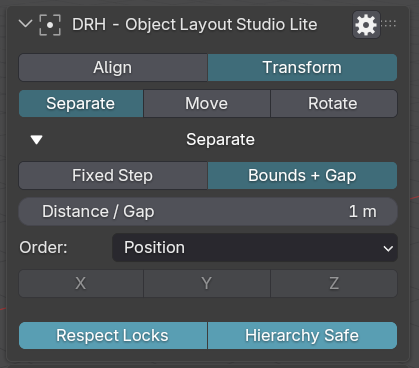
- Separate objects using exact distances
- Bounds-aware spacing
- Move objects by exact values
- Rotate objects by exact angles
- Local and World transform workflows
- Swap and randomize transforms
Faster Everyday Layout
Replace repetitive manual positioning with fast, repeatable controls.
Align selections, create consistent spacing, organize objects into grids, separate overlapping assets, match transforms, or move and rotate multiple objects using exact values.
Focused by Design
Lite gives you the tools needed for everyday object layout while keeping the interface compact and easy to use.
It includes:
- Align
- Align to Active
- Distribution
- Rearrangement
- Separate / Arrange
- Move
- Rotate
Need More?
Choose DRH - Object Layout Studio for the complete toolkit, including advanced workflows such as:
- Auto Orient
- View-relative tools
- Point, Line, and Plane alignment
- Geometry registration
- Best Fit / ICP
- Surface placement
- Advanced line and radial layouts
- Quantization
- Precision origin tools
Perfect For
- Everyday modeling
- Object organization
- Scene layout
- Prop placement
- Grid arrangements
- Consistent spacing
- Transform matching
- Repeated object positioning
- Users who prefer a smaller focused toolkit
Free on BlendKit
DRH - Object Layout Studio Lite is free for everyone on BlendKit.
Download the official current release directly from this BlendKit page.
GitHub is used for documentation, support, bug reports, compatibility questions, and feature requests. Official releases and downloads are distributed exclusively through BlendKit.
Requirements and Installation
- Download the ZIP from this BlendKit product page.
- In Blender, go to Edit > Preferences > Add-ons > Install...
- Choose the downloaded ZIP file.
- Enable DRH - Object Layout Studio Lite.
- Open the N Panel and use the DRH-Tools panel.
If the Complete edition is installed, use only one edition at a time to avoid duplicate interface tools.
Compatibility
- Version: 1.0.0
- Blender: 4.2+
- Location: N Panel > DRH - Dual Units
- Platforms: Windows, macOS, Linux
This is a source-based Blender add-on focused on dual-unit transform visualization and measurement review.
Documentation and Support
GitHub Support:
https://github.com/pacosalasv/DRH_Object_Layout_Studio-Support
User Manual (PDF):
https://github.com/pacosalasv/DRH_Object_Layout_Studio-Support/blob/main/docs/manual/user-manual.pdf
Use GitHub for installation help, compatibility questions, bug reports, feature requests, and workflow guidance.
Official releases and downloads are available exclusively through BlendKit.


