
 Models
 Materials
 HDRIs
 Scenes
 Brushes
 Node Groups
 Printables
 Creators
 Creations

Farmstead Builder
 add-on
Every farm building in one tool: 40 presets of barns, silos, grain bins, sheds, Quonsets, coops, stables, oast houses, windpumps, bales and fences, live sliders, photo textures and game-ready meshes.
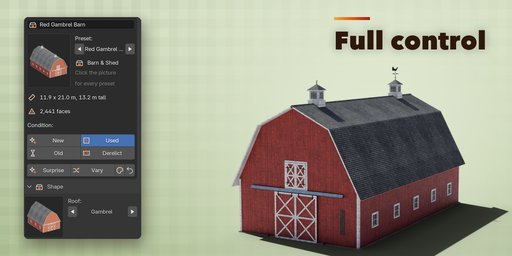



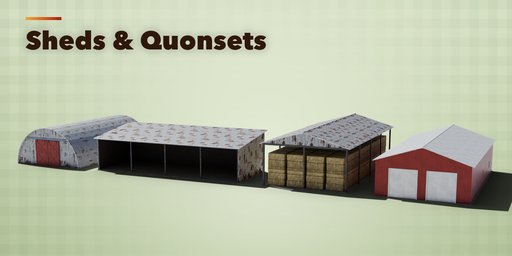
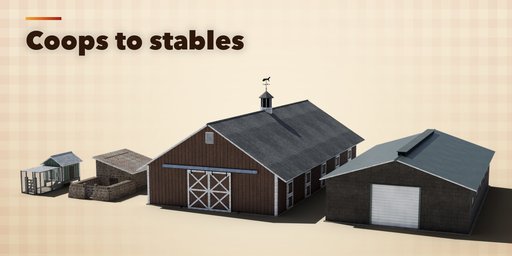
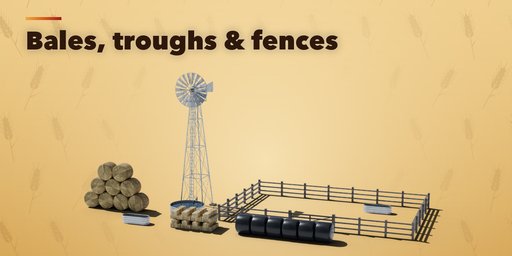
Farmstead Builder makes every kind of farm building inside Blender, from a red gambrel barn to a whole farmyard. Pick one of 40 real-world presets, drag a few sliders or press Surprise, and the building rebuilds live with photo textures, clean UVs and real-world sizes.
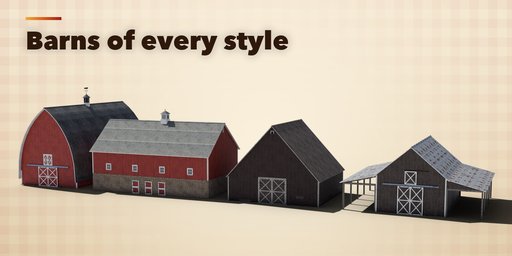
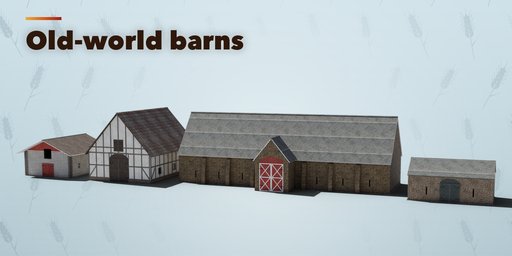
It covers the farm buildings of America and Europe: gambrel, gothic-arch, bank, Dutch, pole, prairie, monitor and tobacco barns, timber-frame, alpine, tithe, threshing and field barns, horse stables, livestock barns, milking parlours, loafing sheds, machine sheds, hay barns and Quonset huts, chicken coops with runs, pig sties and granaries on staddle stones.
Round buildings are included too: round and octagonal barns, oast houses with their kilns and cowls, and dovecotes. Storage comes as concrete stave, glass-lined steel and tile tower silos, corrugated grain bins with ladders and vents, corn cribs and silage bunkers. Finish the yard with a windpump whose wheel really turns, round, square and wrapped bales, stock tanks and troughs, hay racks, paddock fences, gates and dry stone walls.
Barns and sheds
Choose from 10 roof shapes (gable, gambrel, gothic arch, hip, half hip, monitor, saltbox, shed, Quonset and flat), 7 roof coverings and 12 wall claddings from vertical boards to fieldstone, brick and timber frame. Add sliding, hinged, Dutch or roll-up doors, hay loft doors, windows, cupolas and weathervanes, lean-tos on any side, porches, a bank or stone plinth and a yard with a chicken run, stone pen or paddock.
Condition
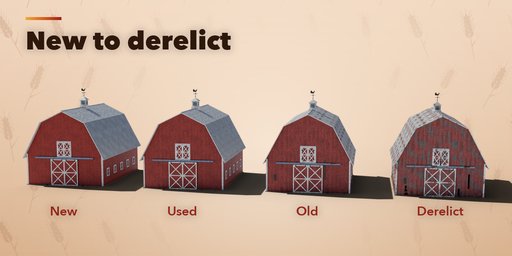
Pick New, Used, Old or Derelict with one click. The condition ages the materials (faded and peeling paint, rust, dirt and moss) and the geometry too: missing and replaced wall boards, broken window panes, mismatched, rusty or storm-lifted roof sheets, bare patches where shingles blew off, sagging doors, a sway-backed ridge and a leaning frame on derelict barns. A Weathering slider fine-tunes the look.
Materials
Every surface uses bundled CC0 photo textures from Poly Haven with physically based shading that also works in game engines. Choose your own paint colors for walls, trim, doors and roof.
Features
- 40 real-world presets in 10 structure types, each with a picture in the sidebar
- Live rebuild while you drag a slider, plus Surprise and Vary buttons
- Real-world sizes in meters, with the size and face count shown in the panel
- Game-ready: clean UVs, low, medium or high detail, sensible origins, low face counts
- Animated windpump wheel that loops forever
- New, Used, Old or Derelict condition in one click, with real damage to boards, panes and roof sheets
- Shift+A menu with every preset, and Convert to Mesh for export to FBX, OBJ or glTF
Requires Blender 4.2 or newer. Tested on Blender 4.2, 4.5 and 5.2 LTS.
How to use
Installation
In Blender open Edit, Preferences, Get Extensions, then use Install from Disk and pick the farm_buildings_generator zip. The add-on is listed as Farmstead Builder.
Usage
- In Object Mode press Shift+A and choose Mesh, Farm Building, then pick a preset. You can also open the Farmstead tab in the 3D viewport sidebar (N) and press Add Building.
- With a building selected, click the big picture in the sidebar to see every preset as a picture and pick one. The building changes in place.
- Press Surprise for a random real-world farm building, or Vary to change the current one a little. The paint button picks new colors and the arrow button resets the building to its preset.
- Open the sections below to change the shape (size, roof shape, pitch), walls and roofing, doors and windows, extras (cupolas, weathervanes, lean-tos, yard) and the finish (paint colors and weathering). Every change rebuilds the building live.
- The Condition buttons on the first panel age the building: New, Used, Old or Derelict changes the paint, rust and dirt and adds real damage (missing boards, broken panes, patched or lifted roof sheets, a sagging ridge). The Weathering slider fine-tunes it.
- Detail sets how round the curved parts are: Low for distant buildings and mobile games, High for close-ups.
- The windpump wheel is animated: press Play to see it turn and set its speed in turns per minute.
- Convert to Mesh turns a building into plain mesh objects for export (FBX, OBJ, glTF). Delete removes a building with all its parts.
Switch the viewport to Material Preview or Rendered to see the photo textures.
FAQ
Which Blender versions are supported?
Blender 4.2 and newer. It is tested on Blender 4.2, 4.5 and 5.2 LTS.
Can I use the buildings in a game engine?
Yes. Every building has clean UVs, physically based materials with photo textures, real-world sizes and a low face count. Convert to Mesh turns it into plain mesh objects ready for FBX, OBJ or glTF export.
Are the textures included?
Yes. The photo textures are CC0 Poly Haven textures bundled with the add-on, so nothing needs to be downloaded and you may use them in commercial work.
Does the windpump move?
Yes. Its wheel is keyframed to turn forever at the speed you set, so it plays in the viewport, in renders and after export as an animation.


