
 Add-ons
 Models
 Materials
 HDRIs
HDRIs
 Scenes
 Brushes
 Node Groups
 Printables
 Creators
 Creations
Why DRH - Dual Units & Measurements
Work with metric and imperial measurements side by side without constantly changing Blender's scene unit settings.
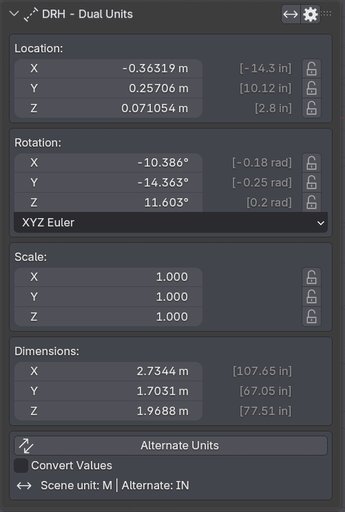
DRH - Dual Units & Measurements adds a familiar Transform-style workflow to the N Panel, showing alternate converted values alongside your active scene values for Location, Rotation, Scale, and Dimensions.
Version 1.1.0 adds safer scene-scale conversion, improved unit accuracy, better preset handling, faster viewport labels, and a cleaner workflow for mixed-unit projects.
Built for artists who need faster measurement checks, clearer scale review, and fewer manual conversions during modeling.
Free for everyone on BlendKit.
What's New in Version 1.1.0
Version 1.1.0 focuses on accuracy, scene conversion, and day-to-day use.
- Redesigned Scene Data Conversion with broad support for Blender geometry, transforms, modifiers, constraints, animation, Geometry Nodes, and other unit-aware data.
- Safer conversion workflow with confirmation, conversion reporting, and protection against ambiguous or unsupported data.
- Improved unit accuracy with corrected rounding, carry handling, negative-zero cleanup, micrometer support, thou support, and more reliable unit swapping.
- Smarter presets that stay synchronized with the actual scene configuration.
- Faster viewport labels with improved redraw and update handling.
- Clearer measurements with explicit bounding-area and bounding-volume terminology.
Key Features
- Dual-unit Transform view: see your active scene units and alternate converted values together.
- Location, Rotation, Scale, and Dimensions: review and edit the transform values that matter most without leaving the N Panel.
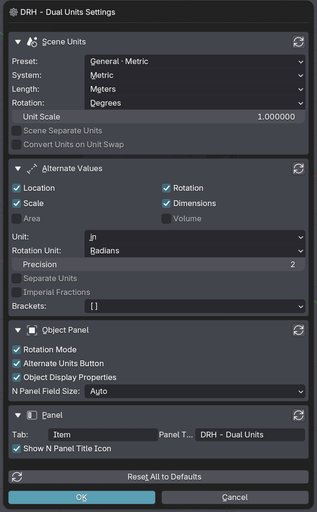
- Metric and imperial workflows: work across meters, centimeters, millimeters, micrometers, feet, inches, thou, and other supported Blender units.
- Editable Transform-style interface: edit and lock values from a familiar Blender-style layout.
- Fast alternate-unit switching: change the secondary display units to match the job.
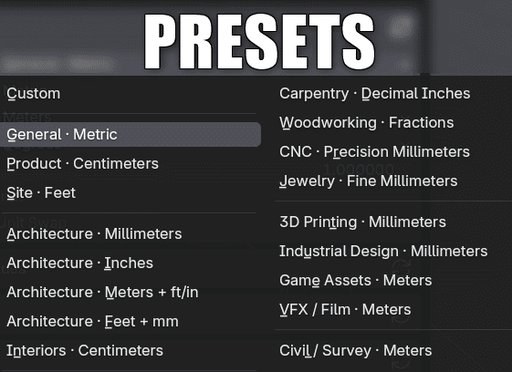
- Workflow presets: configure common architecture, product, woodworking, CNC, 3D printing, VFX, and technical workflows quickly.
- Scene Data Conversion: convert supported scene data when the physical scale of a project needs to change.
- Conversion reporting: review what was converted, skipped, or requires manual attention.
- Viewport object labels: add readable custom labels for previews, reviews, and screenshots.
- Less manual conversion: reduce interruptions and avoid preventable unit mistakes.
Measure Faster Without Changing Your Scene Setup
Mixed-unit projects are common. A Blender scene may be built in meters while a client drawing, product specification, or reference uses inches, feet, centimeters, or millimeters.
DRH keeps the Blender scene setup intact while showing the alternate measurement beside it. This makes it easier to check dimensions, compare references, and confirm scale without stopping to change unit settings or calculate conversions by hand.
When the project itself needs to be rescaled, the Scene Data Conversion tool handles supported Blender data and reports anything that needs manual review.
Safer Scene Data Conversion
Version 1.1.0 rebuilds Scene Data Conversion around Blender's own unit metadata and known scene-space data.
The converter covers supported object transforms, geometry, shape keys, curves, armatures, modifiers, constraints, animation, NLA actions, Geometry Nodes inputs, and other writable unit-aware properties.
DRH does not blindly multiply every numeric value. When Blender does not expose enough information to make a safe conversion, the data is preserved instead of being guessed.
Linked or read-only data, baked simulation data, arbitrary driver expressions, volume-grid internals, and other ambiguous values are reported when relevant.
A confirmation step and conversion report help you review what changed and what may still need attention.
Save a backup before running any scene-wide scale conversion on a production file.
More Accurate Unit Display
Version 1.1.0 improves measurement formatting throughout the add-on.
Rounding and unit carry are now normalized correctly, avoiding results such as 1 m 100 cm or 1 ft 12 in.
The update also improves fractional-inch display, negative-zero handling, micrometers, thou, and exact fixed-unit switching.
Workflow Presets
Quickly switch between practical unit setups for:
- Architecture
- Interior design
- Product design
- Woodworking
- CNC
- Jewelry
- 3D printing
- Industrial design
- Game assets
- VFX and film
- Civil and survey workflows
Version 1.1.0 also improves preset-state detection. If manual changes no longer match the selected preset, DRH returns the state to Custom.
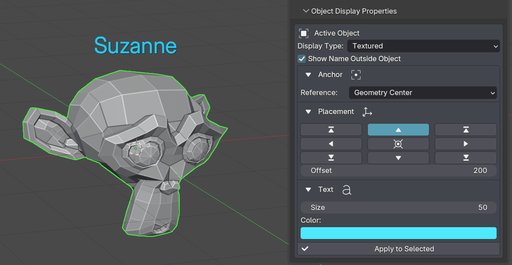
Custom Viewport Object Labels
Display clean custom object names directly in the 3D Viewport.
Control label position, size, color, alignment, and display behavior for clearer previews, reviews, and screenshots.
Version 1.1.0 reduces unnecessary redraw work and restores Blender's original Show Name state when DRH labels are disabled or the add-on is removed.
Perfect For
- Architectural visualization
- Interior design
- Product modeling
- Woodworking and fabrication
- CNC workflows
- Jewelry
- 3D printing
- Technical and industrial modeling
- VFX and game asset scale checking
- Reference-based modeling
- Scale and dimension verification
- Client-facing measurement review
- Teams working across metric and imperial standards
Free on BlendKit
DRH - Dual Units & Measurements is free for everyone on BlendKit.
Download the current release directly from this page.
If DRH is useful in your work, please leave a rating. Ratings help me continue development, improve the add-on, and work on future updates.
GitHub is used for documentation, support, bug reports, compatibility questions, and feature requests.
Official releases are distributed through BlendKit.
Requirements and Installation
- Download the DRH Dual Units 1.1.0 ZIP from this BlendKit page.
- Open Blender Preferences.
- Install the downloaded ZIP as a Blender Extension or add-on.
- Enable DRH - Dual Units if required by your Blender version.
- Open the 3D Viewport N Panel.
- Open DRH - Dual Units.
Compatibility
- Version: 1.1.0
- Blender: 4.2+
- Location: 3D Viewport > N Panel > DRH - Dual Units
- Platforms: Windows, macOS, Linux
- Format: Blender Extension ZIP
DRH - Dual Units & Measurements is a source-based Blender extension for dual-unit measurement display, transform review, viewport labels, and supported scene-scale conversion.
Documentation and Support
GitHub Support:
https://github.com/pacosalasv/DRH_Dual_Units-Support
User Manual:
https://github.com/pacosalasv/DRH_Dual_Units-Support/blob/main/docs/manual/user-manual.pdf
Use GitHub for installation help, compatibility questions, bug reports, feature requests, and workflow guidance.
Official releases are available through BlendKit.


