
 Models
 Materials
 HDRIs
 Scenes
 Brushes
 Node Groups
 Printables
 Creators
 Creations
Smart Bevels
 add-on
Create unlimited color-coded bevel weights, see overlapping bevels live, merge bevel modifiers into one smooth bevel, and join objects without losing a single bevel.
Smart Bevels
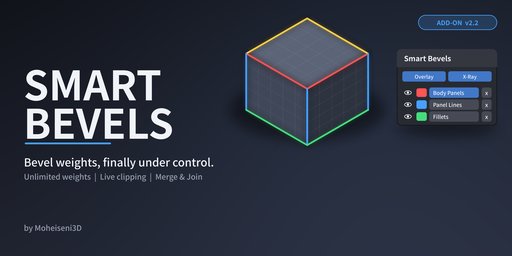
Take control of your bevels
Smart Bevels turns bevel weights into something you can actually see and manage. Create as many weight attributes as you need, give each one its own color, switch them on and off with a single click, and keep every bevel modifier tidy and in the right order.
Built for hard-surface artists who use weighted Bevel modifiers with Subdivision, and who are tired of guessing which edge has which weight.
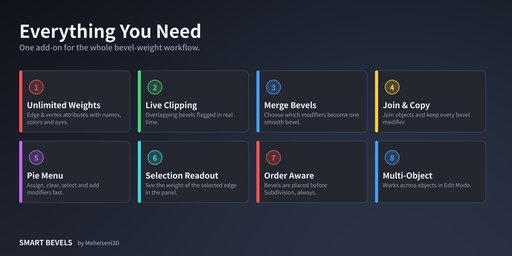
What you get
**Unlimited bevel weights
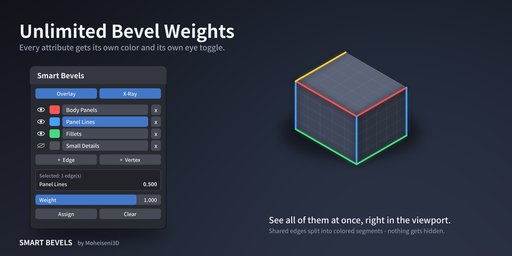
Create as many edge or vertex weight attributes as you want.
Every attribute has its own color and its own eye toggle.
Show several attributes at once. When two attributes share an edge, the edge is split into colored segments, so nothing is hidden.
Overlay colors get stronger as the weight value rises.
**Live Clipping detection
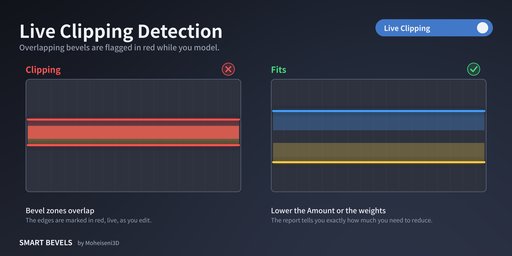
Finds bevels that are too close together for the modifier Amount.
Edges that would overlap are highlighted in red right in the viewport.
Switch on Live Clipping and it re-checks while you move vertices or change weights and Amount.
The report tells you how much space you are short of, so you know how far to reduce the Amount.
**Merge Bevels (smooth size transitions)
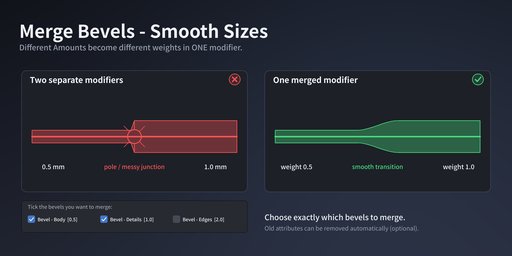
Two bevel modifiers with different Amounts meeting on the same edge chain can create ugly junctions.
Merge Bevels combines the modifiers you tick into ONE modifier and ONE attribute. Different Amounts become different weight values, so the size changes smoothly along the chain.
You choose exactly which bevels are merged.
Optionally remove the old attributes automatically.
**Join & Copy Bevels
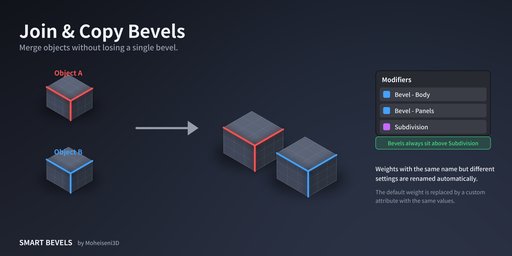
Join several objects and the weight-based Bevel modifiers of the other objects are copied onto the result, with all their settings.
Same attribute name but different settings? One is renamed automatically so weights never get mixed up.
Default weights are converted into a custom attribute with identical values when needed.
Identical bevels are not duplicated.
**Always in the right order
New and merged bevels are placed before the Subdivision modifier.
Smart Bevels never creates a Subdivision modifier for you.
Fast workflow
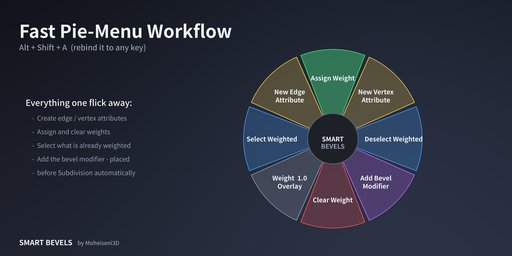
A pie menu (Alt+Shift+A by default, fully rebindable) with Assign, Clear, Select Weighted, new attribute and Add Bevel Modifier.
Select an edge and read its weight directly in the sidebar.
Works across several objects in Edit Mode.
Requirements
Blender 4.3 or newer
Works with weight-limited Bevel modifiers (Affect: Edges or Vertices)
Installation
Download the ZIP. Do not unzip it.
In Blender: Edit > Preferences > Add-ons > Install from Disk, then pick the ZIP.
Enable "Smart Bevels".
Press N in the 3D Viewport and open the "Smart Bevels" tab. Or press Alt+Shift+A in Edit Mode for the pie menu.
**Good to know (limits)
Live Clipping checks edges that face each other inside the same face. It does not check corner-to-corner overlaps or very short edges.
Clipping detection supports Offset and Width bevel types. Percent, Depth and Absolute are skipped.
The Custom Profile curve of a Bevel modifier is not copied by Join & Copy or Merge.
The selection weight readout is turned off on very dense meshes (over 300k edges or vertices) to keep the UI fast.
Support
Questions or bug reports: message me through the product page [or: [email protected]]. Please include your Blender version and, if possible, a small .blend that shows the problem.
License
Smart Bevels is released under the GNU GPL v3 (or later). The full source is included in the download.


