
 Models
 Materials
 HDRIs
HDRIs
 Scenes
 Brushes
 Node Groups
 Printables
 Creators
 Creations
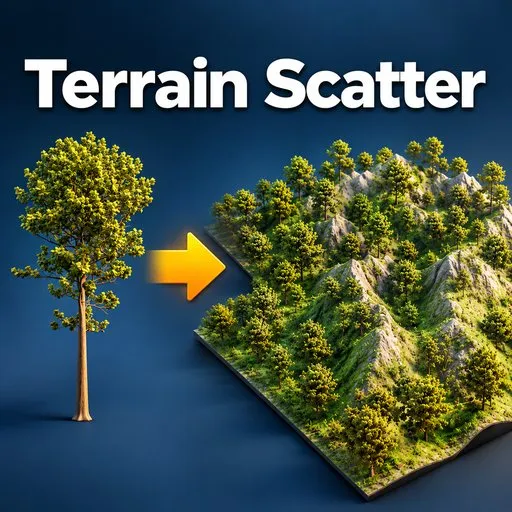
Terrain Scatter - Scatter Trees and Rocks on Any Terrain with Density Painting
 add-on
Terrain Scatter places trees and rocks across any terrain mesh in Blender 4.2 and newer. Paint density with a weight brush, align objects to the ground, add scale and rotation variation, and preview placement before you commit. Instances share mesh
Fill a terrain with trees and rocks without fighting node trees
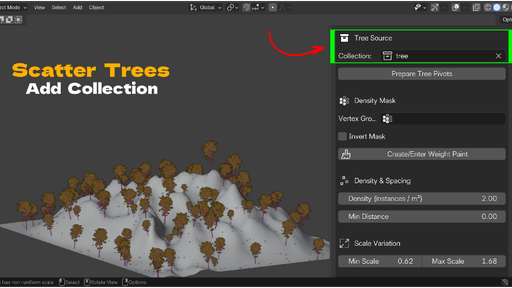
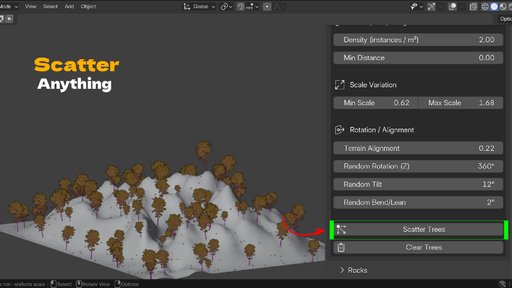
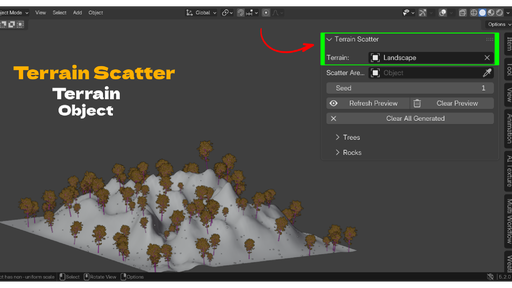
Scattering used to mean building a particle system or wiring a geometry nodes setup for every project. Terrain Scatter gives you a small sidebar panel instead. You pick a terrain, point it at a collection of tree meshes and a collection of rock meshes, and scatter. Placement follows the surface, sits flat on the ground, and stays inside the area you choose.
The addon works with the meshes you already have. Your own trees, purchased rock packs, kitbash assets, anything that lives in a collection. There is no special asset format and no library to import.
Paint where things grow
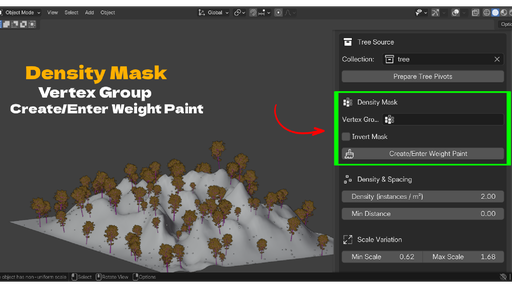
Every terrain has areas that should stay clear. A path, a river bed, a clearing, the spot where your camera moves. Terrain Scatter uses a terrain vertex group as a density mask. Click one button and the addon creates the group, fills it, and drops you into Weight Paint mode. Paint white where you want dense growth and black where you want none. Scatter again and the trees follow your brush. An invert option lets you paint the clear areas instead if that is faster for your scene.
See placement before you build it
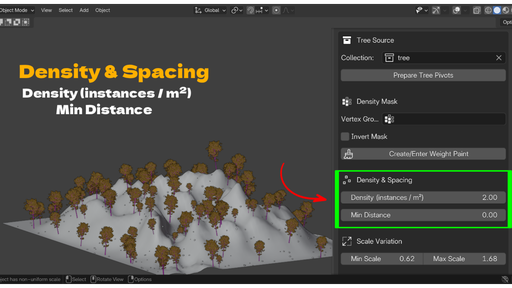
Refresh Preview drops small axis markers at every point the addon would use, with the real scale and rotation applied. No mesh instances are created yet. You read the spread, adjust density or minimum distance, and refresh again. When the layout looks right, you scatter for real. This keeps the heavy step for last and makes tuning fast.
Instances that stay light
Scattered objects are linked duplicates. They share the source mesh data, so scattering ten thousand trees does not create ten thousand meshes. Your file size and viewport stay manageable on scenes that would choke a naive duplicate approach.
Respects your terrain modifiers
Placement is calculated against the evaluated terrain. If you have a Subdivision Surface or a Displace modifier shaping the ground, trees land on the final displaced surface, not the base cage. The density mask still reads correctly because it is sampled from the original mesh through a nearest vertex lookup.
Non-destructive from start to finish
Preview markers, scattered collections, and the bend on each instance are all reversible. Clear Trees, Clear Rocks, or Clear All Generated removes what the addon made and leaves your source objects and terrain untouched. The bend and lean variation is a Simple Deform modifier on each instance, so it never edits shared mesh data.
Who it is for
Environment artists blocking out forests and rocky landscapes
Motion designers who need a filled background fast
Hobbyists and students who want scatter results without learning geometry nodes
Anyone building game-ready or render-ready nature scenes in Blender
Requirements
Blender 4.2 or newer. Works on Windows, macOS, and Linux. No internet connection, no external dependencies.
Key Features with Benefits
Separate Trees and Rocks channels. Each type has its own source collection, density, spacing, scale, and rotation settings, so you tune tall trees and low rocks independently in one pass.
Weight paint density mask. One button creates the vertex group and enters Weight Paint mode. You paint growth zones directly on the terrain instead of guessing values.
Invert mask option. Paint the empty areas instead of the full ones when that is the quicker path for your scene.
Non-destructive preview. Axis markers show exact position, scale, and rotation before any real geometry is made, so tuning is instant.
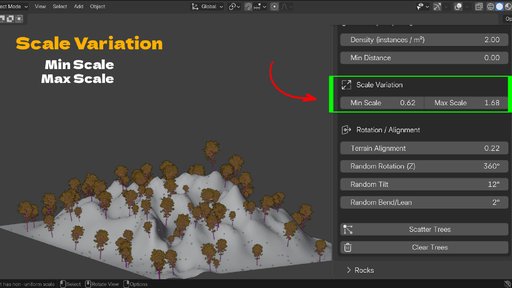
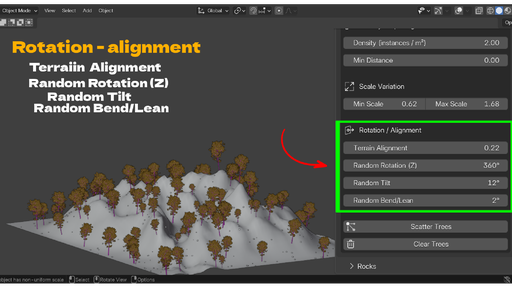
Terrain normal alignment with a strength slider. Set 0 for perfectly upright trees, 1 to follow the slope, or anything between for a natural mix.
Random scale range. Set a minimum and maximum and every instance picks a size in that range, so no two trees read as copies.
Random Z rotation, tilt, and bend. Yaw spins each object, tilt leans it off axis, and a per-instance Bend modifier curves trunks for a wind-blown look. All controllable in degrees.
Minimum distance rejection. Set a spacing value and instances never overlap, which matters for readable forests and clean collision later.
Optional scatter area object. Use any object's bounding box to limit the footprint on X and Y, or leave it empty to cover the whole terrain.
Modifier-aware placement. Trees and rocks land on the displaced, subdivided surface, not the base mesh.
Memory-safe linked duplicates. Thousands of instances share one mesh datablock each.
Seed control. Change one number for a new layout, keep it for a result you can reproduce exactly.
Safety cap at 50000 instances. A mistyped density value cannot freeze Blender.
One click cleanup. Clear trees, rocks, preview, or everything the addon generated.
Workflow Benefits
Fewer steps than particles or nodes. Assign two collections, click scatter, done. No modifier stack to build per project.
Tune with feedback, not guesswork. Preview markers mean you see the result of a density change in a second instead of waiting for a full scatter.
Keep files small. Linked duplicates hold viewport speed and file size down on large scenes.
Iterate freely. Clear and re-scatter as many times as you want with different seeds or settings. Your source assets never change.
Stay art directed. The density brush puts you in control of composition instead of leaving it to a noise texture.
Move between projects. Because it uses plain collections and standard Blender data, results open fine on any machine with the addon, and the scattered objects are normal editable objects.
Use Cases
Block out a forest for an animation background in a few minutes
Fill a game level greybox terrain with trees and boulders for scale reference
Build a rocky desert or mountain scene with controlled clusters of rock
Add mid-ground and background vegetation behind a hero asset
Create a clearing or a path by painting the density mask black where the camera travels
Scatter debris, crystals, mushrooms, or any repeating asset, not just trees and rocks
Produce quick concept renders of a landscape with real depth
Populate an environment for a matte painting or a still
Extra Points
No subscription, no login, no asset pack lock-in. You own the addon and use your own meshes.
Reads like native Blender. The panel sits in the N sidebar and uses standard fields, so there is almost nothing to learn.
Works offline. No network access at all. Safe for studio machines behind a firewall.
Small and readable code. GPL licensed, clean module layout, easy to audit or extend.


