Blendkit logo
  • Download Blendkit
  • Subscribe
  • Mission
  • Users
    • FAQ
    • Terms & conditions
      • Terms and Conditions
      • Privacy Policy
      • Refund Policy
    • Get Blender add-ons
    • Blendkit beyond Blender
      • Blendkit for Godot
      • Blendkit for Rhino
      • Blendkit for Maya
      • Blendkit for Unreal
    • Add-on troubleshooting
    • Licenses
      • Lincenses info
      • Linceses FAQ
    • Service status
    • Cookies
      • Cookie Policy
      • Cookie settings
  • Creators
    • FAQ
    • Overview
    • Terms and Conditions for creators
    • General Uploading info
    • Upload Models
    • Upload Materials
    • Upload Brushes
    • Upload Add-ons
    • Guidelines for add-on creators
    • Upload Scenes
    • Upload HDRs
    • Upload Printables
    • Blender Tutorials
    • Validation Statuses
    • Fair Share Redistributions
    • Affiliate program
    • Most common upload issues
  • News
  • About
    • Our team
    • Contact
    • Press Kit
    • Blender 3D Training
    • Job positions
  • Models
  • Materials
  • HDRI
  • Scenes
  • Brushes
  • PrintablesNEW
  • Add-onsNEW
  • Log In
  • Register

BK BD 25

Blender 3D Modeling Blender Add-Ons

Free Plan

Get 76,503 free assets

Full Plan 33% off

Access the full library & enjoy 155,898 assets

Blender add-ons 33% off

Find free & paid Blender add-ons

Become creator

Share & sell your assets

Built by 3D artists, for 3D artists. Meet Blendkit →

All assets

Add-ons icon Add-ons

  • Models icon Models
    • Architecture
      • Building
        • Commercial Historic Private Sci-fi
        • Other building
        Door Exterior element
        • Bench Facade element Fence Fountain Playground Swimming pool Urban Environment
        • Other exterior element
        Floor Covering Molding / Carving Scenes Stairs Structure Wall Panel
        • 3D Panel Stone Panel Upholstery Panel Wood Panel
        • Other wall panel
        Window
      • Other architecture
      Character
      • Anatomy
        • Full Body Head Internal organ Limbs Skeleton
        • Other anatomy
        Animal
        • Bird Dinosaur Fish Insect Mammal Reptile
        • Other animal
        Clothing
        • Accessories Footwear Headwear Lingerie Man Clothing Woman Clothing
        • Other clothing
        Humanoids
        • Child Fantasy Hero/ Heroines Medical Men Military Police Sci-Fi Sports Women
        • Other humanoids
        Monster / Creature Robot
      • Other character
      Decoration
      • Bag / Suitcase Blanket Book Carpets Clock / Watch Curtain Decoration Set Fabrics Fireplace Food / Drinks
        • Beverage Food Fruit / Vegetable Kitchenware Sweets / Dessert Tableware set
        • Other food / drinks
        Holiday Decoration Mirror Money Picture Pillow Sculpture Textile Vase Miscellaneous
      • Other decoration
      Effects / Simulations
      • Modifier Motion design Simulations Technical
      • Other effects / simulations
      Industrial
      • Container Equipment Machinery Parts Sign Tools
        • Handtools Powertools
        • Other tools
      • Other industrial
      Interior
      • Armchair Bathroom furniture
        • Accessories Bathhub Faucet Furniture Set Laundry Shower Toilet / Bidet Towel rail Wash Basin
        • Other bathroom furniture
        Bed Cabinets
        • Bookcase Commode Shelving TV Cabinets
        • Other cabinets
        Chair
        • Bar Chair Regular Chair
        • Other chair
        Console Dressing Table Kids furniture
        • Bed Chair Furniture Set Miscellaneous Table Toy Wardrobe
        • Other kids furniture
        Kitchen Furniture
        • Faucet Kitchen Appliance Kitchen Set Sink Storage
        • Other kitchen furniture
        Lights
        • Ceiling Light Floor Lamp IES Light Industrial Light Outdoor Light Table Lamp Wall Light
        • Other lights
        Office Furniture
        • Chair Desk Stationery Storage Table
        • Other office furniture
        Outdoor Furniture Pouf Restaurant / Bar Seating Set
        • Chair-table Set Sofa-table Set
        • Other seating set
        Shopping / Retail Sideboard / Drawers Chest Sofa Table Wardrobe
      • Other interior
      Military
      • Aircraft Vehicles Watercraft Weapon / Armor
        • Historic Modern Sci-Fi
        • Other weapon / armor
      • Other military
      Nature
      • Atmosphere
        • Cloud Fog Smoke / Fire Wind Setup
        • Other atmosphere
        Grass Landscape
        • Environment Elements Terrain
        • Other landscape
        Plant
        • Bouquet Fitowall Indoor Outdoor
        • Other plant
        Tree
      • Other nature
      Science
      • Lab Equipment Medical Equipment Microbiology Miscellaneous Pharmacy
      • Other science
      Space
      • Miscellaneous Planet Satellite Spacecraft Station
      • Other space
      Sport / Hobby
      • Fishing Gym Hobby Accessories Miscellaneous Music
        • Accessories Instruments Stage Studio
        • Other music
        Sport
      • Other sport / hobby
      Technology
      • Audio Devices Computer
        • Components / Hardware Desktop Game Console Keyboard Laptop Monitor Mouse Peripheral
        • Other computer
        Device
        • Cellular Phone Corded Phone Smartphone Smart Watch Tablet
        • Other device
        Home Appliance Miscellaneous Photography Robotics Video devices
      • Other technology
      Transport
      • Aircraft
        • Accessories / Part Air Baloon Airplane Drone Glider Helicopter Historic Plane Private Jet Seaplane
        • Other aircraft
        Bicycle Car
        • Buggy Concept Historical Luxury / Supercar Modern Racing Sci-Fi
        • Other car
        Emergency
        • Ambulance Fire trucks Police
        • Other emergency
        Heavy Vehicle
        • Industrial Trailer Truck Van
        • Other heavy vehicle
        Motocycle
        • Historical Race Standard
        • Other motocycle
        Public Transport
        • Bus Taxi
        • Other public transport
        Railed vehicle
        • Cargo Passenger
        • Other railed vehicle
        Small Electric Vehicles Vehicle Parts Watercraft
        • Accessories / Part Boat Hovercraft Ship Submarine Yacht
        • Other watercraft
      • Other transport
    • Other models
  • Materials icon Materials
    • Animal Asphalt Bricks Ceramic Concrete Dirt Fabric
      • Blackout Chenille Dimout Embroidery Flat weave Jacquard Print Sheer Suede Texture Velvet Vinyl / Imitation leather
      • Other fabric
      Floor Food Fx Glass Grass Ground Human Ice Leather Liquid Marble Metal Organic Ornaments Paper Paving Plaster Plastic Rock Roofing Rubber Rust Sand Soil Stone Tech Tiles Wood
    • Other materials
  • HDRIs icon HDRIs
    • Indoor
      • Abstract Futuristic Environments Holiday Industrial Interiors Nighttime Environments Public Residential Rural Sports Studio
      • Other indoor
      Outdoor
      • Abstract Architectural Cityscapes Futuristic Environments Holiday Landscapes Nature Nighttime Environments Sports Urban Water Environments
      • Other outdoor
    • Other hdris
  • Scenes icon Scenes
    • Abstract Cartoon Exterior
      • Architectural Nature Post-apocalyptic Private Public Rural Urban
      • Other exterior
      Gaming Industrial Interior
      • Creative studios
        • Photography Studios TV Studios YouTube/Podcast Studios
        • Other creative studios
        Interior Isometric Private Public
      • Other interior
      Product visualization
      • Cloth viz Mockup Studio
      • Other product visualization
      Science Templates
      • Background Brush templates Magazine cover Typography Validation scenes
      • Other templates
      Thematic Scenes
      • Fantasy Historical Holiday Sci-fi Space Underwater
      • Other thematic scenes
    • Other scenes
  • Brushes icon Brushes
    • Anatomy
      • Animal / creature
        • Claws Face / head Feather Fins Fur Limbs Organs Scales Scars & wounds Skeleton Skin Spikes Tails & horns
        • Other animal / creature
        Human
        • Body Face Hair & nails Muscles Organs Scars & wounds Skeleton Skin
        • Other human
      • Other anatomy
      Art
      • Pattern Sculpture
      • Other art
      Clothing
      • Accessories Fabric Stitches
      • Other clothing
      Damage
      • Concrete Crack Cut Dirt Glass Metal Plaster Rust Wood
      • Other damage
      Geometric Industrial
      • Hard surface Sci-fi
      • Other industrial
      Misc Nature
      • Crater Fire Ice Landscape Organic Plant Rock Soil Stone Wood
      • Other nature
    • Other brushes
  • Node Groups icon Node Groups
    • Compositing Nodes Geometry Nodes
      • Curves
        • Curve Deformers Curve Optimizers Curve Shapes
        • Other curves
        Distribution
        • Arrays Distribution Transform Surface Distribution Volumetric Distribution
        • Other distribution
        Generators
        • Animations Curve Generators Measurements Mesh Generators Voxel Generators
        • Other generators
        Material
        • Colors
        Math
        • Functions Interpolations
        Selection
        • Falloffs Select by
        • Other selection
        Simulation
        • Diffusions Particle Physics
        • Other simulation
        Tools
        • Edit / Object mode
        • Other tools
        Topology
        • Mesh Deformers Mesh Primitives Remeshers Tessellate Mesh
        • Other topology
        Utilities
        • Rotation Switches Text / String Tools UV Vector Fields Visualizers
        • Other utilities
      • Other geometry nodes
      Shading Nodes
      • Effects Procedural Textures
      • Other shading nodes
  • Printables icon Printables
    • Containers Fashion Games Holders Instruments Mechanics Misc Organics
    • Other printables
  • Add-ons icon Add-ons
    • 3D View Add Mesh Animation Development General Import - Export Material Mesh Modeling Node Object Paint Render Rigging Scene System Tools User Interface UV
  • Creators icon Creators
  • Creations icon Creations
YouTube Facebook Instagram GitHub TikTok BlueSky Mastodon
  • Trending  
  • Most bookmarked  
  • Highest asset score  
  • Highest complexity  
  • Highest quality  
  • Asset count  
  • Asset score sum
  • Newest
  • Most relevant
  • All
  • Free
  • Full
  • Paid
  • All assets
  • My bookmarked assets
  • All
  • 0 - 999
  • 1,000 - 9,999
  • 10,000 - 99,999
  • 100,000 - 999,999
  • 1,000,000 and more
  • All
  • Less than 256
  • 256
  • 512
  • 1K
  • 2K
  • 4K
  • 8K
  • 16K and more
  • All
  • Sculpt
  • Texture paint
  • All
  • Procedural
  • Texture based
  • All
  • Realistic
  • Non photorealistic
  • Other
  • All
  • Yes
  • No
  • All
  • Geometry nodes
  • All
  • Yes
  • No
  • All
  • Yes
  • No
  • All
  • No Sexualized Content
  • Sexualized Content
  • All
  • Yes
  • No
  • All
  • Windows
  • MacOS
  • Linux
  Bookmarks
The asset was added to your bookmarks.
Now you can filter it in Blendkit add-on.
  Bookmarks
The asset was removed from your bookmarks
  Bookmarks
Your rating could not be saved. Please try again.

AutoRemesher Quad: One-Click Quad Remesh

add-on add-on

Turn dense triangle meshes into clean quad topology with one click. AutoQuadRemesher runs the AutoRemesher engine locally inside Blender's viewport. Download the small engine once (Windows or macOS), then remesh fully offline, with no account, no sub

$29 $19.43
Share on Twitter Share on Facebook Share on Reddit Share link

What AutoQuadRemesher Does
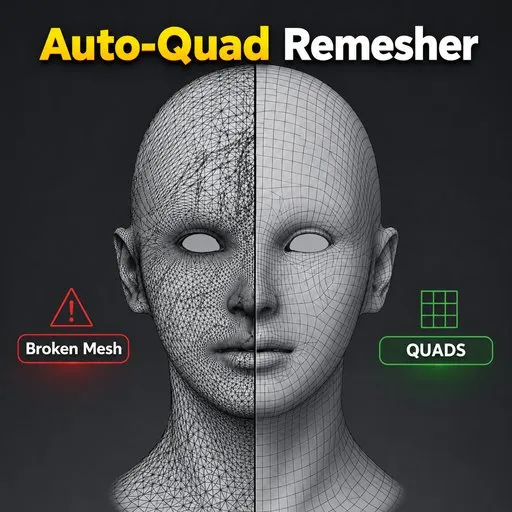
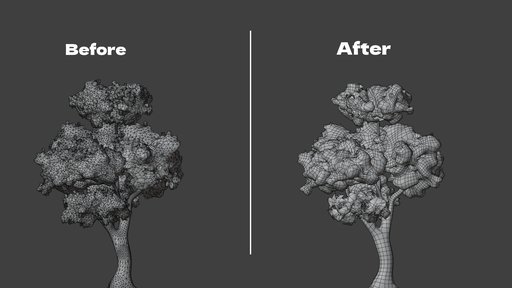
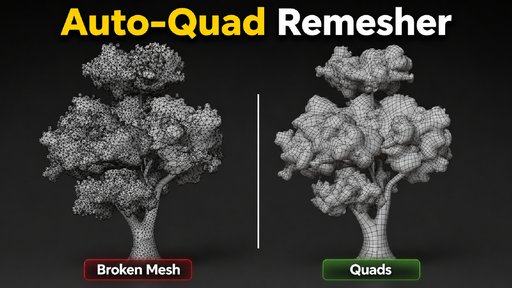
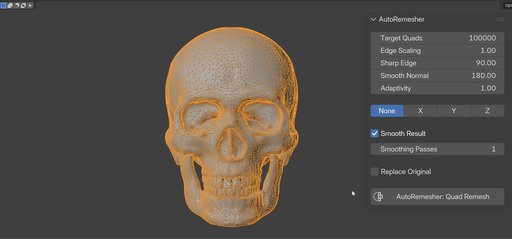
AutoQuadRemesher takes a messy mesh, a sculpt, a scan, a boolean result, a procedural tree, and rebuilds it as clean, mostly-quad topology. You select an object, open the N-panel, and click one button. There is no export step and no separate application to open.

Under the hood it runs the open-source AutoRemesher engine as a small local program. The first time you use it, the addon downloads that engine straight from its public GitHub release for your operating system. After that one-time download, everything runs offline: Blender sends the engine your mesh as text over a pipe, the engine computes the new quad layout, and sends the result back the same way. Nothing about your mesh is written to disk or leaves your computer.
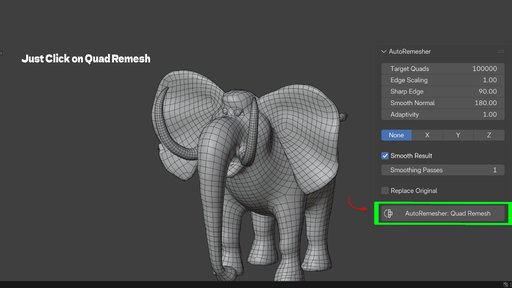
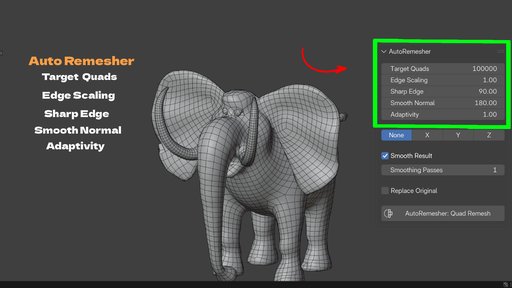
Image 1
Image 2
Image 3
Image 4
Image 5
Image 6

Sculpted, scanned, and procedurally generated meshes are rarely clean. They're triangle-heavy, uneven in density, and hard to subdivide, rig, or texture without artifacts. Fixing that by hand means drawing edge loops one at a time or running a shrinkwrap retopology pass over a reference mesh. Both take real time, often hours for anything with detail.

Blender's built-in Quadriflow remesh is included and free, but it operates on the whole shape as a black box and gives you limited control over sharp edges, adaptivity, or which openings stay open. Dedicated paid remeshers exist too, but several route your mesh to a cloud service or require a subscription. AutoQuadRemesher runs the actual remesh entirely on your machine, with the parameters exposed directly in the panel; the only thing it ever downloads is the engine program itself, once.
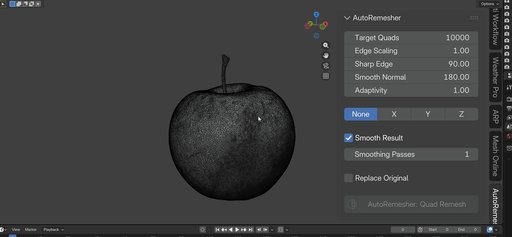
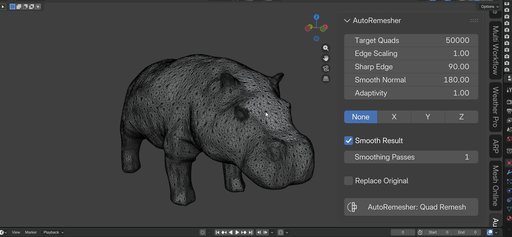
Image 1
Image 2
Image 3

How It Works
Install the addon and open the N → AutoQuadRemesher sidebar tab.
Click Download Dependencies once (enable Allow Online Access in Blender's System preferences if prompted). The addon fetches the correct engine binary for Windows or macOS from GitHub and verifies it before use.
Select a mesh object and set the parameters, or leave the defaults (20,000 target quads is a solid starting point).
Click AutoQuadRemesher: Quad Remesh.
Blender evaluates your mesh with modifiers applied, triangulates it, and streams it to the downloaded engine in memory.
The engine runs on a background thread. Blender's UI stays responsive while it works, and you can press Esc to cancel.
A new object is created with the quad result, positioned exactly where the source object was.
What You Control
Target Quads sets roughly how many quads the result should have.
Edge Scaling scales edge length, higher values mean a lower-poly result.
Sharp Edge sets the dihedral angle above which an edge is treated as a hard edge and preserved.
Smooth Normal sets an angle threshold for normal smoothing on low-poly output.
Adaptivity controls whether quad density stays uniform (0) or concentrates in curved, detailed areas (1).
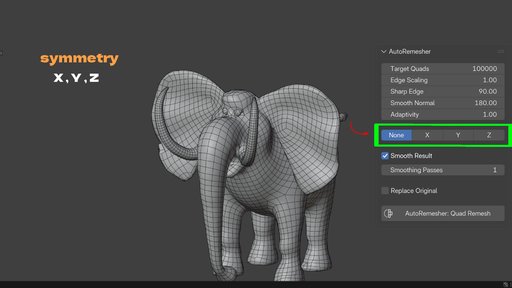
Symmetry (X/Y/Z) remeshes one half of a centered mesh and mirrors it, so both sides get identical topology.
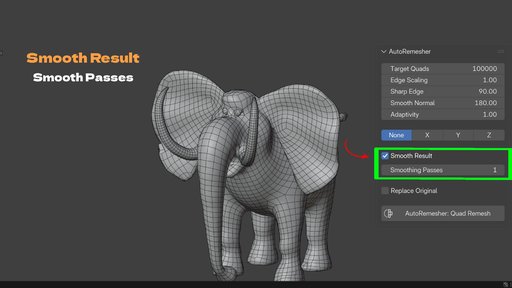
Smooth Result runs tangential smoothing passes, reprojected onto the original surface, to even out quad shape and size without losing the silhouette. Open boundaries are pinned, so hole rims keep their exact shape.
Replace Original deletes the source object and keeps only the remeshed result, or leaves both if you want to compare.
What It Preserves
Genuine holes, a character's eye sockets, a shirt's neck opening, an open sleeve, stay open. The engine does not cap boundaries the way some remeshers do by treating everything as a closed volume. This matters for characters and garments where an open edge is intentional, not a mesh error.

Who It's For
Sculptors who need a clean, subdivision-ready base mesh before rigging or exporting.
Game artists who need lower, more even poly counts with predictable quad flow.
Anyone cleaning up photogrammetry or 3D scan data, which is almost always dense, triangulated, and irregular.
Hard-surface and archviz artists dealing with boolean results full of n-gons and triangles that resist a clean Subdivision Surface modifier.
Procedural asset workflows, trees, foliage, generated rocks, where the source geometry was never meant to be a final mesh.
Mac users, specifically: this is the version of the addon that actually gets you a working engine on macOS, without hunting down or self-building a binary.
What It Doesn't Do (Yet)
Being upfront here matters more than sounding impressive. The remesh output is new geometry: the exchange between Blender and the engine only carries vertex positions and face data, so UVs, materials, and vertex groups are not copied onto the result automatically. Treat the output the way you'd treat any fresh retopology pass, unwrap and reassign materials afterward.

The engine also isn't included in the package, by design, so BlenderKit's review process could approve it. The first run needs a short internet connection to fetch the engine binary; after that, no connection is required. Downloadable binaries currently cover Windows x64 and macOS x86_64 (Intel, also runs on Apple Silicon via Rosetta 2). Linux isn't covered by a downloadable binary yet, though a compatible custom build can be pointed to through the Engine Path preference.

Getting Started
Install the addon from Edit → Preferences → Add-ons → Install from Disk, open the N → AutoQuadRemesher panel, click Download Dependencies once, then select a mesh and click Quad Remesh. That's the entire learning curve.

Key Features With Benefits
Feature Benefit
One-click operator in the N-panel You stay inside Blender. No exporting, no separate app, no round trip.
On-demand engine download from GitHub No bundled executable to review or trust blindly. You see exactly where it comes from, and it's fetched once, verified, then used offline from then on.
Works offline after the first download Your mesh data never leaves your machine during remeshing. No account, no upload, no subscription for the actual work.
Windows and macOS support Unlike a bundled-Windows-only package, this build downloads the right engine for your OS, Windows x64 or macOS x86_64 (Intel/Rosetta).
Background thread + modal timer Blender's interface stays responsive while the engine works. Press Esc to cancel anytime.
Preserves open boundaries Eye sockets, neck holes, and sleeve openings stay open instead of being capped shut.
X / Y / Z symmetry mode Remesh half a symmetric model and mirror it for identical, matching topology on both sides.
Adaptivity control Put more quads where the surface curves and fewer on flat areas, instead of uniform density everywhere.
Sharp Edge angle threshold Hard edges and mechanical details stay crisp instead of getting rounded off by the remesh.
Smooth Result with pinned boundaries Regularizes quad shape and size after remeshing, without losing hole rims or the input silhouette.
Automatic modifier evaluation and triangulation Works on your mesh's final, evaluated shape, no manual "apply modifiers" step first.
World transform baked into output The result appears exactly where the source object was, ready to work with immediately.
Replace Original toggle Clean up automatically, or keep the source around to compare before/after.
Post-remesh report See quad, non-quad, and vertex counts right after the operation finishes.
Workflow Benefits
From sculpt to production mesh in one step. Instead of manually retopologizing a multires or dyntopo sculpt, run one operator and get a quad base mesh you can subdivide, rig, or bake normals onto.

No app switching. The engine runs inside the Blender process. You never export an OBJ, open another program, and re-import.

No waiting on a frozen viewport. Because the engine runs on a background thread, you can keep orbiting and inspecting the viewport while it works, and cancel with Esc if a setting was off.

One small download, then no cloud dependency. After the one-time engine download, everything runs locally, so studio or personal work that can't leave your machine stays on your machine during the actual remesh.

Actually works on a Mac. If you've been stuck with a Windows-only bundled remesher, this build downloads a native macOS binary instead of leaving Mac users out.

Fewer redo cycles. Adjustable Target Quads, Adaptivity, and Sharp Edge settings mean you can dial in a result close to what you need instead of accepting a one-size-fits-all remesh and cleaning it up by hand afterward.

Symmetry without manual mirroring. For centered, symmetric props and characters, the X/Y/Z symmetry option guarantees both sides match exactly, rather than manually mirroring a retopo cage.

Use Cases
Sculpt-to-rig prep. Take a high-detail ZBrush-style sculpt done in Blender and generate a clean quad cage suitable for a Subdivision Surface modifier and rigging.
Photogrammetry and 3D scan cleanup. Scanned meshes are dense, triangulated, and often non-manifold. Quad remeshing gives you a workable, editable base.
Procedural asset optimization. Trees, rocks, and foliage generated by add-ons or particle systems are rarely built for animation or games. Remeshing gives them predictable, lower topology.
Boolean and hard-surface cleanup. Boolean operations leave n-gons and triangles that break a clean Subdivision Surface result. A quad remesh restores a subdivision-friendly cage.
Symmetric character and prop topology. For anything centered on an axis, from a helmet to a stylized head, symmetry mode guarantees matching flow on both sides without manual mirror modeling.
Game-ready poly reduction. Use Target Quads and Edge Scaling to bring a dense asset down to a controlled, even-density mesh instead of a decimated, irregular one.
Iteration during blockout. Reshape a rough form, remesh it clean, keep sculpting, and remesh again, without a manual retopo pass at every stage.
Mac-based studios and freelancers who couldn't use the Windows-only bundled version of this addon before.

By

Author avatar Junaid Alam

File size

37.2 MiB

Version

1.2.0

Platforms

windows-x64, macos-x64

Minimal required Blender version

4.2.0

AutoRemesher Quad: One-Click Quad Remesh

add-on AutoRemesher Quad: One-Click Quad Remesh

5
LINEUP Community
Free

add-on LINEUP Community

25
Quad Bridge
Free

add-on Quad Bridge

23
Booleanbite: 1-Click Procedural Edge Damage For Blender

add-on Booleanbite: 1-Click Procedural Edge Damage For Blender

17
Body_Sculptor

add-on Body_Sculptor

17
Measure and Scale
Free

add-on Measure and Scale

15
Tmeasure v1.1.3
Free

add-on Tmeasure v1.1.3

15
Easy Footprints

add-on Easy Footprints

14
Selective Subdivide V2
Free

add-on Selective Subdivide V2

13
B.slicer

add-on B.slicer

12
Profiler 2.0  -  Advanced curve beveling tool

add-on Profiler 2.0 - Advanced curve beveling tool

9
Image Trace 3D

add-on Image Trace 3D

9
LINEUP Pro

add-on LINEUP Pro

8
Architectural Interior-Molding System

add-on Architectural Interior-Molding System

8
Profiler
Full Plan

add-on Profiler

6
"Cracks" Damage addon 💥Windows, Linux, Mac approved

add-on "Cracks" Damage addon 💥Windows, Linux, Mac approved

6
World Space Texture Mapping

add-on World Space Texture Mapping

6
Terrain Scatter - Scatter Trees and Rocks on Any Terrain with Density Painting

add-on Terrain Scatter - Scatter Trees and Rocks on Any Terrain with Density Painting

6
Snow Generator

add-on Snow Generator

6
Better Bend - Geometry Nodes Bend Modifier with Intuitive Controls

add-on Better Bend - Geometry Nodes Bend Modifier with Intuitive Controls

5
Fast Remesher

add-on Fast Remesher

5
QuadSketch – Interactive Retopology for Blender

add-on QuadSketch – Interactive Retopology for Blender

5
FormLift

add-on FormLift

5
Morph Target Pro

add-on Morph Target Pro

5
Ornament Forge

add-on Ornament Forge

5

  • «
  • 1
  • 2
  • 3
  • …
  • 18
  • 19
  • 20
  • »
Added To Cart
To complete your purchase or update it, please go to cart. If you want to find more awesome add-ons, continue to explore.
Go to Cart
Already Purchased
You already purchased this item. It is impossible to buy it again. Continue to explore and enjoy :-)
My Orders