Blendkit logo
  • Download Blendkit
  • Subscribe
  • Mission
  • Users
    • FAQ
    • Terms & conditions
      • Terms and Conditions
      • Privacy Policy
      • Refund Policy
    • Get Blender add-ons
    • Blendkit beyond Blender
      • Blendkit for Godot
      • Blendkit for Rhino
      • Blendkit for Maya
      • Blendkit for Unreal
    • Add-on troubleshooting
    • Licenses
      • Lincenses info
      • Linceses FAQ
    • Service status
    • Cookies
      • Cookie Policy
      • Cookie settings
  • Creators
    • FAQ
    • Overview
    • Terms and Conditions for creators
    • General Uploading info
    • Upload Models
    • Upload Materials
    • Upload Brushes
    • Upload Add-ons
    • Guidelines for add-on creators
    • Upload Scenes
    • Upload HDRs
    • Upload Printables
    • Blender Tutorials
    • Validation Statuses
    • Fair Share Redistributions
    • Affiliate program
    • Most common upload issues
  • News
  • About
    • Our team
    • Contact
    • Press Kit
    • Blender 3D Training
    • Job positions
  • Models
  • Materials
  • HDRI
  • Scenes
  • Brushes
  • PrintablesNEW
  • Add-onsNEW
  • Log In
  • Register

BK BD 25

Blender 3D Import - Export Add-Ons

Free Plan

Get 75,168 free assets

Full Plan 33% off

Access the full library & enjoy 154,392 assets

Blender add-ons 33% off

Find free & paid Blender add-ons

Become creator

Share & sell your assets

Built by 3D artists, for 3D artists. Meet Blendkit →

All assets

Add-ons icon Add-ons

  • Models icon Models
    • Architecture
      • Building
        • Commercial Historic Private Sci-fi
        • Other building
        Door Exterior element
        • Bench Facade element Fence Fountain Playground Swimming pool Urban Environment
        • Other exterior element
        Floor Covering Molding / Carving Scenes Stairs Structure Wall Panel
        • 3D Panel Stone Panel Upholstery Panel Wood Panel
        • Other wall panel
        Window
      • Other architecture
      Character
      • Anatomy
        • Full Body Head Internal organ Limbs Skeleton
        • Other anatomy
        Animal
        • Bird Dinosaur Fish Insect Mammal Reptile
        • Other animal
        Clothing
        • Accessories Footwear Headwear Lingerie Man Clothing Woman Clothing
        • Other clothing
        Humanoids
        • Child Fantasy Hero/ Heroines Medical Men Military Police Sci-Fi Sports Women
        • Other humanoids
        Monster / Creature Robot
      • Other character
      Decoration
      • Bag / Suitcase Blanket Book Carpets Clock / Watch Curtain Decoration Set Fabrics Fireplace Food / Drinks
        • Beverage Food Fruit / Vegetable Kitchenware Sweets / Dessert Tableware set
        • Other food / drinks
        Holiday Decoration Mirror Money Picture Pillow Sculpture Textile Vase Miscellaneous
      • Other decoration
      Effects / Simulations
      • Modifier Motion design Simulations Technical
      • Other effects / simulations
      Industrial
      • Container Equipment Machinery Parts Sign Tools
        • Handtools Powertools
        • Other tools
      • Other industrial
      Interior
      • Armchair Bathroom furniture
        • Accessories Bathhub Faucet Furniture Set Laundry Shower Toilet / Bidet Towel rail Wash Basin
        • Other bathroom furniture
        Bed Cabinets
        • Bookcase Commode Shelving TV Cabinets
        • Other cabinets
        Chair
        • Bar Chair Regular Chair
        • Other chair
        Console Dressing Table Kids furniture
        • Bed Chair Furniture Set Miscellaneous Table Toy Wardrobe
        • Other kids furniture
        Kitchen Furniture
        • Faucet Kitchen Appliance Kitchen Set Sink Storage
        • Other kitchen furniture
        Lights
        • Ceiling Light Floor Lamp IES Light Industrial Light Outdoor Light Table Lamp Wall Light
        • Other lights
        Office Furniture
        • Chair Desk Stationery Storage Table
        • Other office furniture
        Outdoor Furniture Pouf Restaurant / Bar Seating Set
        • Chair-table Set Sofa-table Set
        • Other seating set
        Shopping / Retail Sideboard / Drawers Chest Sofa Table Wardrobe
      • Other interior
      Military
      • Aircraft Vehicles Watercraft Weapon / Armor
        • Historic Modern Sci-Fi
        • Other weapon / armor
      • Other military
      Nature
      • Atmosphere
        • Cloud Fog Smoke / Fire Wind Setup
        • Other atmosphere
        Grass Landscape
        • Environment Elements Terrain
        • Other landscape
        Plant
        • Bouquet Fitowall Indoor Outdoor
        • Other plant
        Tree
      • Other nature
      Science
      • Lab Equipment Medical Equipment Microbiology Miscellaneous Pharmacy
      • Other science
      Space
      • Miscellaneous Planet Satellite Spacecraft Station
      • Other space
      Sport / Hobby
      • Fishing Gym Hobby Accessories Miscellaneous Music
        • Accessories Instruments Stage Studio
        • Other music
        Sport
      • Other sport / hobby
      Technology
      • Audio Devices Computer
        • Components / Hardware Desktop Game Console Keyboard Laptop Monitor Mouse Peripheral
        • Other computer
        Device
        • Cellular Phone Corded Phone Smartphone Smart Watch Tablet
        • Other device
        Home Appliance Miscellaneous Photography Robotics Video devices
      • Other technology
      Transport
      • Aircraft
        • Accessories / Part Air Baloon Airplane Drone Glider Helicopter Historic Plane Private Jet Seaplane
        • Other aircraft
        Bicycle Car
        • Buggy Concept Historical Luxury / Supercar Modern Racing Sci-Fi
        • Other car
        Emergency
        • Ambulance Fire trucks Police
        • Other emergency
        Heavy Vehicle
        • Industrial Trailer Truck Van
        • Other heavy vehicle
        Motocycle
        • Historical Race Standard
        • Other motocycle
        Public Transport
        • Bus Taxi
        • Other public transport
        Railed vehicle
        • Cargo Passenger
        • Other railed vehicle
        Small Electric Vehicles Vehicle Parts Watercraft
        • Accessories / Part Boat Hovercraft Ship Submarine Yacht
        • Other watercraft
      • Other transport
    • Other models
  • Materials icon Materials
    • Animal Asphalt Bricks Ceramic Concrete Dirt Fabric
      • Blackout Chenille Dimout Embroidery Flat weave Jacquard Print Sheer Suede Texture Velvet Vinyl / Imitation leather
      • Other fabric
      Floor Food Fx Glass Grass Ground Human Ice Leather Liquid Marble Metal Organic Ornaments Paper Paving Plaster Plastic Rock Roofing Rubber Rust Sand Soil Stone Tech Tiles Wood
    • Other materials
  • HDRIs icon HDRIs
    • Indoor
      • Abstract Futuristic Environments Holiday Industrial Interiors Nighttime Environments Public Residential Rural Sports Studio
      • Other indoor
      Outdoor
      • Abstract Architectural Cityscapes Futuristic Environments Holiday Landscapes Nature Nighttime Environments Sports Urban Water Environments
      • Other outdoor
    • Other hdris
  • Scenes icon Scenes
    • Abstract Cartoon Exterior
      • Architectural Nature Post-apocalyptic Private Public Rural Urban
      • Other exterior
      Gaming Industrial Interior
      • Creative studios
        • Photography Studios TV Studios YouTube/Podcast Studios
        • Other creative studios
        Interior Isometric Private Public
      • Other interior
      Product visualization
      • Cloth viz Mockup Studio
      • Other product visualization
      Science Templates
      • Background Brush templates Magazine cover Typography Validation scenes
      • Other templates
      Thematic Scenes
      • Fantasy Historical Holiday Sci-fi Space Underwater
      • Other thematic scenes
    • Other scenes
  • Brushes icon Brushes
    • Anatomy
      • Animal / creature
        • Claws Face / head Feather Fins Fur Limbs Organs Scales Scars & wounds Skeleton Skin Spikes Tails & horns
        • Other animal / creature
        Human
        • Body Face Hair & nails Muscles Organs Scars & wounds Skeleton Skin
        • Other human
      • Other anatomy
      Art
      • Pattern Sculpture
      • Other art
      Clothing
      • Accessories Fabric Stitches
      • Other clothing
      Damage
      • Concrete Crack Cut Dirt Glass Metal Plaster Rust Wood
      • Other damage
      Geometric Industrial
      • Hard surface Sci-fi
      • Other industrial
      Misc Nature
      • Crater Fire Ice Landscape Organic Plant Rock Soil Stone Wood
      • Other nature
    • Other brushes
  • Node Groups icon Node Groups
    • Compositing Nodes Geometry Nodes
      • Curves
        • Curve Deformers Curve Optimizers Curve Shapes
        • Other curves
        Distribution
        • Arrays Distribution Transform Surface Distribution Volumetric Distribution
        • Other distribution
        Generators
        • Animations Curve Generators Measurements Mesh Generators Voxel Generators
        • Other generators
        Material
        • Colors
        Math
        • Functions Interpolations
        Selection
        • Falloffs Select by
        • Other selection
        Simulation
        • Diffusions Particle Physics
        • Other simulation
        Tools
        • Edit / Object mode
        • Other tools
        Topology
        • Mesh Deformers Mesh Primitives Remeshers Tessellate Mesh
        • Other topology
        Utilities
        • Rotation Switches Text / String Tools UV Vector Fields Visualizers
        • Other utilities
      • Other geometry nodes
      Shading Nodes
      • Effects Procedural Textures
      • Other shading nodes
  • Printables icon Printables
    • Containers Fashion Games Holders Instruments Mechanics Misc Organics
    • Other printables
  • Add-ons icon Add-ons
    • 3D View Add Mesh Animation Development General Import - Export Material Mesh Modeling Node Object Paint Render Rigging Scene System Tools User Interface UV
  • Creators icon Creators
  • Creations icon Creations
YouTube Facebook Instagram GitHub TikTok BlueSky Mastodon
  • Trending  
  • Most bookmarked  
  • Highest asset score  
  • Highest complexity  
  • Highest quality  
  • Asset count  
  • Asset score sum
  • Newest
  • Most relevant
  • All
  • Free
  • Full
  • Paid
  • All assets
  • My bookmarked assets
  • All
  • 0 - 999
  • 1,000 - 9,999
  • 10,000 - 99,999
  • 100,000 - 999,999
  • 1,000,000 and more
  • All
  • Less than 256
  • 256
  • 512
  • 1K
  • 2K
  • 4K
  • 8K
  • 16K and more
  • All
  • Sculpt
  • Texture paint
  • All
  • Procedural
  • Texture based
  • All
  • Realistic
  • Non photorealistic
  • Other
  • All
  • Yes
  • No
  • All
  • Geometry nodes
  • All
  • Yes
  • No
  • All
  • Yes
  • No
  • All
  • No Sexualized Content
  • Sexualized Content
  • All
  • Yes
  • No
  • All
  • Windows
  • MacOS
  • Linux
  Bookmarks
The asset was added to your bookmarks.
Now you can filter it in Blendkit add-on.
  Bookmarks
The asset was removed from your bookmarks
  Bookmarks
Your rating could not be saved. Please try again.

3MF Magic Solver - Import, Paint and Export Multicolor 3MF for 3D Printing

add-on add-on

Any coloured model in, clean filaments out: imports 3MF painting exactly, paints from the shape in one click, turns textures into a filament print, repairs the mesh and exports painted 3MF, OBJ and STL.

$19 $12.73
Share on Twitter Share on Facebook Share on Reddit Share link

A 3MF lands on your disk. Blender either refuses it, or opens a grey mesh with the colours gone. You wanted to change one thing and print it - instead you are rebuilding materials by hand.

3MF Magic Solver ("3Mffer") is the round trip. Drag the file into the viewport and the model arrives with everything it carried: colour groups, base materials, and the actual painting from Bambu Studio or PrusaSlicer, face by face. Click one preset and the model is painted from its own geometry. Export, and the slicer opens it coloured and not a grey blob you have to paint again.

Any coloured model, not only a 3MF. An OBJ or GLB scan with a photo texture, an FBX game asset, a PLY with a colour per vertex: Blender's own importer opens it, 3Mffer puts it in millimetres and captures the colour out of its materials, per triangle corner, so the texture becomes printable paint. Capture Colour from Materials does the same for any mesh already in the scene.

No tutorials, go fast. The panel is a five-step to-do list and each step ticks itself when it is really done: scene in millimetres, model loaded, painted, filaments within your slot count, exported.
Image 1
New in 1.2.0 beta

A coloured model in, a clean filament print out.

Colour to filaments

A scan, a textured game asset or a GLB carries its colour as a photo. Give each triangle the nearest spool and it looks right on screen and prints badly: the shadows baked into the texture cost a spool of their own, and every speck of colour is a filament change on every layer it crosses.

Make Filament Version (new panel 2) turns that colour into a print:

  • Baked shading is taken out first. Light makes a colour darker, it does not change its hue, so the lit and the shaded side of a red jacket end up as one red filament. A slider sets how hard.
  • The filaments are picked by coverage and by how different they are, so a small white eye on a red figure still gets its own spool. A slot is only used for a colour that is really different: ask for 4, get 3 if the model has 3.
  • Or use your spools: type the colours you have loaded, read them from a Bambu Studio, Orca, Creality Print or PrusaSlicer project, or take them from the model. With more spools than slots, the best ones for this model are picked.
  • Patches smaller than the minimum area (1.5 sq mm by default) join the colour around them, and the borders are smoothed.
  • It always starts again from the original colour, so you can try 3, then 5, then your own spools. Back to Full Colour puts the original back.

The panel then shows each filament and how much of the surface it covers.

Make it printable, in one click

Make Printable (panel 5) runs the repair ladder for you, gentlest first: Quick Fix, then Deep Fix, then Rebuild Solid if you allow it. It stops at the first step that leaves the mesh watertight and tells you which one it was. Rebuild Solid now carries the colour over per triangle corner, read from the nearest point of the old surface, so painted edges survive it.

Print size

Scale to Print Size sets the longest side, or the height, width or depth, to the millimetres you type. Put on the Plate sits the model on Z = 0, centred. A scan or a game asset arrives at whatever size its app used.

10 new presets, 29 in all

Miniature, Toon, Rainbow Layers, Kawaii Pastel, Galaxy, Haunted Glow, Rusted Iron, Marble Statue, Snow Capped and Camo. The paint panel is now grouped: Materials and finishes, Figures, minis and fun, Terrain, tiles and parts, Light and checks.

Fixed
  • 1.1.x read colours from an ordinary 8-bit texture (PNG, JPG) lighter than they are. A 50% grey texel now stays 50% grey.
  • 1.1.x showed painted colours lighter in the viewport than in the print. The paint is now stored the way Blender expects, so the viewport and the slicer agree. Scenes painted with 1.1 still open with the right colours.
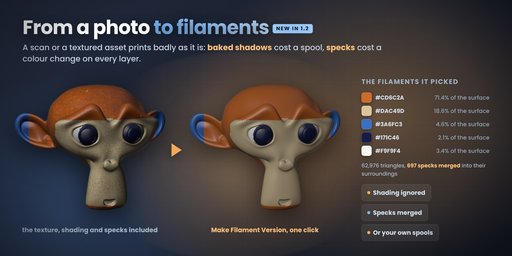
Image 1
Import that actually reads the file

A 3MF is a zip holding one or more models, a palette and - when it came out of a slicer - the painting itself. All of it is read:

  • <basematerials> with a displaycolor per material;
  • <m:colorgroup>, what Bambu Studio calls "standard 3mf colour import";
  • paint_color, the PrusaSlicer / Bambu Studio MMU painting, decoded down its whole recursive split tree so the filaments land on the same faces they were painted on.

Objects made of <component> references are flattened with their transforms
- what the author modelled is what you get - and a Bambu, Orca or Creality project that hides its geometry in 3D/Objects/object_N.model is followed there. When the project declares its spools, the real filament colours come across with it. A 500 000-triangle painted Creality project imports in about 23 seconds with its palette intact.
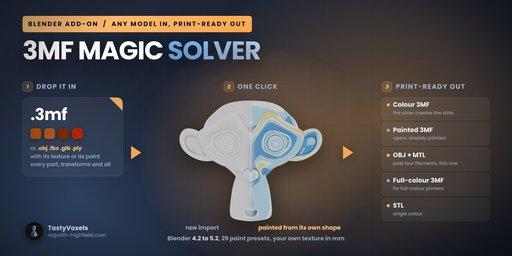
Image 1
Paint in one click, from the shape itself

Twenty-nine presets in four groups (materials and finishes; figures, minis and fun; terrain, tiles and parts; light and checks), no UVs, no textures, not one brush stroke. The colour comes out of the geometry:

  • curvature tells a crevice from a ridge - and it is normalised on the model's own 90th percentile, so a soft organic sculpt and a hard-edged mechanical part both use the full range instead of washing out;
  • thickness finds the walls too thin to print;
  • ambient occlusion finds what sits buried in shadow;
  • outward, height and normal fields do the rest.

Weathered rock, carved wood, gilded relief, mossy stone, lava, ice, antique silver, water and jewels, terrain, edge highlight, two-tone… and two that are diagnosis rather than decoration: thin-wall check and backlit, which colours the model by how much light gets through the wall.

Every button carries a chip made of that preset's own filaments, so you see the palette before you click. Filament slots folds a richer preset down to the number of spools you actually own, closest colours merged first.
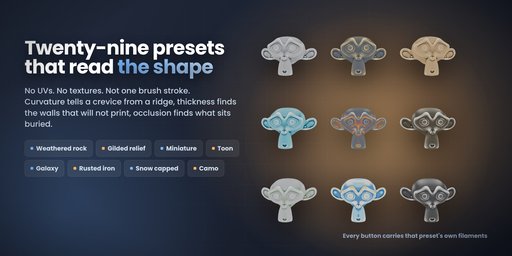
Image 1
Bring your own texture

Where the presets read the shape, this reads space: a texture sampled in millimetres, so a 40 mm tile is 40 mm on the printed part whatever the size of the model.

Load your own image - a licensed wood or stone photo, a scan, a height map, your own artwork - and it is wrapped triplanar: no UVs, no unwrapping, no seam. That matters, because a 3MF that came out of a slicer almost never carries usable UVs, and nobody should have to unwrap a downloaded model before they can put a texture on it. Paint with the photo's own colours, or use it as a pure height map and carve it in.

Brick, cells, marble, clouds, brushed metal, stripes and rings are built in for before you have picked an image - brick is the default because a running bond with mortar joints is pure geometry, which is what a procedural is genuinely good at. Depth can be negative, so the joints go in and the bricks stand proud.

Nothing here is destructive. The untouched vertex positions are stored on the mesh, so Reset Shape always puts the surface back; relief measured from the original never stacks on itself; and Clear Paint restores the colours the file arrived with, not a flat grey.
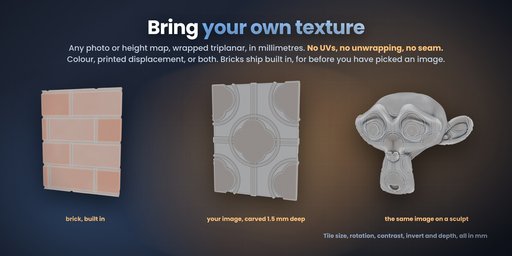
Image 1
Printable relief

The same fields, moving the surface instead of colouring it: emboss the ridges, engrave the crevices, deepen the recesses by a millimetre you choose. Detail that survives even a single-filament print.
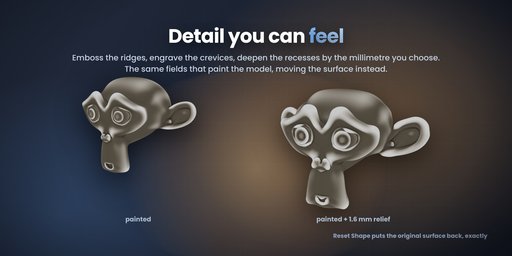
Image 1
Export: five containers, because one is never enough
  • Colour 3MF - standard 3MF plus a colour group, one object made of components, no Metadata folder. The slicer creates a filament slot per colour it finds. The universal one.
  • Painted 3MF - a real paint_color per triangle plus the extruder map. The model opens already painted, ready to slice. Filament 1 is the object's own extruder and carries no attribute at all, exactly as the slicers write it themselves.
  • OBJ + MTL - per-vertex colours in the OBJ, faces grouped per filament, MTL alongside. Past four filaments this is the one that works: the slicers read the colours from the vertices, not from the MTL, and their colour dialog opens fully populated.
  • STL - geometry only, for a one-filament print.
  • Full-colour 3MF - the whole colour, no palette. A captured texture is embedded as a texture (m:texture2d + a m:tex2coord per corner, the PNG in the zip), anything else as one colour per vertex. For UV inkjet, binder jet and PolyJet printers, and viewers. Reads back in lib3mf, the 3MF Consortium's reference library, with zero warnings. FDM slicers open it as geometry.

Paint that lives per triangle corner (a captured texture, a slicer's own painting) picks the filament per triangle from its own three corners, so a colour edge lands on the triangle edge instead of one triangle out.

Plus Bake Paint into Material Slots: one material per filament, which is the currency the rest of the pipeline speaks.
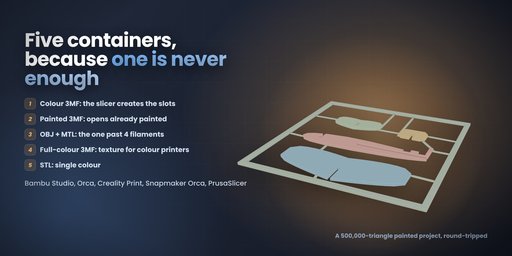
Image 1
Is it printable? Three repairs, gentlest first

Slicers refuse a mesh with holes, zero-area faces or edges shared by three faces, even when it looks perfect in Blender. Check Mesh counts them and changes nothing. Then Quick Fix (weld, loose bits, zero-area faces, small holes, normals out), Deep Fix (repeated until nothing changes, plus duplicate faces and inner walls removed, crowded edges pruned back to two faces, every open loop capped, the big ones too) and, as the last resort, Rebuild Solid: a fresh closed skin on a voxel grid with the colours carried over and the old mesh kept as a hidden backup, for crossing surfaces and overlapping shells that no edge repair can touch. The first two are kept only where they measurably help; a clean mesh is left untouched.
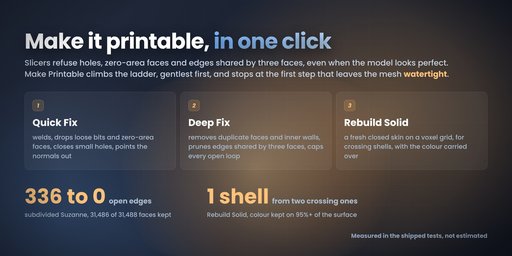
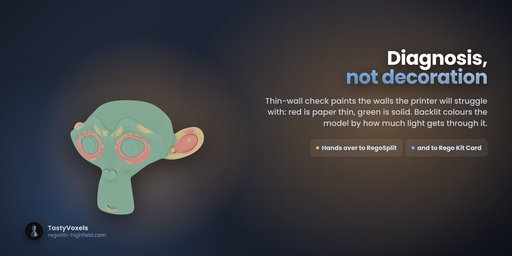
Image 1
Image 2
It plays with the other Rego add-ons

Install RegoSplit or Rego Kit Card and two more buttons appear. Hand to RegoSplit bakes the paint into material slots and passes the model over for Split with Pins, or Separate by Color when your printer has no AMS. Hand to Rego Kit Card traces it into flat plates that snap together on one card. No re-export, no round trip through disk.

3Mffer imports and paints. Cutting, pinning and colour separation stay RegoSplit's job; flat kit cards stay Rego Kit Card's. Buy one, buy all three: nothing is duplicated.

What it is NOT

Honest limits, so nobody buys the wrong thing:

  • It reads geometry, colours and painting. Slicer settings, supports, plates and modifiers inside a project file are not imported.
  • Preset painting is per vertex: a crisp boundary follows the mesh's own resolution. Subdivide first if you want a sharper line. A captured texture and a slicer's painting are per triangle corner and keep their edges.
  • Colour work stops at filaments: Make Filament Version reduces a texture to the spools you have, but splitting colours into printable solids is RegoSplit's ground.
  • The full-colour 3MF is written to specification and reads back in the 3MF Consortium's own library; it has not yet been opened on a full-colour printer's own software. Check it in yours before a long print.
  • No brush. This add-on paints from the shape; hand painting is Blender's own vertex paint, which it reads and writes happily.
  • Very heavy imports (500 k triangles and up) take tens of seconds. The painting is decoded exactly, not sampled.
  • Slicer behaviour is claimed from the file formats and from files produced by Bambu Studio, Orca, Creality Print and PrusaSlicer. Always check the filament mapping in your slicer before a long print.
Requirements
  • Blender 4.2 LTS or newer (extension format)
  • Windows, macOS, Linux
  • No internet connection required, ever
No AI, no network, no telemetry

3MF Magic Solver contains no artificial intelligence and no machine learning, and it has no network code at all: no telemetry, no analytics, nothing leaves your machine. It works fully offline.

On the development side I use AI tools the way I use every other tool in my kit - for coding assistance and for translation. I read and understand every line that ships and I take full responsibility for how it behaves. The 217 automated checks are there to back that up: they run headless on Blender 4.2, 4.5 LTS and 5.2, with the add-on installed from the zip, and check real results - every preset paints, every palette fits the slot count, all five exports write and read back, the paint_color encoder round-trips against the decoder over the whole filament range, a textured sphere exported as GLB, OBJ and PLY comes back with its colour matched to the texture corner by corner, and a deliberately broken mesh comes out of the repair ladder clean.

This is a beta, and I want to build it with you

3MF Magic Solver is in beta. The version on sale is 1.2.0 beta. Everything on this page works today and is covered by automated tests (217 checks, run on Blender 4.2, 4.5 LTS and 5.2 with the add-on installed from the zip you download), but a beta can still have problems, above all with files I have never seen. A 3MF can come out of a dozen slicers, painted in a dozen ways, and I only find the awkward ones if you send them to me.

So if something goes wrong, please tell me in the comments on this page: what you dropped in, what came out and what you expected. Every report goes into the next update. Every future version is included: buy once, updated for good.

Known issues in 1.2.0 beta: none known yet.
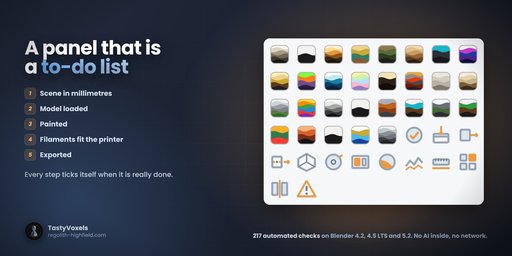
Image 1
By

Author avatar TastyVoxels

File size

6.0 MiB

Version

1.2.0

Platforms

windows-x64, macos-arm64, linux-x64, macos-x64, windows-arm64

Minimal required Blender version

4.2.0

3MF Magic Solver - Import, Paint and Export Multicolor 3MF for 3D Printing

add-on 3MF Magic Solver - Import, Paint and Export Multicolor 3MF for 3D Printing

VisibleIO - Product Configurator
Free

add-on VisibleIO - Product Configurator

26
CGHEVEN Asset Library
Free

add-on CGHEVEN Asset Library

25
CopyX — Cross-Version Copy & Paste for Blender Objects
Free

add-on CopyX — Cross-Version Copy & Paste for Blender Objects

14
Survey Image Aligner – Geodetic & Construction Workflow
Free

add-on Survey Image Aligner – Geodetic & Construction Workflow

12
Multi Object Export
Free

add-on Multi Object Export

8
3MF Import/Export with Material/Paint data
Free

add-on 3MF Import/Export with Material/Paint data

7
Scene Data Exporter
Free

add-on Scene Data Exporter

7
UDIM Atlas Builder
Free

add-on UDIM Atlas Builder

7
STEP Importer
Free

add-on STEP Importer

7
Fab Bridge - Megascans Assets

add-on Fab Bridge - Megascans Assets

7
SVG Exporter 1.1.0

add-on SVG Exporter 1.1.0

5
Bulk FBX Importer
Free

add-on Bulk FBX Importer

5
Blender to Affinity photo

add-on Blender to Affinity photo

5
Plateline Light: Batch Camera Setup from Plates
Free

add-on Plateline Light: Batch Camera Setup from Plates

4
VFX Scene Builder - After Effects to Blender

add-on VFX Scene Builder - After Effects to Blender

4
DAE (Collada) Exporter (Blender 5.0+ Compatible)

add-on DAE (Collada) Exporter (Blender 5.0+ Compatible)

4
Unity Bridge

add-on Unity Bridge

4
GLB Optmizer

add-on GLB Optmizer

3
Clean Up Pro - One-Click Scene Cleanup, Texture Fix & Game Engine Export

add-on Clean Up Pro - One-Click Scene Cleanup, Texture Fix & Game Engine Export

3
Unreal Engine Bridge

add-on Unreal Engine Bridge

3
Mesh Statistics Exporter
Free

add-on Mesh Statistics Exporter

3
Blender to Unity

add-on Blender to Unity

2
Blender to Godot

add-on Blender to Godot

2
Export Each - Batch Export Collections / Object with One Click

add-on Export Each - Batch Export Collections / Object with One Click

2

  • «
  • 1
  • 2
  • 3
  • …
  • 18
  • 19
  • 20
  • »
Added To Cart
To complete your purchase or update it, please go to cart. If you want to find more awesome add-ons, continue to explore.
Go to Cart
Already Purchased
You already purchased this item. It is impossible to buy it again. Continue to explore and enjoy :-)
My Orders