Models
 Materials
 HDRIs
HDRIs
 Scenes
 Brushes
 Node Groups
 Printables
 Creators
 Creations
Unreal Engine Bridge
 add-on
Send meshes into Unreal with collision, sockets, LODs and names applied. Use real project folders, skip unchanged assets and follow Blender edits live. Windows only; Unreal Engine installed separately.
From Blender into your running Unreal Editor.
Send meshes from Blender into a running Unreal Editor with one button. Assets land in the project's real Content Browser folders, with collision, sockets, LODs and names applied.
Windows only. Unreal Engine is not included. Install and license it separately from Epic Games. Tachyon Studio is not affiliated with, endorsed by or sponsored by Epic Games.
Tools included
- Push meshes directly into the open editor.
- Browse and mirror your project's real folders.
- Follow edits with live updates and skip unchanged assets.
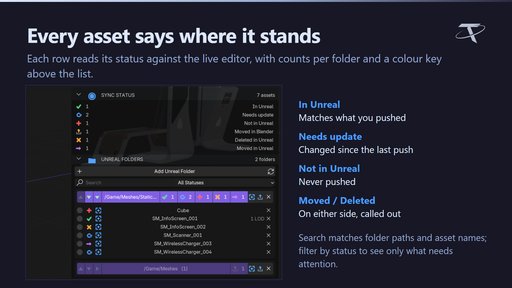
- Track asset status, including items moved or deleted on the Unreal side.
- Send associated collision and LOD data with the mesh.
- Configure the one-time Unreal setup from the bridge.
The original feature demonstrations below show the workflow in use. Unreal Collision Maker and Unreal LOD Maker integrate when installed, but are optional separate products, not included.
Requirements
Version 1.0.0. The uploaded package contains an extension manifest requiring Blender 4.2 or newer; this listing targets Blender 4.2–5.2. The source release advertises Unreal 5.2–5.8. A running, configured Unreal Editor and local project are required. Commands go to the local editor through localhost. Windows only. GPL-3.0-or-later.
Documentation and support
Full documentation · Tachyon Studio Discord
Created by Tachyon Studio.