
 Models
 Materials
 HDRIs
 Scenes
 Brushes
 Node Groups
 Printables
 Creators
 Creations
OneAtlas | One-Click Texture Atlas Automation
 add-on
Turn Multi-Material Chaos into One Clean Atlas
Texture atlas baking shouldn’t feel like solving a puzzle every time.
OneAtlas transforms complex Blender scenes into a single optimized mesh with a unified texture atlas — safely, automatically
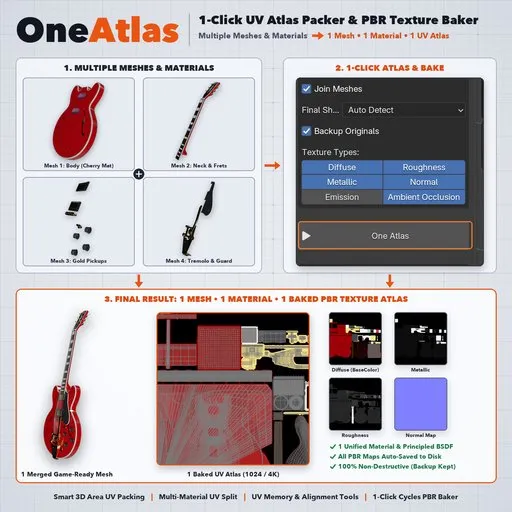
Turn Multiple Meshes & Materials into 1 Game-Ready Asset
Preparing multi-part, multi-material 3D assets for Game Engines, AR/VR, WebGL, or Mobile shouldn't take 30 minutes of manual UV unwrapping and shader node setup per model.
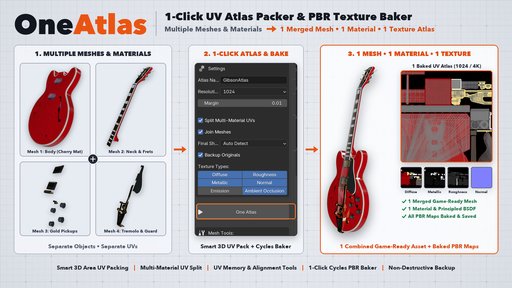
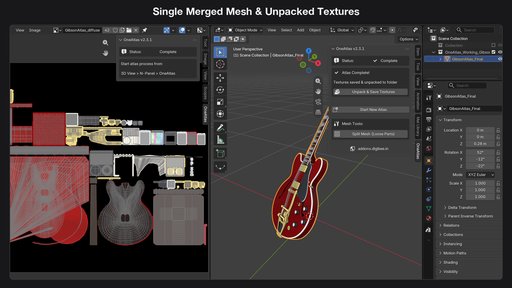
OneAtlas v2.3.1 automates the entire optimization pipeline in Blender — combining multiple separate meshes and materials into 1 Merged Mesh • 1 Unified Material • 1 Baked PBR Texture Atlas safely and non-destructively.
Select Meshes → Click One Atlas → Done.
What OneAtlas v2.3.1 Solves Automatically
Manual texture atlas workflows usually require:
- Creating new AtlasUV maps across dozens of separate objects
- Separating multi-material faces so their UVs don't overlap
- Scaling UV islands manually to match 3D texel density
- Wiring up image texture nodes inside every material slot
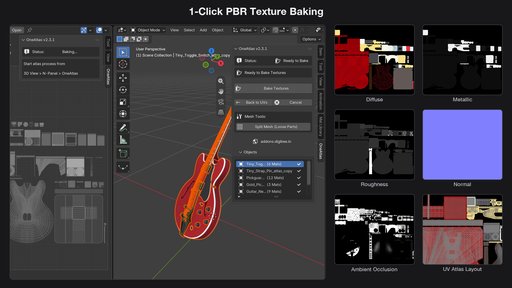
- Baking Diffuse, Roughness, Metallic, Normal, Emission, and AO one by one in Cycles
- Joining meshes and rebuilding a clean Principled BSDF material
OneAtlas handles all of this automatically on safe working copies while preserving your original untouched objects inside a hidden Atlas_Backup collection.
Core Features (v2.3.1)
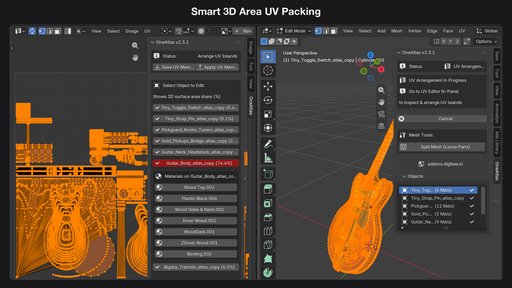
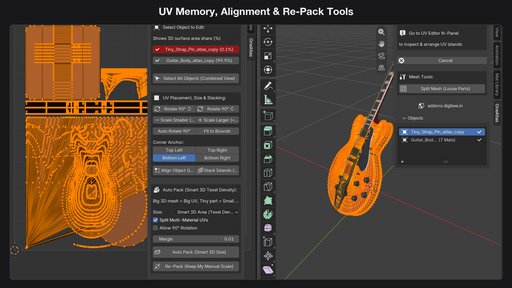
- Automatically calculates the real-world 3D surface area (% share) of every object and material zone.
- Large hero surfaces automatically receive proportional high-resolution UV space, while tiny bolts, pins, or switches get compact UV space so zero pixels are wasted.
- Supports both 1-Click Automated Mode and 2-Stage Interactive UV Mode (Create Atlas UVs → Edit → Bake Textures).
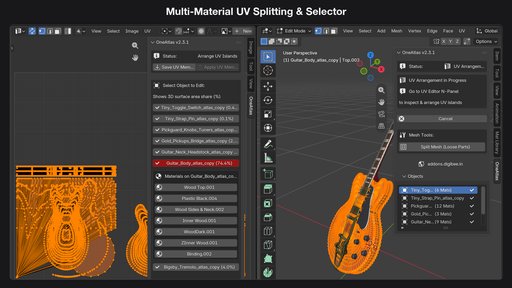
- Automatically detects objects with multiple material slots ([2Mats], [3Mats]) and packs each material zone into its own non-overlapping UV region.
- Interactive Material UV Selector: Click any material slot directly in the OneAtlas panel while in Edit Mode to isolate, move, or scale that material's UV islands independently.
- UV Memory (Save UVs / Restore UVs): Save a snapshot of your UV layout before experimenting and restore it in 1 click.
- UV Placement & Transform Tools: Rotate 90°, Auto Rotate 90°, Fit to Bounds, Corner Anchor (Top/Bottom Left/Right), Align Object, and Stack Islands.
- Smart Re-Pack: Re-pack while keeping your manual island scale or re-pack using Smart 3D Texel Density.
- Split Mesh (Loose Parts): Built-in mesh splitter with camera-ray backface visibility filtering to separate complex kitbashed models cleanly.
- Bakes Diffuse (Base Color), Roughness, Metallic, Normal, Emission, and Ambient Occlusion (AO) in one pass.
- Smart Shader Mode (Auto Detect): Automatically handles both standard Principled BSDF materials and unlit/emissive shaders.
- Auto-Unpack to Disk (//Unpacked_Textures/): Automatically exports all baked .png maps into an Unpacked_Textures/ folder right next to your .blend file.
Perfect For Game Dev, AR / VR & WebGL Pipelines
- Game Developers: Reduce multi-object props and environment assets to 1 Draw Call for Unreal Engine 5, Unity, and Godot.
- AR / VR / XR Developers: Create lightweight single-mesh, single-material assets for ARKit, ARCore, WebXR, Meta Quest, and Apple Vision Pro.
- WebGL & Mobile 3D: Export clean single-atlas glTF / GLB / FBX models for Three.js, PlayCanvas, and Babylon.js.
- 3D Marketplace & BlendKit Creators: Finalize multi-part models into clean, studio-grade single-material assets in seconds.
- Blender Compatibility: Blender 3.0 – 4.x – 5.x+ (Extension & Add-on compatible)
- Render Engines: Works with Cycles & EEVEE scenes (automatically uses Cycles for baking and restores your viewport afterward)
- Output Format: High-quality .png PBR maps automatically unpacked to //Unpacked_Textures/
- Workflow: 100% Non-Destructive (Atlas_Backup collection)
- Platforms: Windows, macOS (Intel & Apple Silicon), Linux


