Blendkit logo
  • Download Blendkit
  • Subscribe
  • Mission
  • Users
    • FAQ
    • Terms & conditions
      • Terms and Conditions
      • Privacy Policy
      • Refund Policy
    • Get Blender add-ons
    • Blendkit beyond Blender
      • Blendkit for Godot
      • Blendkit for Rhino
      • Blendkit for Maya
    • Add-on troubleshooting
    • Licenses
      • Lincenses info
      • Linceses FAQ
    • Service status
    • Cookies
      • Cookie Policy
      • Cookie settings
  • Creators
    • FAQ
    • Overview
    • Terms and Conditions for creators
    • General Uploading info
    • Upload Models
    • Upload Materials
    • Upload Brushes
    • Upload Add-ons
    • Guidelines for add-on creators
    • Upload Scenes
    • Upload HDRs
    • Upload Printables
    • Blender Tutorials
    • Validation Statuses
    • Fair Share Redistributions
    • Affiliate program
    • Most common upload issues
  • News
  • About
    • Our team
    • Contact
    • Press Kit
    • Blender 3D Training
    • Job positions
  • Models
  • Materials
  • HDRI
  • Scenes
  • Brushes
  • PrintablesNEW
  • Add-onsNEW
  • Log In
  • Register

BK BD 25

Blender 3D Modeling Blender Add-Ons

Free Plan

Get 71,290 free assets

Full Plan

Access the full library & enjoy 148,815 assets

Blender add-ons 15% off

Find free & paid Blender add-ons

Become creator

Share & sell your assets

Built by 3D artists, for 3D artists. Meet Blendkit →

All assets

Add-ons icon Add-ons

  • Models icon Models
    • Architecture
      • Building
        • Commercial Historic Private Sci-fi
        • Other building
        Door Exterior element
        • Bench Facade element Fence Fountain Playground Swimming pool Urban Environment
        • Other exterior element
        Floor Covering Molding / Carving Scenes Stairs Structure Wall Panel
        • 3D Panel Stone Panel Upholstery Panel Wood Panel
        • Other wall panel
        Window
      • Other architecture
      Character
      • Anatomy
        • Full Body Head Internal organ Limbs Skeleton
        • Other anatomy
        Animal
        • Bird Dinosaur Fish Insect Mammal Reptile
        • Other animal
        Clothing
        • Accessories Footwear Headwear Lingerie Man Clothing Woman Clothing
        • Other clothing
        Humanoids
        • Child Fantasy Hero/ Heroines Medical Men Military Police Sci-Fi Sports Women
        • Other humanoids
        Monster / Creature Robot
      • Other character
      Decoration
      • Bag / Suitcase Blanket Book Carpets Clock / Watch Curtain Decoration Set Fabrics Fireplace Food / Drinks
        • Beverage Food Fruit / Vegetable Kitchenware Sweets / Dessert Tableware set
        • Other food / drinks
        Holiday Decoration Mirror Money Picture Pillow Sculpture Textile Vase Miscellaneous
      • Other decoration
      Effects / Simulations
      • Modifier Motion design Simulations Technical
      • Other effects / simulations
      Industrial
      • Container Equipment Machinery Parts Sign Tools
        • Handtools Powertools
        • Other tools
      • Other industrial
      Interior
      • Armchair Bathroom furniture
        • Accessories Bathhub Faucet Furniture Set Laundry Shower Toilet / Bidet Towel rail Wash Basin
        • Other bathroom furniture
        Bed Cabinets
        • Bookcase Commode Shelving TV Cabinets
        • Other cabinets
        Chair
        • Bar Chair Regular Chair
        • Other chair
        Console Dressing Table Kids furniture
        • Bed Chair Furniture Set Miscellaneous Table Toy Wardrobe
        • Other kids furniture
        Kitchen Furniture
        • Faucet Kitchen Appliance Kitchen Set Sink Storage
        • Other kitchen furniture
        Lights
        • Ceiling Light Floor Lamp IES Light Industrial Light Outdoor Light Table Lamp Wall Light
        • Other lights
        Office Furniture
        • Chair Desk Stationery Storage Table
        • Other office furniture
        Outdoor Furniture Pouf Restaurant / Bar Seating Set
        • Chair-table Set Sofa-table Set
        • Other seating set
        Shopping / Retail Sideboard / Drawers Chest Sofa Table Wardrobe
      • Other interior
      Military
      • Aircraft Vehicles Watercraft Weapon / Armor
        • Historic Modern Sci-Fi
        • Other weapon / armor
      • Other military
      Nature
      • Atmosphere
        • Cloud Fog Smoke / Fire Wind Setup
        • Other atmosphere
        Grass Landscape
        • Environment Elements Terrain
        • Other landscape
        Plant
        • Bouquet Fitowall Indoor Outdoor
        • Other plant
        Tree
      • Other nature
      Science
      • Lab Equipment Medical Equipment Microbiology Miscellaneous Pharmacy
      • Other science
      Space
      • Miscellaneous Planet Satellite Spacecraft Station
      • Other space
      Sport / Hobby
      • Fishing Gym Hobby Accessories Miscellaneous Music
        • Accessories Instruments Stage Studio
        • Other music
        Sport
      • Other sport / hobby
      Technology
      • Audio Devices Computer
        • Components / Hardware Desktop Game Console Keyboard Laptop Monitor Mouse Peripheral
        • Other computer
        Device
        • Cellular Phone Corded Phone Smartphone Smart Watch Tablet
        • Other device
        Home Appliance Miscellaneous Photography Robotics Video devices
      • Other technology
      Transport
      • Aircraft
        • Accessories / Part Air Baloon Airplane Drone Glider Helicopter Historic Plane Private Jet Seaplane
        • Other aircraft
        Bicycle Car
        • Buggy Concept Historical Luxury / Supercar Modern Racing Sci-Fi
        • Other car
        Emergency
        • Ambulance Fire trucks Police
        • Other emergency
        Heavy Vehicle
        • Industrial Trailer Truck Van
        • Other heavy vehicle
        Motocycle
        • Historical Race Standard
        • Other motocycle
        Public Transport
        • Bus Taxi
        • Other public transport
        Railed vehicle
        • Cargo Passenger
        • Other railed vehicle
        Small Electric Vehicles Vehicle Parts Watercraft
        • Accessories / Part Boat Hovercraft Ship Submarine Yacht
        • Other watercraft
      • Other transport
    • Other models
  • Materials icon Materials
    • Animal Asphalt Bricks Ceramic Concrete Dirt Fabric
      • Blackout Chenille Dimout Embroidery Flat weave Jacquard Print Sheer Suede Texture Velvet Vinyl / Imitation leather
      • Other fabric
      Floor Food Fx Glass Grass Ground Human Ice Leather Liquid Marble Metal Organic Ornaments Paper Paving Plaster Plastic Rock Roofing Rubber Rust Sand Soil Stone Tech Tiles Wood
    • Other materials
  • HDRIs icon HDRIs
    • Indoor
      • Abstract Futuristic Environments Holiday Industrial Interiors Nighttime Environments Public Residential Rural Sports Studio
      • Other indoor
      Outdoor
      • Abstract Architectural Cityscapes Futuristic Environments Holiday Landscapes Nature Nighttime Environments Sports Urban Water Environments
      • Other outdoor
    • Other hdris
  • Scenes icon Scenes
    • Abstract Cartoon Exterior
      • Architectural Nature Post-apocalyptic Private Public Rural Urban
      • Other exterior
      Gaming Industrial Interior
      • Creative studios
        • Photography Studios TV Studios YouTube/Podcast Studios
        • Other creative studios
        Interior Isometric Private Public
      • Other interior
      Product visualization
      • Cloth viz Mockup Studio
      • Other product visualization
      Science Templates
      • Background Brush templates Magazine cover Typography Validation scenes
      • Other templates
      Thematic Scenes
      • Fantasy Historical Holiday Sci-fi Space Underwater
      • Other thematic scenes
    • Other scenes
  • Brushes icon Brushes
    • Anatomy
      • Animal / creature
        • Claws Face / head Feather Fins Fur Limbs Organs Scales Scars & wounds Skeleton Skin Spikes Tails & horns
        • Other animal / creature
        Human
        • Body Face Hair & nails Muscles Organs Scars & wounds Skeleton Skin
        • Other human
      • Other anatomy
      Art
      • Pattern Sculpture
      • Other art
      Clothing
      • Accessories Fabric Stitches
      • Other clothing
      Damage
      • Concrete Crack Cut Dirt Glass Metal Plaster Rust Wood
      • Other damage
      Geometric Industrial
      • Hard surface Sci-fi
      • Other industrial
      Misc Nature
      • Crater Fire Ice Landscape Organic Plant Rock Soil Stone Wood
      • Other nature
    • Other brushes
  • Node Groups icon Node Groups
    • Compositing Nodes Geometry Nodes
      • Curves
        • Curve Deformers Curve Optimizers Curve Shapes
        • Other curves
        Distribution
        • Arrays Distribution Transform Surface Distribution Volumetric Distribution
        • Other distribution
        Generators
        • Animations Curve Generators Measurements Mesh Generators Voxel Generators
        • Other generators
        Material
        • Colors
        Math
        • Functions Interpolations
        Selection
        • Falloffs
        • Other selection
        Simulation
        • Diffusions Particle Physics
        • Other simulation
        Tools
        • Edit / Object mode
        • Other tools
        Topology
        • Mesh Deformers Mesh Primitives Remeshers Tessellate Mesh
        • Other topology
        Utilities
        • Rotation Switches Text / String Tools UV Vector Fields Visualizers
        • Other utilities
      • Other geometry nodes
      Shading Nodes
      • Effects Procedural Textures
      • Other shading nodes
  • Printables icon Printables
    • Containers Fashion Games Holders Instruments Mechanics Misc Organics
    • Other printables
  • Add-ons icon Add-ons
    • 3D View Add Mesh Animation Development General Import - Export Material Mesh Modeling Node Object Paint Render Rigging Scene System Tools User Interface UV
  • Creators icon Creators
  • Creations icon Creations
YouTube Facebook Instagram GitHub TikTok BlueSky Mastodon
  • Trending  
  • Most bookmarked  
  • Highest asset score  
  • Highest complexity  
  • Highest quality  
  • Asset count  
  • Asset score sum
  • Newest
  • Most relevant
  • All
  • Free
  • Full
  • Paid
  • All assets
  • My bookmarked assets
  • All
  • 0 - 999
  • 1,000 - 9,999
  • 10,000 - 99,999
  • 100,000 - 999,999
  • 1,000,000 and more
  • All
  • Less than 256
  • 256
  • 512
  • 1K
  • 2K
  • 4K
  • 8K
  • 16K and more
  • All
  • Sculpt
  • Texture paint
  • All
  • Procedural
  • Texture based
  • All
  • Realistic
  • Non photorealistic
  • Other
  • All
  • Yes
  • No
  • All
  • Geometry nodes
  • All
  • Yes
  • No
  • All
  • Yes
  • No
  • All
  • No Sexualized Content
  • Sexualized Content
  • All
  • Yes
  • No
  • All
  • Windows
  • MacOS
  • Linux
  Bookmarks
The asset was added to your bookmarks.
Now you can filter it in Blendkit add-on.
  Bookmarks
The asset was removed from your bookmarks
  Bookmarks
Your rating could not be saved. Please try again.

Auto Quad Filler Pro – One-Click Quad Topology Transitions Between Uneven Edge Loops

add-on add-on

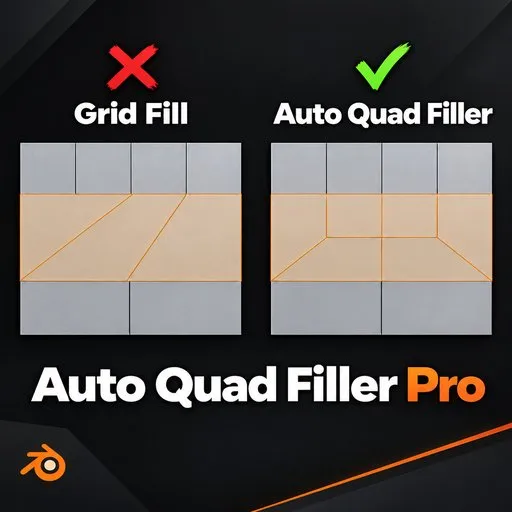
Auto Quad Filler Pro closes the gap between two edge loops with different edge counts using clean, all-quad topology instead of the long diagonal triangles you get from Grid Fill or manual bridging. Select two open edge chains

$7 $5.95
Share on Twitter Share on Facebook Share on Reddit Share link

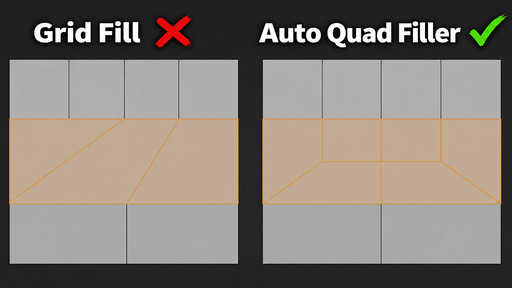
The problem: merging uneven edge loops always ends in bad topology

Every Blender modeler hits this wall. You have four edge loops on one side of a surface and only two on the other. Maybe it's a character's torso narrowing into an arm, a hard-surface panel stepping down, or two separately modeled parts that need to join. Blender's Grid Fill and manual Bridge Edge Loops can technically close that gap, but they do it with long diagonal edges cutting across the surface. Those diagonals turn into stretched triangles or n-gons the moment you subdivide, and they break your edge flow.

The usual fix is manual: place a pole, cut in extra edges by hand, merge vertices, clean up triangles, check the normals, and hope the flow still reads correctly after a Subdivision Surface modifier. On a simple panel that's a few minutes. Repeated across a whole character or hard-surface kit, it is hours of repetitive, error-prone work.

What Auto Quad Filler Pro actually does

Auto Quad Filler Pro is a Blender add-on that automates exactly this step. In Edit Mode, select two separate open edge chains with a different number of edges — for example a 4-edge loop and a 1-edge loop — and run the Fill operator. The add-on builds a proper quad-first topology transition between them, using the same reference-style pole patterns experienced topology artists use by hand: three or four quads feeding into one lower support face, instead of one giant fan of triangles.

It is not a general remesher and it does not touch the rest of your mesh. It only replaces the exact gap between your two selected chains. Your original boundary edges are never moved, split, or deleted — the add-on works on a temporary copy of the mesh and only commits the result if the entire transition passes validation.

How it fits your workflow

Select two open boundary edge chains in Edit Mode (the two loop ends you want connected).
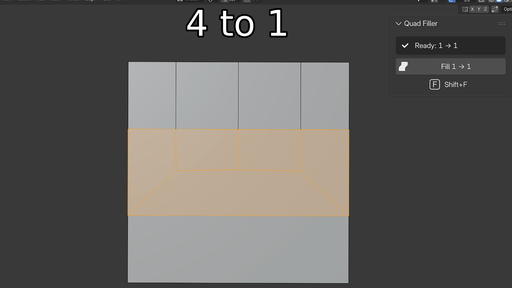
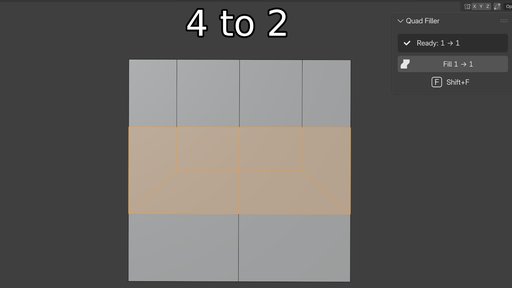
Check the N-panel: it reads your selection live and shows the exact ratio, e.g. "Ready: 4 → 1".
Press Shift+F, click Fill, or right-click and choose Quad Filler from the context menu.
The transition is generated, selected, and ready for further editing or a Subdivision Surface modifier.
If the two chains have different edge-count parity (an odd difference, like 5 → 2), the add-on adds a single supporting vertex on one side automatically so the result still closes as clean quads — you do not have to work out the parity fix yourself.

Built for predictable, subdivision-ready results

Every supported ratio has a known, fixed face breakdown, so you always know what you are getting:

4 → 1: 4 quads + 1 five-sided face
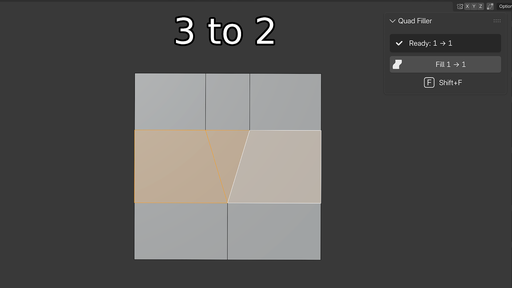
3 → 2: 2 quads + 1 triangle
3 → 1: 4 quads
2 → 1: 3 quads + 1 triangle
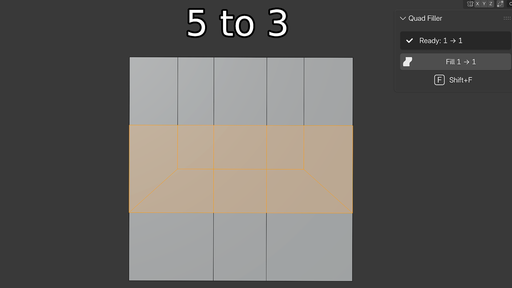
Larger and uneven ratios (5 → 3, 6 → 2, 4 → 2, and so on) are handled by the same strip-reduction logic, splitting the difference into individual two-strip reduction points along the loop instead of one wide fan.
Every generated patch is checked against its expected quad/triangle/n-gon count before it is written to your mesh. If a candidate does not validate, the add-on rejects it and leaves your mesh exactly as it was — you get a clear error message in the status bar instead of a broken result to clean up.

Options that respect your original geometry

Preserve Symmetry — on mirrored parts (like a symmetrical character or prop), the add-on favors placing the transition so both sides land in matching positions.
Relax Internal Vertices — smooths the newly created internal points for a nicer surface flow without ever moving your selected boundary vertices.
Debug Mode — highlights the generated transition faces with a dedicated debug material and writes the full candidate scoring breakdown to a text block, useful when you want to see exactly why a particular layout was chosen.
Who this is for

Character and creature modelers building clean, subdivision-ready quad topology for rigging and deformation.
Hard-surface and game asset artists closing loop-count mismatches on panels, greebles, and mechanical parts.
Retopology artists merging loop counts from different parts of a base mesh.
Anyone tired of manually placing poles and cleaning up Grid Fill triangles every time two edge loops do not match.
Why it beats the manual workflow

Grid Fill gives you a flat fan of diagonal edges across the whole gap — one operation, one topology shape, no options. Auto Quad Filler Pro instead builds the transition the way a topology-aware artist would place it by hand: quads on the outside, a controlled pole or small n-gon only where the math requires it, and a supporting horizontal edge that keeps the surface reading correctly under subdivision. What used to take manual edge cuts, vertex merges, and cleanup now takes one selection and one keypress — and it is undo-safe, because nothing is committed until the result passes validation.
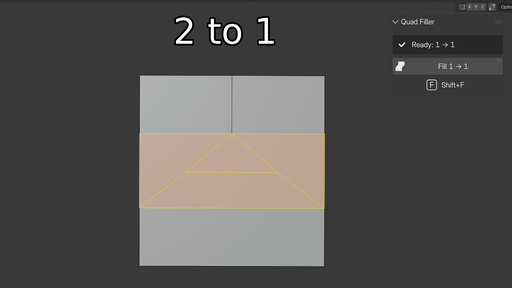
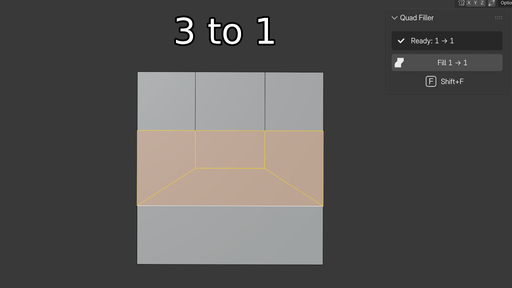
Image 1
Image 2
Image 3
Image 4
Image 5
Image 6
Image 7

Key Features (with benefits)

  • One-click quad transitions (Shift+F or Fill button) — turns a multi-minute manual topology fix into a single keypress, so you spend time modeling instead of patching edge flow.
  • Template-based reference topology (4→1, 3→2, 3→1, 2→1, and general reduction bands) — every transition follows a known, artist-style pole pattern instead of a random triangle fan, so your result looks intentional, not accidental.
  • Automatic parity handling — odd-count differences get a single side vertex added automatically, so you never have to work out the extra-edge fix by hand.
  • Live selection readout in the N-panel — shows "Ready: X → Y" before you even click, so you know exactly what transition will be built and catch selection mistakes early.
  • Validated, undo-safe commits — the add-on plans and checks the entire result on a working copy first; if anything fails validation, your original mesh is left untouched and you get a clear error message.
  • Preserve Symmetry option — keeps transitions mirrored correctly on symmetrical meshes, saving you from manually matching left/right topology.
  • Relax Internal Vertices option — smooths new interior points for better shading and subdivision behavior without moving your original boundary.
  • Debug Mode with visual highlighting — colors the transition faces and logs the full candidate comparison, so you can understand or troubleshoot exactly what was generated and why.
  • Right-click context menu and dedicated N-panel tab — fits directly into the Edit Mode workflow you already use, no extra menus to hunt for.
  • Non-destructive to your selection — your originally selected boundary edges are never split, merged, or moved by the operation.

Workflow Benefits

Cuts topology cleanup time from minutes to seconds on every loop-count mismatch you hit while modeling.
Keeps edge flow consistent across a model instead of leaving stretched triangles that show up as pinching or shading artifacts after a Subdivision Surface modifier.
Removes the guesswork of manual pole placement — the add-on already knows where the pole or n-gon should sit for each ratio.
Reduces retopology errors because every result is validated against an expected face count before it touches your mesh.
Speeds up iteration — since it is a normal Blender operator with full undo support, you can try a fill, undo, adjust your selection, and try again without any risk to your mesh.
Fits existing habits — works from a selection and a keyboard shortcut, so it slots into a normal box-modeling or retopology pass without changing how you already work.

Use Cases

  1. Character modeling: closing the loop-count gap where a torso, limb, or neck narrows and the surrounding loops don't line up 1-to-1.
  2. Hard-surface and mechanical modeling: merging panel sections, greebles, or plating where one side has more loop cuts than the other.
  3. Game asset creation: producing clean, subdivision- and normal-map-friendly quad topology for assets that need to bake or deform correctly.
  4. Retopology over a sculpt or scan: joining retopologized sections that were built at different edge densities.
  5. Prop and hard-surface kitbashing: connecting two separately modeled pieces whose edge loops don't naturally match.
  6. Teaching and topology reference: quickly generating textbook examples of 4-to-1, 3-to-2, 3-to-1, and 2-to-1 pole transitions for study or demonstration.
By

Author avatar Junaid Alam

File size

6.0 MiB

Version

1.0.6

Platforms

windows-x64, macos-arm64, linux-x64, macos-x64, windows-arm64

Minimal required Blender version

4.0.0

Body_Sculptor
Free

add-on Body_Sculptor

28
Quad Bridge
Free

add-on Quad Bridge

26
Tmeasure v1.1.3
Free

add-on Tmeasure v1.1.3

22
Measure and Scale
Free

add-on Measure and Scale

19
Booleanbite: 1-Click Procedural Edge Damage For Blender

add-on Booleanbite: 1-Click Procedural Edge Damage For Blender

16
Subdivide Selected
Free

add-on Subdivide Selected

16
LINEUP Community
Free

add-on LINEUP Community

14
B.slicer

add-on B.slicer

11
Fusion: Extension For Blender

add-on Fusion: Extension For Blender

11
Easy Footprints

add-on Easy Footprints

8
Better Bend - Geometry Nodes Bend Modifier with Intuitive Controls

add-on Better Bend - Geometry Nodes Bend Modifier with Intuitive Controls

7
Profiler 2.0  -  Advanced curve beveling tool

add-on Profiler 2.0 - Advanced curve beveling tool

7
"Cracks" Damage addon 💥Windows, Linux, Mac approved

add-on "Cracks" Damage addon 💥Windows, Linux, Mac approved

6
HUD & UI Elements

add-on HUD & UI Elements

6
Wrap For Blender - Automatic Retopology Of Any Model

add-on Wrap For Blender - Automatic Retopology Of Any Model

6
Final Topology for Artists
Full Plan

add-on Final Topology for Artists

6
Card/Keychain w/ Custom Design and QR Generation and opt. NFC Cavity for 3D Printing
Free

add-on Card/Keychain w/ Custom Design and QR Generation and opt. NFC Cavity for 3D Printing

5
World Space Texture Mapping

add-on World Space Texture Mapping

5
Image Trace 3D

add-on Image Trace 3D

5
LINEUP Pro

add-on LINEUP Pro

5
Profiler
Full Plan

add-on Profiler

4
ArchiForm

add-on ArchiForm

4
FSX3D Blueprint Tool

add-on FSX3D Blueprint Tool

4
Vacuum Wrap

add-on Vacuum Wrap

4

  • «
  • 1
  • 2
  • 3
  • …
  • 18
  • 19
  • 20
  • »
Added To Cart
To complete your purchase or update it, please go to cart. If you want to find more awesome add-ons, continue to explore.
Go to Cart
Already Purchased
You already purchased this item. It is impossible to buy it again. Continue to explore and enjoy :-)
My Orders