
 Materials
 HDRIs
HDRIs
 Scenes
 Brushes
 Node Groups
 Printables
 Add-ons
 Creators
 Creations
 model
model
Aerodynamics Visualization
Get this modelDocumentation for every setting is included inside the Geometry Nodes setup. Open the node tree and you'll find it in the README documentation frame.
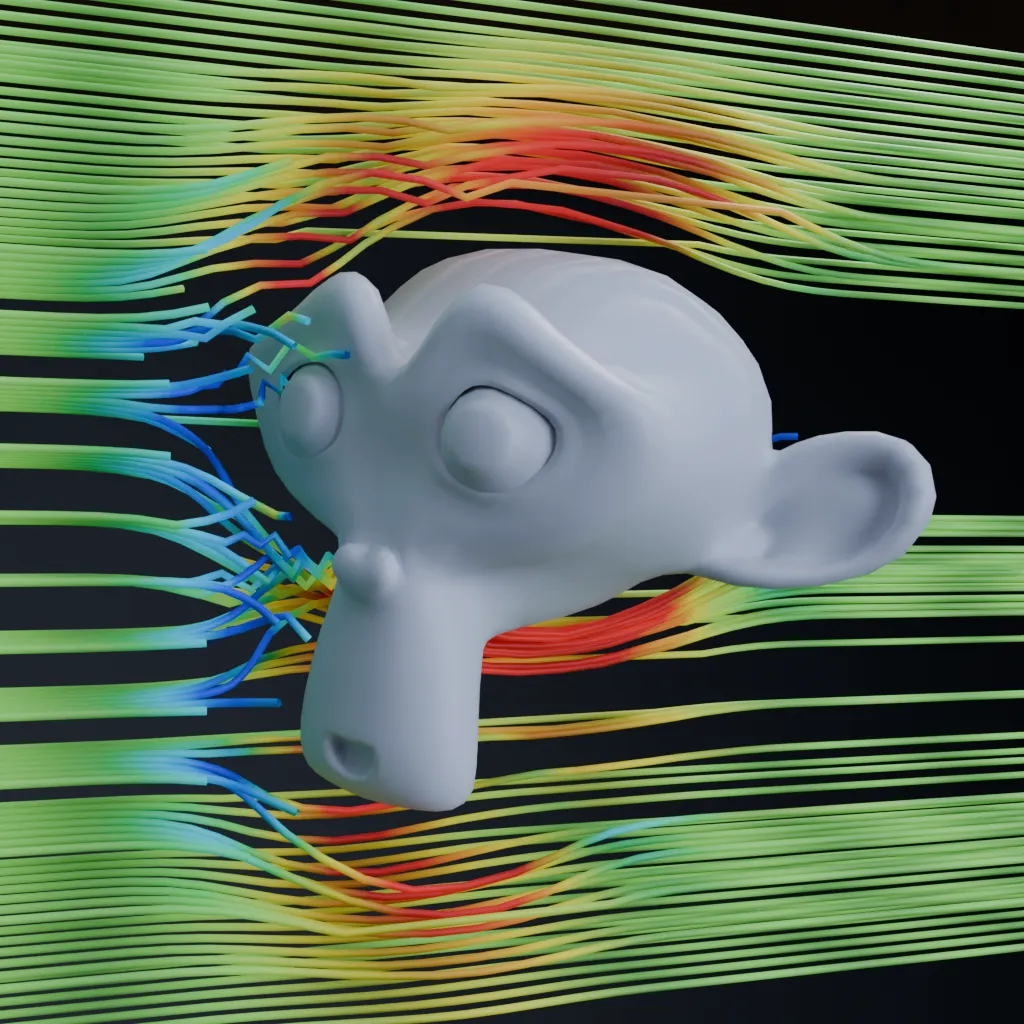
A live procedural airflow visualization built with Geometry Nodes. Select any mesh as the target and the system generates streamlines moving along its local positive X direction, with live updates whenever the target is moved, rotated, or scaled. The included FlowSpeed material colors each streamline by normalized velocity, transitioning from blue at slow or stagnant regions through green at freestream speed to red where the flow accelerates. Animated pulses and a progressive reveal make the airflow direction easy to read during playback.
Perfect for aerodynamic demonstrations, vehicle concepts, product visualization, educational diagrams, and stylized wind-tunnel shots. Adjust flow speed, influence radius, streamline resolution, emission dimensions, integration accuracy, surface clearance, line thickness, and display slicing from the modifier panel. The system visualizes stagnation, surface deflection, and potential-flow-style acceleration while keeping streamlines outside the target geometry. Use the world-space slicing controls to isolate cross-sections or inspect interior flow patterns. This is an artistic potential-flow approximation rather than a full CFD simulation, so it does not model viscosity, turbulence, flow separation, or recirculating wake vortices.


