
 Add-ons
 Models
 Materials
 HDRIs
 Scenes
 Brushes
 Node Groups
 Printables
 Creators
 Creations
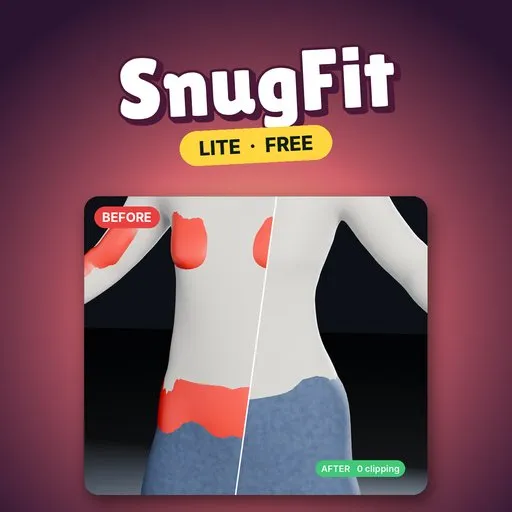
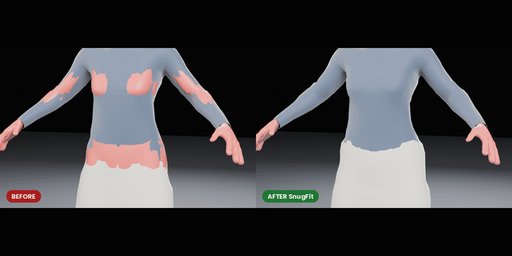
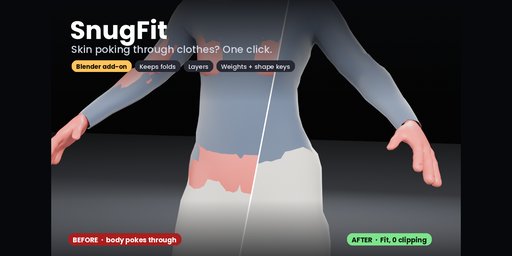
SnugFit Lite is a free Blender add-on that fixes skin poking through clothes. Select the outfit, select the body, click Fit: anything inside the body is pushed out to a small gap, and the folds of the cloth are kept.
EVERYTHING IN LITE- Fit: anything inside the body is pushed out to a small gap (2 mm default) and the push fades over the cloth around it, so folds move instead of getting ironed flat
- Saved as a shape key named SnugFit, so you can dial the fix back
- Two-way check: catches body detail poking out between the vertices of a low-poly outfit, which Shrinkwrap misses
- Clip Check: scrubs the animation and reports the worst poke-through in mm and its frame
- Quick Start: one click adds a torso and a shirt that pokes through it, ready to fit
- Install: Edit › Preferences › Get Extensions › Install from Disk, and pick the zip.
- Press N in the 3D viewport and open the SnugFit tab. Click Add Demo, then Fit.
- On your own scene: select the outfit, shift-select the body, press Fit.
- Raise Falloff if a push leaves a dent in the cloth; lower it to keep the change local.
- Mark vertices that must not move (waistbands, collars) in a vertex group named SnugFit_Pin.
- Demo shirt: 1,002 vertices too deep and 310 body points poking through → 0 and 0, in 0.1 s
- Blender 4.2 LTS to 5.2; Windows and Linux tested, macOS not tested
- One outfit per Fit; fitting is done in the rest pose
Lite stays free. The full SnugFit is a separate paid add-on; search SnugFit under Add-ons here on Blendkit.
- Layers: tights + skirt + jacket fitted together, inside-out
- Fit to This Body: move an outfit made for one body onto another
- Transfer Weights and Transfer Shape Keys from the body
- Hide Body Under Outfit: masks the covered skin
Remove Lite before installing the full version.
By


