Models
 Materials
 HDRIs
 Scenes
 Brushes
 Node Groups
 Printables
 Creators
 Creations
RizomUV Bridge
 add-on
Send meshes to RizomUV, unwrap and pack, then return UVs without replacing mesh geometry. Includes recipes, texel density, UDIM controls and save sync. Windows only; RizomUV licensed separately.
Send. Unwrap. Return your UVs.
Send meshes to RizomUV, unwrap and pack, then return UVs to Blender. Reuse a running instance, select an installed version and sync on save without manual file handling. UV returns update UVs, not mesh geometry.
Windows only. Requires a separate RizomUV license from Rizom-Lab. This is the Blender-side bridge; no RizomUV software or license is included. Tachyon Studio is independent of Rizom-Lab.
Tools included
- Unwrap and pack: Manual, Unwrap, Pack or Custom Lua modes, plus Game, Hero and Trim presets.
- Unwrap rules: assign recipes by collection, name, material or triangle count and share rules as JSON.
- Smart seams: auto-cut or use Blender seams, then return island cuts as seams.
- Packing: padding, rotation, stacking and UDIM tiles by count, material or collection.
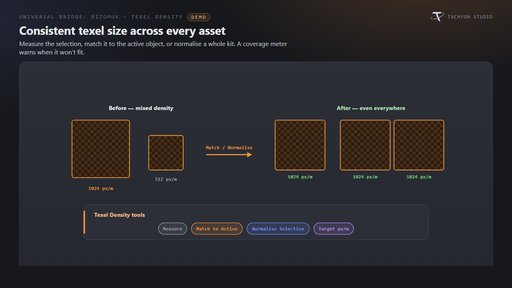
- Texel density: measure, match or normalize, with coverage warnings and suggested targets.
- Live sync and watch folders: synchronize on RizomUV save; watch for OBJ files and optional RZT projects.
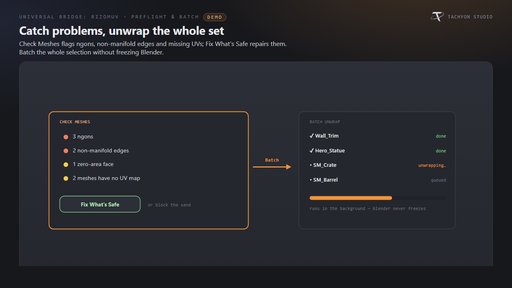
- Preflight and batch: inspect mesh issues, choose safe fixes, batch unwrap and identify assets needing another pass.
- Return options: name/topology matching, UV channels, checker preview, Flip V and a UV minimap.
Requirements and setup
This download is the Blender 4.2–5.2 extension. The separate classic Blender 3.3–4.1 installer is not included. Windows only; macOS and Linux are unsupported. Auto-detect RizomUV or choose its executable. To send into an already-running instance, set RizomUV’s Remote-Control path as described in the documentation. The bridge uses local file exchange. Works independently; Universal Bridge Manager is included.
Documentation and support
Installation and workflow documentation · Tachyon Studio Discord support
Created by Tachyon Studio.