
 Models
 Materials
 HDRIs
 Scenes
 Brushes
 Node Groups
 Printables
 Creators
 Creations
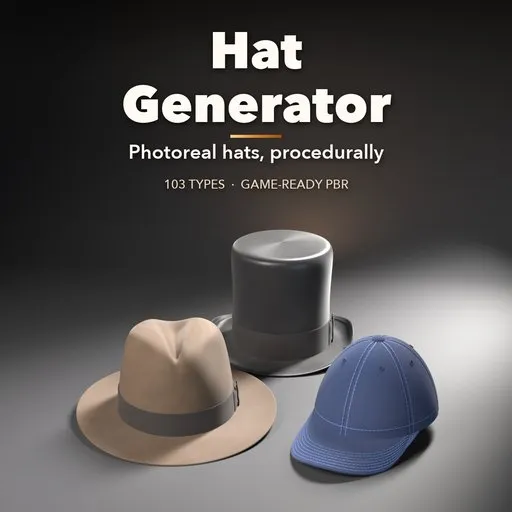
Hat Generator
 add-on
Photoreal procedural hats: 128 types from caps, beanies and berets to fedoras, top hats and cultural headwear, every part adjustable, real fabric PBR materials and three detail levels.
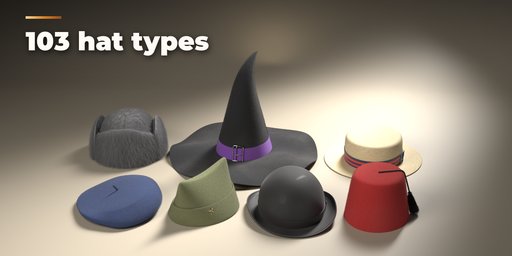
Hat Generator builds photorealistic hats inside Blender, from everyday caps to historical and cultural headwear: baseball, trucker, dad and cycling caps, newsboys and flat caps, beanies, chullos, berets and bucket hats, fedoras, trilbies, Tyroleans, homburgs, pork pies, bowlers, top hats and cowboy hats, Panamas, boaters, sun hats and sombreros, Bretons, a whole military family (peaked, crusher and Soviet furazhka caps, kepis and the Legion's kepi blanc, Civil War forage caps and Hardee hats, shakos, busbies, lancer czapkas, rogatywkas, eight-point covers, German, desert, Chinese and Japanese field caps, garrison caps and pilotkas, the Ottoman kabalak, budenovkas, Balmoral bonnets, caubeens, cap comforters, campaign, slouch, Gurkha and jungle hats, and M1, Brodie and Stahlhelm steel helmets), sou'westers, hard hats, chef toques and mortarboards, trappers and ushankas, witch, wizard, tricorn and bicorne hats, fezzes, turbans, kufis, kippahs, pillboxes, Gandhi caps, glengarries, šajkačas, karakuls, birettas, mitres, monteras, coonskin caps, Sami four-winds hats, Ottoman börks, Chinese court hats with wings, fringed liangmao, veiled weimao, see-through horsehair gats and jeongjagwan, keffiyehs with agal cords, Javanese blangkons, Malay tengkoloks, Burmese gaung paungs, woven basket hoods, umbrella hats, half hats, fascinators, Victorian tilt hats, poke bonnets and whoopee caps. Pick one of 126 types, then change anything: every part is a number, a choice or a switch, and the hat rebuilds live as you drag.
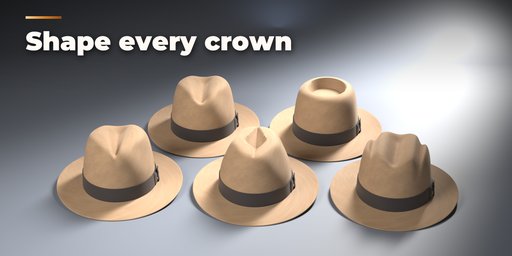
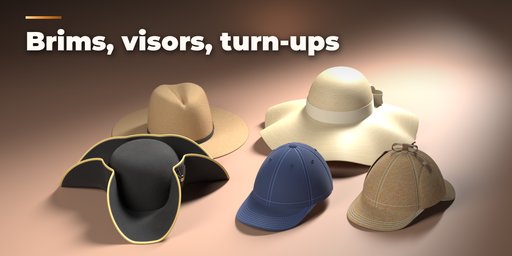
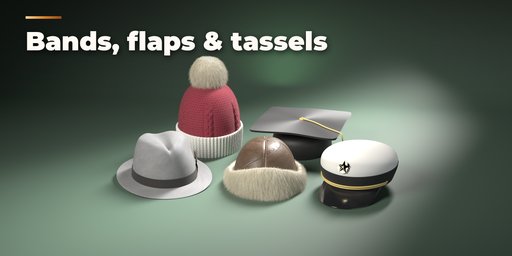
The crown is a dome, a tapered felt crown, a cylinder, a cone, a puffed beret or an open band, sewn from panels with seams, eyelets and a top button, or knitted with ribs. Dent it with a center dent, teardrop, diamond, telescope, cattleman or C-crown crease and pinch the front. Give it a brim all around with snap, curl, droop, waves and an edge binding, turn it up all around, as a tricorn or bicorne, on one side, at the front or at the back, or give it a curved or flat visor, or one at the front and the back. Embroider the brim with a scrolling vine or a diamond lattice in gold or silk thread. Dress it with a ribbon, leather, cord, pleated or wide band, a flat bow, tied bow or buckle, feathers, a cockade, a badge or a flower, a cuff, ear flaps, a chin strap or visor cord, a snapback or strap closure, a pompom, a tassel or a cord fringe, a patch, a mortarboard, a raccoon tail, side wings or a sheer veil.
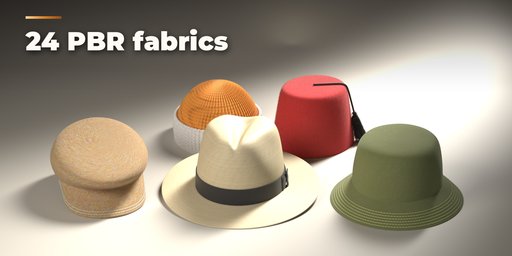
Every surface is a PBR Principled material usable in any game engine, made from real scans and true-scale woven textures: fur and wool felt, straw braid and fine Panama straw, cotton twill, canvas, poplin, denim, corduroy, tweed, linen, velvet, chunky knit, heather jersey, fleece, leather, suede, silk satin, faux fur, jute, hard plastic and patent leather, with brass, gold, silver, nickel, gunmetal, copper or black metal parts. Three detail levels go from game-ready to close-up renders.
Features
- 126 hat types in eight families: caps, knit and soft hats, classic felt, summer and straw, uniform and work, military, winter, costume and culture
- 6 crown shapes, 8 creases, folded boat crowns and mitres, square, octagonal and star-pointed tops, raised rear tiers, half-hat crescents, top piping, panels, seams, eyelets, button and knit ribs
- Brims all around, visors, front and back peaks, 6 turn-up shapes, waves, zigzag points and binding
- Bands, bows, buckles, feathers, cockades, badges, flowers, pompoms and tassels
- Cuffs, ear flaps, neck curtains, birdcage and curtain veils, headscarves, gauze court-hat wings, chin straps and bead strings, cap closures, patches and mortarboards
- Scale shrinks any hat into a fascinator or tilt hat worn on the side of the head, with a birdcage net over the face, or grows it into a hood over the head with eye slits
- 24 fabrics, including see-through horsehair, with full color control for crown, brim, band, trim, lining and sweatband
- Real fur strands on fur hats, cuffs, tails and pompoms, and a soft fuzz of stray fibres on wool felt, knits, fleece and tweed in renders
- Gold or silk thread embroidery around the brim: a scrolling vine or a diamond lattice
- Topstitching on visors, brims and seams, with contrast thread
- Surprise, Vary and Random Finish buttons for endless new hats
- Any head size and head shape
- Photo Studio adds a backdrop, lights and a camera in one click
- Picture-driven sidebar with six tabs, Shift+A menu and Convert to Mesh
- Game-ready PBR materials, works in Cycles and EEVEE
Requires Blender 4.2 or newer. Tested on Blender 4.2, 4.5 and 5.2 LTS.
How to use
Installation
In Blender open Edit, Preferences, Get Extensions, then use Install from Disk and pick the hat_generator zip.
Usage
- Open the Hat tab in the 3D viewport sidebar (N). With no hat selected, click the picture to choose one of the 126 hat types, or browse the seven families, and add it at the 3D cursor. You can also use Shift+A, Mesh, Hat.
- The card at the top shows the type, its size in cm and its face count. Surprise makes a new random hat, Vary changes the current one a little, the palette button picks a random finish and the arrow resets the type.
- The icon tabs hold every setting: Crown (shape, panels, seams, crease, pinch, top points, tilt, mini hat or hood), Brim (brim, visor, turn-up, waves, edge and stitching), Band & Trim (band, bow, cuff, ear flaps, chin strap, sweatband, closure), Extras (decoration, pompom, tassel, veil or scarf, wings, patch, mortarboard), Materials (fabrics, colors, wear, metal, stitching) and Output (hat size and head shape, detail, parts, Photo Studio, Convert to Mesh, Delete).
- Every picture choice opens a gallery: click the picture next to a setting to see all its options.
Low detail is game-ready; High detail is for close-up renders. Photo Studio adds a seamless backdrop, softboxes and a camera ready to render.
FAQ
Which Blender versions are supported?
Blender 4.2 and newer. It is tested on Blender 4.2, 4.5 and 5.2 LTS.
Are the materials usable in game engines?
Yes. Every material is a single Principled BSDF with image textures (color, roughness, normal), so it bakes and exports cleanly. Low detail keeps the face count modest.
Can I fit a hat to my character?
Yes. Set the hat size (head circumference) and head shape in the Output tab, then move, rotate and scale the hat's root empty onto the head.
Can I edit the result as a normal mesh?
Yes. Convert to Mesh in the Output tab turns the hat into plain mesh objects, ready to edit, rig or export.


