
 Models
 Materials
 HDRIs
 Scenes
 Brushes
 Node Groups
 Printables
 Creators
 Creations
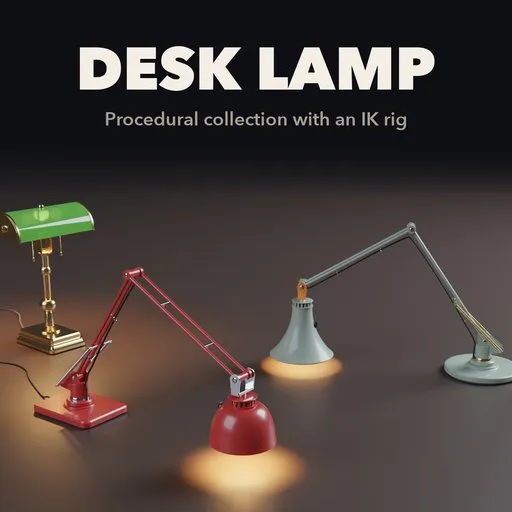
Procedural Desk Lamp Collection
 add-on
Desk lamp generator with an IK rig: balanced-arm, architect clamp, industrial, LED, gooseneck and banker's lamps. Grab the head and the arms follow. Shades, bases, finishes, wear and real lights.
Explore all my Blender addons
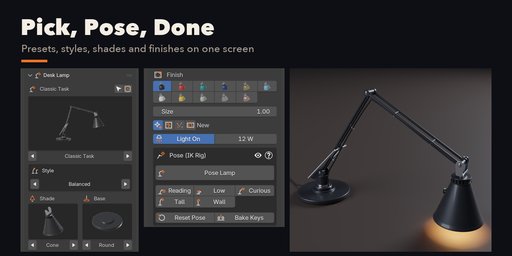
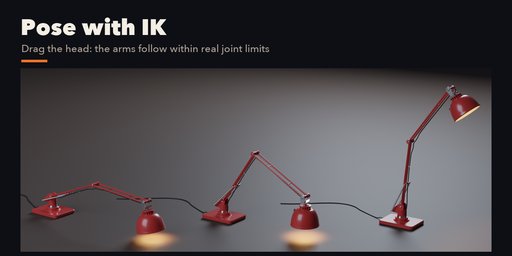
Procedural Desk Lamp Collection builds realistic desk lamps in one click and rigs every one of them with IK. Grab the head, and the arms reach for it, bending only where a real lamp bends and only as far as its joints allow. Rotate the head to aim the shade, and the light follows.
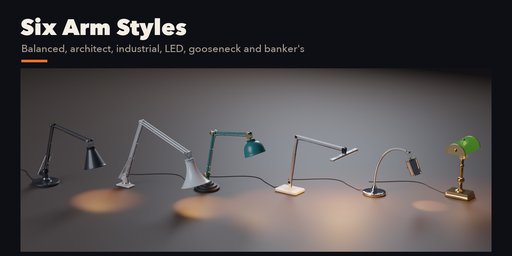
Six lamp families
- Spring balanced-arm task lamps with coil springs that stretch as the arm leans out
- Architect swing-arm lamps with long twin rods, clamped to the desk edge
- Industrial task lamps with knob friction joints and enamel domes on cast iron bases
- Modern LED lamps with slim aluminium arms and a flat LED bar
- Gooseneck lamps whose flexible neck bends smoothly along its length
- Banker's lamps with a brass stem, green cased glass shade and pull chain
Built to animate
Every lamp comes with an armature: a Head control (IK target and aim), a Root control on the desk, hidden deform bones and locked, limited joints that match real travel. One-click poses (Reading, Tall, Low, Wall Wash, Curious), Reset Pose and Bake to Keyframes for FBX, glTF and game engines. Rebuilding the lamp keeps its pose and animation.
Looks
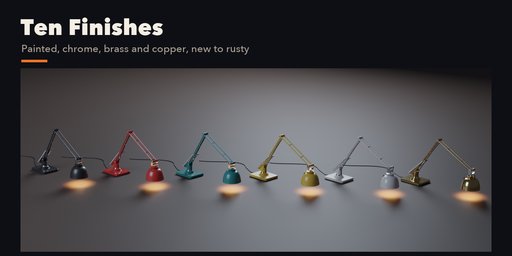
Cone, dome, bell, cylinder, LED bar and banker's glass shades. Round, square, stepped iron, clamp and plinth bases. Ten paint and metal finishes plus custom colour, chrome, brass or black hardware, and New, Used, Old/Dirty and Rusty conditions. A real light sits in every shade, with Edison, globe or LED bulbs and a colour temperature slider.
Every part is UV-mapped with Principled PBR materials and skinned to the rig, so a lamp exports as a plain skinned mesh. Surprise Me makes a random, plausible lamp, or re-rolls the selected one in place.
Requires Blender 4.2 or newer. Tested on Blender 4.2, 4.5 and 5.2 LTS.
How to use
Installation
In Blender open Edit, Preferences, Get Extensions, then use Install from Disk and pick the desk_lamp_generator zip.
Usage
- Open the Desk Lamp tab in the 3D viewport sidebar (N). With nothing selected, click the picture to browse the designs and press Add Desk Lamp, or Surprise Me for a random one. The lamp appears at the 3D cursor.
- With the lamp selected, pick the style, shade, base and finish from the pictures, set the size and the condition, and switch the light on or off. Arm & Head holds the arm lengths, rest angles, springs, cable, hardware and detail; Light holds the bulb, power and colour temperature.
- Pose (IK Rig): press Pose Lamp to enter Pose Mode with the Head control selected. G moves the head and the arms follow; R aims the shade. The ring on the desk (Root) moves and turns the whole lamp. Use the pose buttons for ready-made poses and Reset Pose to go back. Key the Head and Root controls (I) to animate.
- Export: Bake Keys writes the rig's motion as plain keyframes on the deform bones for FBX, glTF and game engines. Convert to Mesh applies the pose and keeps plain meshes.
All sizes are in meters. The root empty sits on the desk under the base, and the arm reaches along +X.
FAQ
Which Blender versions are supported?
Blender 4.2 and newer. It is tested on Blender 4.2, 4.5 and 5.2 LTS.
How does the IK rig work?
Every lamp has an armature. Move the Head control and the lamp's swivel, lower arm and upper arm rotate to reach it, each only about its real hinge and within real joint limits; the gooseneck bends along its whole neck. Rotating the Head aims the shade, and the light object follows.
Can I use the lamps in a game engine?
Yes. Each part is a UV-mapped mesh skinned to the deform bones with Principled BSDF materials. Bake Keys turns IK animation into plain keyframes, then export to FBX or glTF. Pick the Low detail level for real-time use.


