Blendkit logo
  • Download Blendkit
  • Subscribe
  • Mission
  • Users
    • FAQ
    • Terms & conditions
      • Terms and Conditions
      • Privacy Policy
      • Refund Policy
    • Get Blender add-ons
    • Blendkit beyond Blender
      • Blendkit for Godot
      • Blendkit for Rhino
      • Blendkit for Maya
    • Add-on troubleshooting
    • Licenses
      • Lincenses info
      • Linceses FAQ
    • Service status
    • Cookies
      • Cookie Policy
      • Cookie settings
  • Creators
    • FAQ
    • Overview
    • Terms and Conditions for creators
    • General Uploading info
    • Upload Models
    • Upload Materials
    • Upload Brushes
    • Upload Add-ons
    • Guidelines for add-on creators
    • Upload Scenes
    • Upload HDRs
    • Upload Printables
    • Blender Tutorials
    • Validation Statuses
    • Fair Share Redistributions
    • Affiliate program
    • Most common upload issues
  • News
  • About
    • Our team
    • Contact
    • Press Kit
    • Blender 3D Training
    • Job positions
  • Models
  • Materials
  • HDRI
  • Scenes
  • Brushes
  • PrintablesNEW
  • Add-onsNEW
  • Log In
  • Register

BK BD 25

Blender 3D Import - Export Add-Ons

Free Plan

Get 71,820 free assets

Full Plan 20% off

Access the full library & enjoy 149,880 assets

Blender add-ons 20% off

Find free & paid Blender add-ons

Become creator

Share & sell your assets

Built by 3D artists, for 3D artists. Meet Blendkit →

All assets

Add-ons icon Add-ons

  • Models icon Models
    • Architecture
      • Building
        • Commercial Historic Private Sci-fi
        • Other building
        Door Exterior element
        • Bench Facade element Fence Fountain Playground Swimming pool Urban Environment
        • Other exterior element
        Floor Covering Molding / Carving Scenes Stairs Structure Wall Panel
        • 3D Panel Stone Panel Upholstery Panel Wood Panel
        • Other wall panel
        Window
      • Other architecture
      Character
      • Anatomy
        • Full Body Head Internal organ Limbs Skeleton
        • Other anatomy
        Animal
        • Bird Dinosaur Fish Insect Mammal Reptile
        • Other animal
        Clothing
        • Accessories Footwear Headwear Lingerie Man Clothing Woman Clothing
        • Other clothing
        Humanoids
        • Child Fantasy Hero/ Heroines Medical Men Military Police Sci-Fi Sports Women
        • Other humanoids
        Monster / Creature Robot
      • Other character
      Decoration
      • Bag / Suitcase Blanket Book Carpets Clock / Watch Curtain Decoration Set Fabrics Fireplace Food / Drinks
        • Beverage Food Fruit / Vegetable Kitchenware Sweets / Dessert Tableware set
        • Other food / drinks
        Holiday Decoration Mirror Money Picture Pillow Sculpture Textile Vase Miscellaneous
      • Other decoration
      Effects / Simulations
      • Modifier Motion design Simulations Technical
      • Other effects / simulations
      Industrial
      • Container Equipment Machinery Parts Sign Tools
        • Handtools Powertools
        • Other tools
      • Other industrial
      Interior
      • Armchair Bathroom furniture
        • Accessories Bathhub Faucet Furniture Set Laundry Shower Toilet / Bidet Towel rail Wash Basin
        • Other bathroom furniture
        Bed Cabinets
        • Bookcase Commode Shelving TV Cabinets
        • Other cabinets
        Chair
        • Bar Chair Regular Chair
        • Other chair
        Console Dressing Table Kids furniture
        • Bed Chair Furniture Set Miscellaneous Table Toy Wardrobe
        • Other kids furniture
        Kitchen Furniture
        • Faucet Kitchen Appliance Kitchen Set Sink Storage
        • Other kitchen furniture
        Lights
        • Ceiling Light Floor Lamp IES Light Industrial Light Outdoor Light Table Lamp Wall Light
        • Other lights
        Office Furniture
        • Chair Desk Stationery Storage Table
        • Other office furniture
        Outdoor Furniture Pouf Restaurant / Bar Seating Set
        • Chair-table Set Sofa-table Set
        • Other seating set
        Shopping / Retail Sideboard / Drawers Chest Sofa Table Wardrobe
      • Other interior
      Military
      • Aircraft Vehicles Watercraft Weapon / Armor
        • Historic Modern Sci-Fi
        • Other weapon / armor
      • Other military
      Nature
      • Atmosphere
        • Cloud Fog Smoke / Fire Wind Setup
        • Other atmosphere
        Grass Landscape
        • Environment Elements Terrain
        • Other landscape
        Plant
        • Bouquet Fitowall Indoor Outdoor
        • Other plant
        Tree
      • Other nature
      Science
      • Lab Equipment Medical Equipment Microbiology Miscellaneous Pharmacy
      • Other science
      Space
      • Miscellaneous Planet Satellite Spacecraft Station
      • Other space
      Sport / Hobby
      • Fishing Gym Hobby Accessories Miscellaneous Music
        • Accessories Instruments Stage Studio
        • Other music
        Sport
      • Other sport / hobby
      Technology
      • Audio Devices Computer
        • Components / Hardware Desktop Game Console Keyboard Laptop Monitor Mouse Peripheral
        • Other computer
        Device
        • Cellular Phone Corded Phone Smartphone Smart Watch Tablet
        • Other device
        Home Appliance Miscellaneous Photography Robotics Video devices
      • Other technology
      Transport
      • Aircraft
        • Accessories / Part Air Baloon Airplane Drone Glider Helicopter Historic Plane Private Jet Seaplane
        • Other aircraft
        Bicycle Car
        • Buggy Concept Historical Luxury / Supercar Modern Racing Sci-Fi
        • Other car
        Emergency
        • Ambulance Fire trucks Police
        • Other emergency
        Heavy Vehicle
        • Industrial Trailer Truck Van
        • Other heavy vehicle
        Motocycle
        • Historical Race Standard
        • Other motocycle
        Public Transport
        • Bus Taxi
        • Other public transport
        Railed vehicle
        • Cargo Passenger
        • Other railed vehicle
        Small Electric Vehicles Vehicle Parts Watercraft
        • Accessories / Part Boat Hovercraft Ship Submarine Yacht
        • Other watercraft
      • Other transport
    • Other models
  • Materials icon Materials
    • Animal Asphalt Bricks Ceramic Concrete Dirt Fabric
      • Blackout Chenille Dimout Embroidery Flat weave Jacquard Print Sheer Suede Texture Velvet Vinyl / Imitation leather
      • Other fabric
      Floor Food Fx Glass Grass Ground Human Ice Leather Liquid Marble Metal Organic Ornaments Paper Paving Plaster Plastic Rock Roofing Rubber Rust Sand Soil Stone Tech Tiles Wood
    • Other materials
  • HDRIs icon HDRIs
    • Indoor
      • Abstract Futuristic Environments Holiday Industrial Interiors Nighttime Environments Public Residential Rural Sports Studio
      • Other indoor
      Outdoor
      • Abstract Architectural Cityscapes Futuristic Environments Holiday Landscapes Nature Nighttime Environments Sports Urban Water Environments
      • Other outdoor
    • Other hdris
  • Scenes icon Scenes
    • Abstract Cartoon Exterior
      • Architectural Nature Post-apocalyptic Private Public Rural Urban
      • Other exterior
      Gaming Industrial Interior
      • Creative studios
        • Photography Studios TV Studios YouTube/Podcast Studios
        • Other creative studios
        Interior Isometric Private Public
      • Other interior
      Product visualization
      • Cloth viz Mockup Studio
      • Other product visualization
      Science Templates
      • Background Brush templates Magazine cover Typography Validation scenes
      • Other templates
      Thematic Scenes
      • Fantasy Historical Holiday Sci-fi Space Underwater
      • Other thematic scenes
    • Other scenes
  • Brushes icon Brushes
    • Anatomy
      • Animal / creature
        • Claws Face / head Feather Fins Fur Limbs Organs Scales Scars & wounds Skeleton Skin Spikes Tails & horns
        • Other animal / creature
        Human
        • Body Face Hair & nails Muscles Organs Scars & wounds Skeleton Skin
        • Other human
      • Other anatomy
      Art
      • Pattern Sculpture
      • Other art
      Clothing
      • Accessories Fabric Stitches
      • Other clothing
      Damage
      • Concrete Crack Cut Dirt Glass Metal Plaster Rust Wood
      • Other damage
      Geometric Industrial
      • Hard surface Sci-fi
      • Other industrial
      Misc Nature
      • Crater Fire Ice Landscape Organic Plant Rock Soil Stone Wood
      • Other nature
    • Other brushes
  • Node Groups icon Node Groups
    • Compositing Nodes Geometry Nodes
      • Curves
        • Curve Deformers Curve Optimizers Curve Shapes
        • Other curves
        Distribution
        • Arrays Distribution Transform Surface Distribution Volumetric Distribution
        • Other distribution
        Generators
        • Animations Curve Generators Measurements Mesh Generators Voxel Generators
        • Other generators
        Material
        • Colors
        Math
        • Functions Interpolations
        Selection
        • Falloffs
        • Other selection
        Simulation
        • Diffusions Particle Physics
        • Other simulation
        Tools
        • Edit / Object mode
        • Other tools
        Topology
        • Mesh Deformers Mesh Primitives Remeshers Tessellate Mesh
        • Other topology
        Utilities
        • Rotation Switches Text / String Tools UV Vector Fields Visualizers
        • Other utilities
      • Other geometry nodes
      Shading Nodes
      • Effects Procedural Textures
      • Other shading nodes
  • Printables icon Printables
    • Containers Fashion Games Holders Instruments Mechanics Misc Organics
    • Other printables
  • Add-ons icon Add-ons
    • 3D View Add Mesh Animation Development General Import - Export Material Mesh Modeling Node Object Paint Render Rigging Scene System Tools User Interface UV
  • Creators icon Creators
  • Creations icon Creations
YouTube Facebook Instagram GitHub TikTok BlueSky Mastodon
  • Trending  
  • Most bookmarked  
  • Highest asset score  
  • Highest complexity  
  • Highest quality  
  • Asset count  
  • Asset score sum
  • Newest
  • Most relevant
  • All
  • Free
  • Full
  • Paid
  • All assets
  • My bookmarked assets
  • All
  • 0 - 999
  • 1,000 - 9,999
  • 10,000 - 99,999
  • 100,000 - 999,999
  • 1,000,000 and more
  • All
  • Less than 256
  • 256
  • 512
  • 1K
  • 2K
  • 4K
  • 8K
  • 16K and more
  • All
  • Sculpt
  • Texture paint
  • All
  • Procedural
  • Texture based
  • All
  • Realistic
  • Non photorealistic
  • Other
  • All
  • Yes
  • No
  • All
  • Geometry nodes
  • All
  • Yes
  • No
  • All
  • Yes
  • No
  • All
  • No Sexualized Content
  • Sexualized Content
  • All
  • Yes
  • No
  • All
  • Windows
  • MacOS
  • Linux
  Bookmarks
The asset was added to your bookmarks.
Now you can filter it in Blendkit add-on.
  Bookmarks
The asset was removed from your bookmarks
  Bookmarks
Your rating could not be saved. Please try again.

Plateline Pro: Batch Camera Setup from Plates

add-on add-on

Point Blender at a production folder and get one camera per shot: background set, marker bound, focal length read from the EXR header, and JPG proxies so 4K plates actually scrub.

$19 $15.2
Share on Twitter Share on Facebook Share on Reddit Share link
Plateline Pro for Blender
Image 1

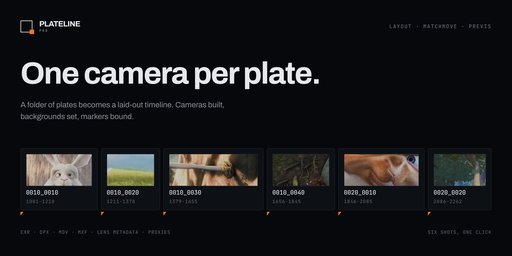
Plateline Pro turns a folder of plates into a laid-out timeline of cameras. Point it at a production tree and it finds every movie and every image sequence inside, builds a camera for each, sets the background image, lays them end to end, and binds a marker to each one.

Built for Layout Artists, Matchmovers and Animators. Plateline Light is the free edition and covers the import itself.

Import a folder, not a file list

Both of the layouts you actually have on disk just work: one shot per folder, or everything side by side. Format and version folders are skipped when naming, so SH010/v003/exr/ gives you a camera called SH010, not exr.

  • Shots are ordered naturally, so Shot_2 comes before Shot_10.
  • Folders named Proxy are ignored, so re-scanning never re-imports your own proxies.
  • Paste a path instead of browsing. Explorer's Copy as path output works, and several paths separated by ; import in one go.
  • Plates already named the production way (0010_0010, 0010_0020) are grouped by the codes in their names, even in one flat folder.
One camera per shot, not per frame

Select all 500 frames of five sequences and you get five cameras, not five hundred. Any frame anchors to the first with the full duration, so it does not matter which one you click.

  • 0010_0010.0001.exr becomes a camera called 0010_0010.
  • SH010.png, SH020.png, SH030.png stay three separate shots.
  • Awkward names survive: spaces, non-ASCII and CJK characters, &, +, #, brackets, dots as separators, inconsistent zero padding, and sequences starting at any number.
Naming that matches your shot list

@@@@_#### gives 0010_0010, 0010_0020, rolling over to 0020_0010 at the next sequence, with separate start and step for each. The panel previews the names before you import, so you read the result instead of decoding the pattern.

A minute with it, start to finish

Use any plates you have. The values quoted below are examples from one shot, so you can see the shape of the result; with your own footage the numbers will be yours.

1. Open the panel. In the 3D viewport press N and pick the Plateline tab.

2. Set the naming. Mode Pattern, pattern @@@@_####, shot and sequence numbering starting at 10 with a step of 10. Before importing anything, the panel shows the names it is about to produce, rolling over to the next sequence where your folders or file names say so. If that preview is not what you expect, nothing has been touched yet and you can change the pattern.

3. Point it at a folder. Click Folder and pick a tree such as PLATES/<shot>/v003/exr/. Every movie and image sequence inside is found. Version and format folders are skipped when naming, and Proxy folders are ignored entirely.

4. Look at what arrived. One camera per shot, not one per frame: fifty numbered files of one sequence give you a single camera, not fifty. Each carries its plate as a background image, sits on its own stretch of the timeline, and has a marker bound to it. The scene end frame moves to match the total length.

5. Scrub. The view cuts from camera to camera at the markers, so whatever frame you are on, you are looking through the right camera for that shot.

6. Check the lens. Select a camera and open Lens Metadata. It reports what it found and where it read it, for example 32.0 mm, sensor 24.89 mm from EXR pinholeFocalLength. Underneath, From the plate header lists whatever else the file carried: ISO, shutter, aperture, white balance, frame rate, reel name, timecode.

If your plates carry no lens data, the panel says so and the camera keeps the fallback value you set in the panel. That is the intended result rather than a failure: nothing is invented, and a zoom lens is reported but never applied.

7. Make 4K playable. Select every camera, set Source to 25% (JPG Proxy) and click Generate Proxies. Same timeline, now smooth. Switch back to Original and the plates are untouched, with the proxies sitting beside them.

Steps 1, 2, 4 and 5 work in the free Light edition too, picking the plates with Files instead. The Folder scan in step 3, the lens in step 6 and the proxies in step 7 are Pro.

Want the exact numbers above to come out exactly? Ask for the test plates mentioned further down: three folders with the expected camera count and metadata values written out, so every claim here can be checked rather than taken on trust.
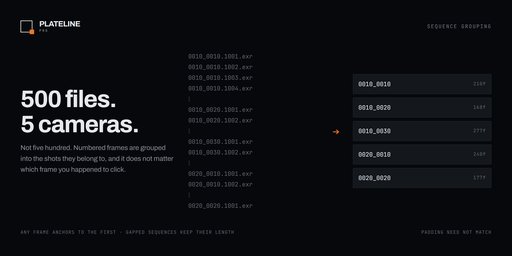
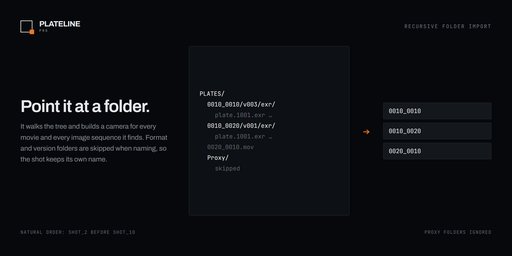
Image 1
Image 2
The lens your plate was shot on

Set Lens to From Metadata and every camera takes its focal length straight out of the file.

  • OpenEXR: pinholeFocalLength first, because the spec defines it as the pinhole to image plane distance, which is exactly what a CG camera's focal length means. Then the other standard and vendor spellings.
  • Sensor width too, so the field of view is right. The same 35 mm lens frames very differently on Super 35 than on full frame.
  • JPEG and TIFF via EXIF, including 35 mm equivalent focal lengths.
  • Nothing is applied silently. Findings are graded, and a zoom lens is reported, never guessed at.
New in 3.1.0: the rest of the header

Productions pack those headers with far more than the lens, so Plateline now reads the rest of it too. The right-hand column shows how each value is rendered, using one shot as an example; your plates will carry their own:

| Custom property | Read from | Shown as |
|---|---|---|
| plateline_iso | isoSpeed | 800 |
| plateline_exposure | expTime | 1/48 s |
| plateline_aperture | aperture, fNumber, tStop | f/2.8 |
| plateline_shutter_angle | shutterAngle | 172.8 deg |
| plateline_white_balance | whiteBalance | 5600 K |
| plateline_timecode | timeCode | 10:00:00:00 |
| plateline_fps | framesPerSecond | 24 fps |
| plateline_camera_make, _model, _serial | cameraMake, cameraModel | ARRI, ALEXA 35 |
| plateline_reel | reelName | A001R2EC |
| plateline_capture_date, plateline_neutral, plateline_owner | capDate, adoptedNeutral, owner | text |

Each lands on the camera as a custom property, so you can read it, drive from it, or export it:

cam = bpy.data.cameras["0010_0010"] cam["plateline_timecode"] # '10:00:00:00' cam["plateline_iso"] # 800.0

Numbers stay numbers, with the unit kept in the panel rather than in the value, so plateline_exposure is 0.0208 seconds and a driver can read it directly. None of it is applied to the camera. Unlike the focal length, these values change nothing about how the shot renders, so they are recorded rather than acted on.
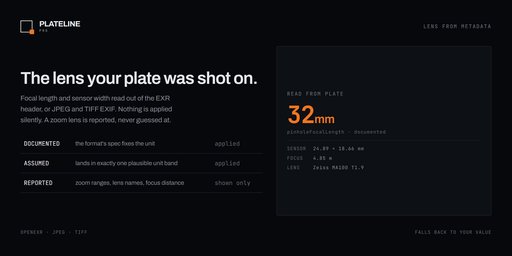
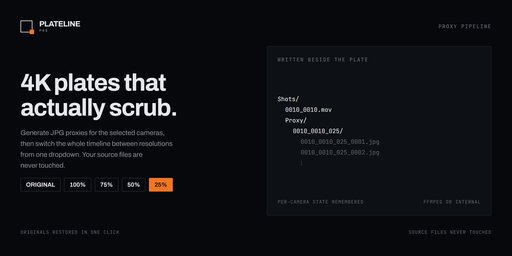
Image 1
Image 2
Proxies, so the timeline plays

4K EXR plates do not scrub well in Blender. Generate JPG proxies at 100, 75, 50 or 25 percent and flip the selected cameras between resolutions from one dropdown.

  • Nothing to install. Proxies are built with Blender's own video sequencer. No external encoder, no setup, no preferences to configure.
  • The panel shows which version is on screen and which resolutions already exist on disk.
  • Progress you can stop: a progress bar while it works, Esc to cancel.
  • Non-destructive: proxies live in a Proxy folder beside the plate. Your source files are never touched.
Also in the box
  • Placement modes: append after the last clip, start at the playhead, or at a fixed frame, with optional handle frames.
  • Cameras land in their own collection, reused across imports.
  • A timeline marker bound to every camera, so scrubbing cuts between shots.
  • Reorder Selected re-stacks cameras and moves their markers with them.
Installation

Requires Blender 4.5 LTS or newer. Verified on 4.5 LTS, 5.0, 5.2.1 LTS and 5.3 alpha. Windows, macOS and Linux. No external dependencies, nothing bundled and nothing downloaded at runtime.

  1. Download plateline_pro-3.1.0.zip.
  2. Drag the zip into the Blender window, or use Edit > Preferences > Add-ons > Install from Disk.
  3. Enable Plateline Pro.

Light and Pro share the same panel, so install one at a time.

Trying it without production plates

This works on footage you are unlikely to have lying around, so there is a 20 MB set of test plates: three folders covering folder import, deliberately awful file naming, and an EXR sequence carrying a full production header (32 mm Zeiss, ISO 800, f/2.8, 5600 K, reel A001R2EC, running timecode). Each folder states the camera count and the exact values to expect, so it can be checked rather than taken on trust. Ask through the message button and I will send it over.

Good to know
  • Version numbers at the end of a file name look like frame numbers, so plate_0001_v1, _v2, _v3 read as one three-frame sequence. Put the version before the frame number, or in its own folder.
  • Lens and shot metadata are read from image headers, not from movie containers.
License

GPL v3 or later.

Demo plates shown in the images are frames from Big Buck Bunny, copyright 2008 Blender Foundation, used under CC BY 3.0.

By

Author avatar Hannes Werner

File size

4.5 MiB

Version

3.1.0

Platforms

windows-x64, macos-arm64, linux-x64, macos-x64, windows-arm64

Minimal required Blender version

4.5.0

Plateline Pro: Batch Camera Setup from Plates

add-on Plateline Pro: Batch Camera Setup from Plates

1
CGHEVEN Asset Library
Free

add-on CGHEVEN Asset Library

51
CopyX — Cross-Version Copy & Paste for Blender Objects
Free

add-on CopyX — Cross-Version Copy & Paste for Blender Objects

22
VisibleIO - Product Configurator
Free

add-on VisibleIO - Product Configurator

15
STEP Importer
Free

add-on STEP Importer

13
Survey Image Aligner – Geodetic & Construction Workflow
Free

add-on Survey Image Aligner – Geodetic & Construction Workflow

12
3MF Import/Export with Material/Paint data
Free

add-on 3MF Import/Export with Material/Paint data

8
Multi Object Export
Free

add-on Multi Object Export

7
DAE (Collada) Exporter (Blender 5.0+ Compatible)

add-on DAE (Collada) Exporter (Blender 5.0+ Compatible)

7
Scene Data Exporter
Free

add-on Scene Data Exporter

6
Essential Tools - Ultimate Blender Workflow Utility Addon

add-on Essential Tools - Ultimate Blender Workflow Utility Addon

6
Plateline Light: Batch Camera Setup from Plates
Free

add-on Plateline Light: Batch Camera Setup from Plates

5
VFX Scene Builder - After Effects to Blender

add-on VFX Scene Builder - After Effects to Blender

5
DAE Importer for Blender 5.0+ (COLLADA Restore)

add-on DAE Importer for Blender 5.0+ (COLLADA Restore)

5
SVG Exporter 1.1.0

add-on SVG Exporter 1.1.0

4
Bulk FBX Importer
Free

add-on Bulk FBX Importer

4
UDIM Atlas Builder
Free

add-on UDIM Atlas Builder

4
Fab Bridge - Megascans Assets

add-on Fab Bridge - Megascans Assets

4
MeLiDA - Measure LiDAR System
Free

add-on MeLiDA - Measure LiDAR System

3
GLB Optmizer

add-on GLB Optmizer

3
Clean Up Pro - One-Click Scene Cleanup, Texture Fix & Game Engine Export

add-on Clean Up Pro - One-Click Scene Cleanup, Texture Fix & Game Engine Export

3
Megascans Bridge

add-on Megascans Bridge

2
The Hard Surface toolbox v 2.0.7 i2M image to mesh system and importer

add-on The Hard Surface toolbox v 2.0.7 i2M image to mesh system and importer

2
ABO Connect

add-on ABO Connect

2
Camera IO

add-on Camera IO

2

  • «
  • 1
  • 2
  • 3
  • …
  • 18
  • 19
  • 20
  • »
Added To Cart
To complete your purchase or update it, please go to cart. If you want to find more awesome add-ons, continue to explore.
Go to Cart
Already Purchased
You already purchased this item. It is impossible to buy it again. Continue to explore and enjoy :-)
My Orders