
 Models
 Materials
 HDRIs
 Scenes
 Brushes
 Node Groups
 Printables
 Creators
 Creations

RigSwitch - One-Click Outfit & Prop Switch for Any Rig
 add-on
One click: outfit/prop switch on any rig. Native drivers, so the rig works for whoever opens it, with no add-on needed. Enum or Bool switches, collections, Mask mode, body mask and Rebuild. Blender 4.2-5.2, $12.
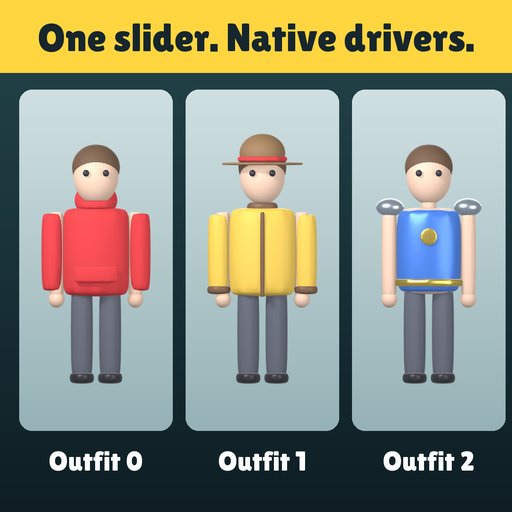
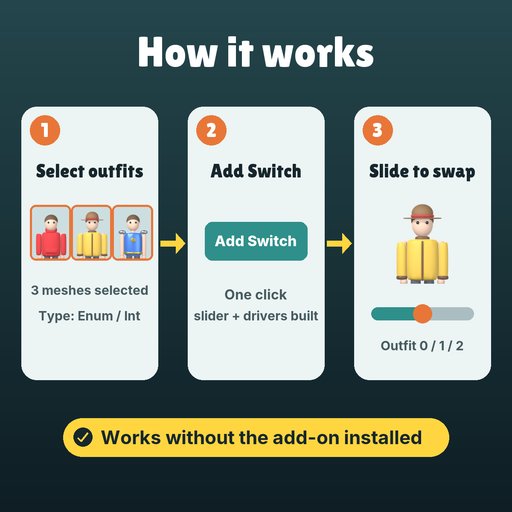
One click: outfit/prop switch on any rig. Native drivers, so the rig works for whoever opens it, with no add-on needed.
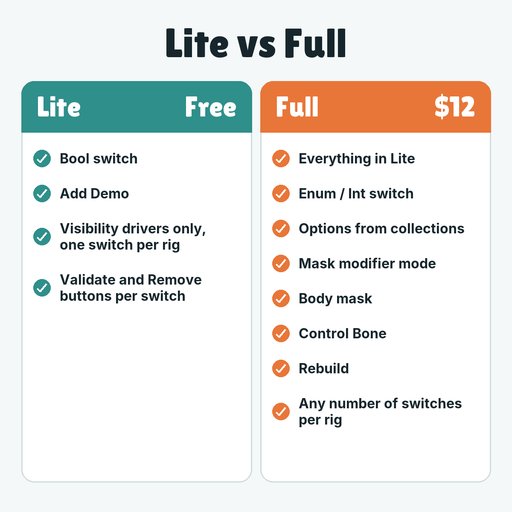
EVERYTHING IN (LITE)- Bool switch: select the meshes, press Add Switch. A custom property on the armature (or a bone) shows or hides them.
- Add Demo: armature, body, Outfit A/B/C and a hat to try it on.
- Visibility drivers only, one switch per rig, plus the switch slider in the panel.
- Validate and Remove buttons per switch. Remove cleans up the property and its drivers.
Full version adds:
- Enum / Int switch: one option per outfit, one slider for all of them.
- Options from collections: one option per child collection.
- Mask modifier mode: drives a Mask modifier instead of hide_viewport.
- Body mask: hides the body part under the active outfit, per option.
- Control Bone: put the property on a bone instead of the armature.
- Rebuild: rewires a switch after you rename or replace objects.
- Any number of switches per rig.
- Install: Edit > Preferences > Get Extensions > Install from Disk, pick rig_switch-0.1.0.zip.
- N panel: in the 3D Viewport press N and open the RigSwitch tab.
- Add Demo (or pick your armature), select the outfit meshes, set Type to Enum / Int.
- Add Switch: the slider appears in the panel. Move it and the outfits change.
The add-on only builds the setup. The result is a custom property plus simple-expression drivers, saved in the .blend.
TIPS- Turn on Body mask when an outfit hides part of the body, so the skin under it does not poke through.
- Use Control Bone to put the slider on a rig bone, so animators can find it and key it.
On the demo rig (3 outfit meshes, 1 body), Blender 4.5 LTS, Enum switch with 3 options and Body mask on:
- Time to add the switch: 2.1 to 4.0 ms (4 runs), one click.
- Drivers created: 12, all simple expressions (no Python autoexec needed).
- Saved, reopened with the add-on not loaded: the slider still flips A, B and C correctly.
- Blender 4.2 to 5.2 (extension format). Tested on Blender 4.5 LTS.
- Mesh objects in Object Mode. The switch property lives on an armature or one of its bones.
- Drivers are native, so the rig works without the add-on installed. You only need the add-on to add, rebuild or remove switches.
RigSwitch Lite is free: one Bool switch per rig, visibility drivers only. Search RigSwitch Lite on Blendkit and try it on the demo, then come back for Enum, collections, Mask mode and Body mask.
Remove Lite before installing the full version.


