
 Models
 Materials
 HDRIs
HDRIs
 Scenes
 Brushes
 Node Groups
 Printables
 Creators
 Creations
Auto Router
 add-on
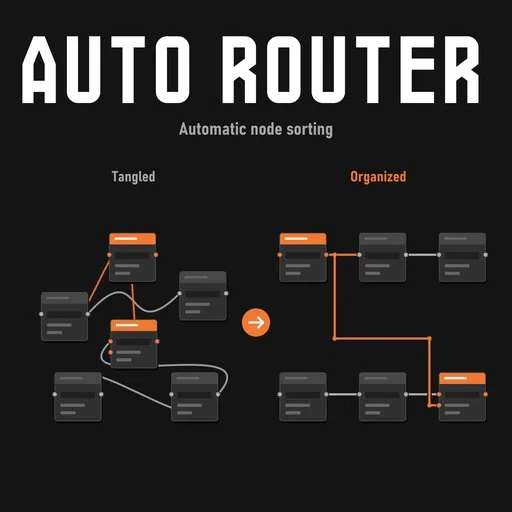
Organize tangled Shader and Geometry Nodes in Blender. Auto Router sorts layouts, cleans wire routing, respects existing frames, and lets you reroute without moving your nodes.
Give your node graph a clear direction
Auto Router brings readable flow back to tangled Shader and Geometry Nodes. Arrange a whole tree with Full Sort, or clean its wiring with Reroute Only while keeping functional nodes and frames in place.
Built for Blender 4.2+, with manual groups, local Group Inputs, and adjustable routing controls.
I have had this system for a while now in my propriatery addon that I use on a daily basis, you can see the result of this system in all my geometry nodes systems. Although you might notice slight differences due to the fact I constantly changed this Addon for the better.
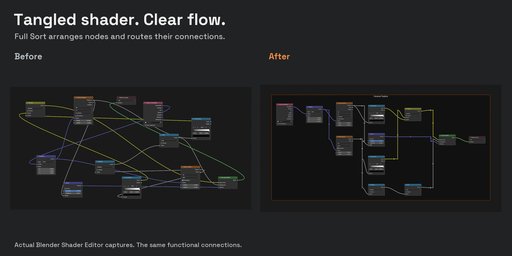
Two ways to organize
Full Sort arranges nodes along their dependencies, respects existing frame membership, and routes the connections between them. Substantial sections among unframed nodes can be grouped automatically.
Reroute Only preserves functional-node and frame positions while rebuilding wire paths using reroutes and shared branches where useful.
432 original nodes. One Full Sort.
A real Geometry Nodes leaf-and-wind system with 712 logical connections and 16 existing frames. The complete result below comes from one Full Sort with Distribute Group Inputs enabled. One Group Input became four local copies; all original nodes, logical connections, and existing frames were preserved. No manual routing refinements were added.
The recording shows the real operation, with processing sped up and a smooth cursor and click pulse added in post. It ends with an overview of the complete graph. Large trees can take several minutes; 65 connections in this example retained their original wiring because of routing limits.
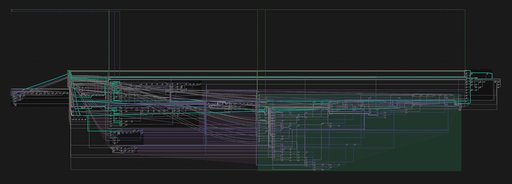
Watch the 432-node system organize in one run
Play the full animated recording
One Full Sort, with processing sped up and a smooth cursor and click pulse added in post. The clip ends with an overview of the complete graph.
Manual groups let you frame selected nodes, add members to the active manual group, remove members, or clear a manual frame while keeping its contents. Existing frame membership is respected during automatic grouping.
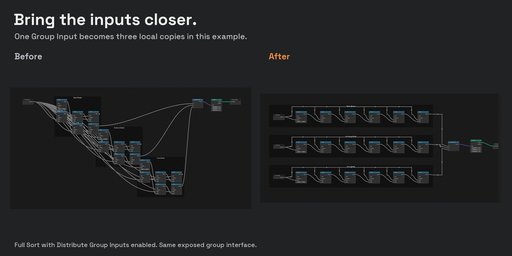
Distribute Group Inputs brings controls closer to substantial consumer regions during Full Sort. Copies share the same group interface; they do not introduce separate user parameters. Distribution is conservative, so large trees can still benefit from manual refinement.
The comparison below shows one Group Input becoming three local copies in a smaller demonstration.
- Install the add-on ZIP through Edit → Preferences → Get Extensions → Install from Disk, then enable AutoRouter.
- Open your Shader or Geometry Nodes tree, press N, and select the AutoRouter sidebar tab.
- Choose Full Sort to rearrange the tree, or Reroute Only to clean its wire paths. Enable Distribute Group Inputs when you want local input copies.
Each operation works on the entire currently edited tree. Enter a nested group first to sort its contents; child groups are not processed recursively.
Adjust the resultStart with the defaults, then use Advanced to tune node spacing, wire spacing, clearance, automatic grouping, and routing budgets. Save important work before cleanup. Esc cancels an interactive run; Blender Undo reverts a completed operation.
Large graphs can take several minutes. Connections that exceed the available space or routing limits keep their original wiring and produce a warning. A crossing-free layout is not guaranteed.
DocumentationThe official AutoRouter guide covers installation, every control, and troubleshooting. An offline PDF guide is included with the add-on.
Blender 4.2+ · Shader & Geometry Nodes · GPL-3.0-or-later
Created by Giorgi Samukashvili.


