
 Models
 Materials
 HDRIs
HDRIs
 Scenes
 Brushes
 Node Groups
 Printables
 Creators
 Creations
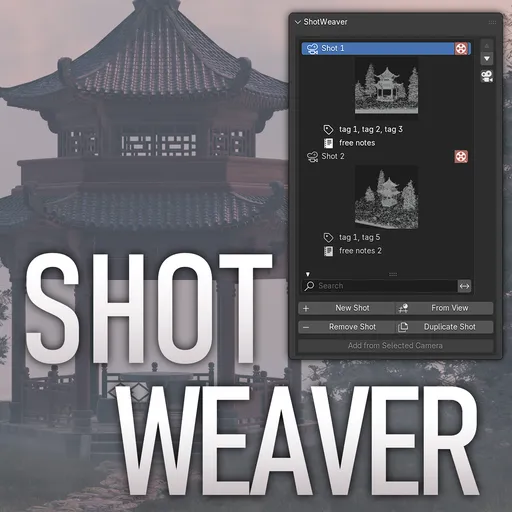
ShotWeaver — Multi-Camera Shot Organiser for Blender
 add-on
ShotWeaver turns Blender into a shot‑centric editing and rendering tool. Perfect for animatics, short films, previz, and any narrative project that uses multiple cameras.
ShotWeaver — Multi-Camera Shot Organiser for Blender
Take control of your camera layout. Plan, organize, and render your shots — all inside Blender.
ShotWeaver brings a proper shot management workflow to the 3D Viewport. Instead of hunting through your outliner for cameras and juggling timeline markers by hand, you get a dedicated panel where every shot lives — with a name, a thumbnail, a frame, notes, tags, and its own optional resolution.
Whether you're blocking an animated short, pre-visualising a live-action sequence, or just organizing a complex product render, ShotWeaver keeps your creative intent readable and your workflow fast.
What it does
Shot list with visual thumbnails
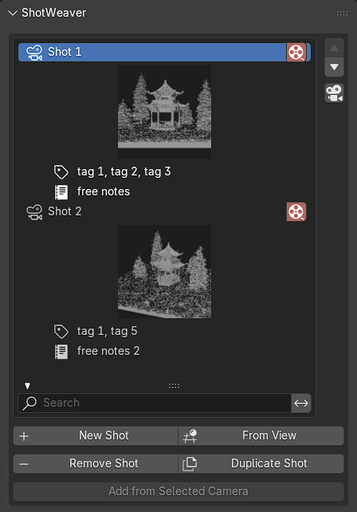
Every shot in your scene is listed in one panel. Hit "Generate All Thumbnails" and each entry fills in with a live viewport preview so you can see exactly what each camera sees at a glance — no more guessing from names alone.
Switch between your shots using the button with the camera icon next to the up/down arrows.
Three ways to add shots
- New Shot — creates a fresh camera placed at the scene origin.
- From View — captures your current viewport angle and turns it into a camera instantly.
- Add from Selected Camera — registers an existing camera you already positioned.
Duplicate and reorder
Duplicate any shot (camera and all settings) in one click. Reorder shots with the up/down arrows — the list order is independent of timeline position.
Per-shot camera settings
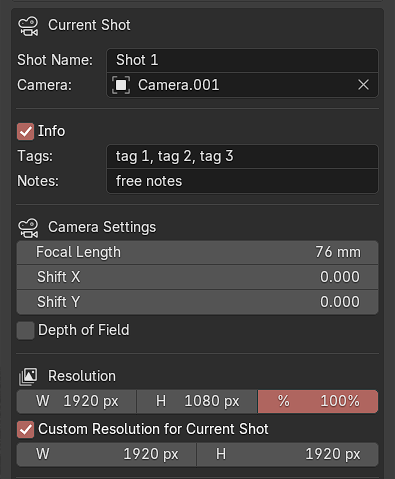
The active shot exposes focal length, lens shift, and depth of field controls directly in the panel. No need to switch to the Camera Properties tab just to tweak a lens.
Tags and notes
Each shot has a free-text notes field for blocking descriptions, mood references, or crew callouts — and a tags field for comma-separated labels like interior, close-up, or action. Tags are searchable: type in the filter bar above the shot list and only matching shots appear.
Per-shot resolution overrides
Set a base resolution for your scene, then opt individual shots into their own width and height — useful when one shot needs to be square, portrait, or at a different quality level. Resolutions sync automatically as you switch between shots and during playback.
Timeline integration
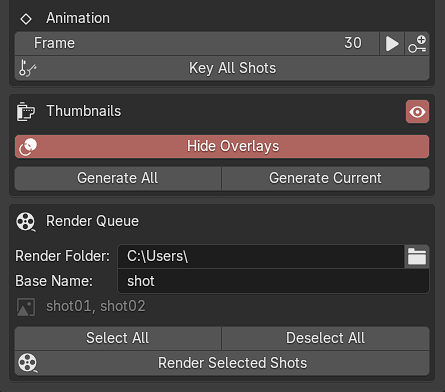
Assign a frame number to each shot and click "Key Shot" to plant a camera marker on the timeline. "Key All Shots" writes markers for every shot at once. Jump directly to any shot's frame with a single button. Conflicts (duplicate marker frames) are flagged with an in-panel warning.
Render queue
Check the render toggle on any shots you want to output, set an output folder and base filename, then hit "Render Selected Shots". ShotWeaver renders each checked shot at its correct frame and resolution, saves numbered PNG files, and restores all your original render settings when it's done. No post-processing required.
Who it's for
- Animators and storyboard artists mapping out a multi-shot sequence
- Cinematics artists working on cutscenes or previz
- Product and archviz artists managing multiple hero angles of the same scene
- Anyone who has more than three cameras in a .blend file and wants to stay organised
Technical details
- Blender version: 4.5 and above
- Category: Animation
- Location: 3D Viewport › Sidebar › ShotWeaver tab
- Single .py file — no dependencies
- Thumbnails are stored in a .shotweaver_thumbs folder next to your .blend and reload automatically when you reopen the file
- All scene data is saved inside the .blend — no external config files


