
 Models
 Materials
 HDRIs
HDRIs
 Scenes
 Brushes
 Node Groups
 Printables
 Creators
 Creations
K-tools: Scene Light Manager (SLM)
 add-on
A complete lighting toolbox for Blender
K-Tools: Scene Light Manager
Stop fighting Blender’s interface just to light your scene.
Scene Light Manager (SLM) is a professional, high-fidelity lighting workflow toolkit designed to keep you in the creative flow. Adjust intensity, change shapes, solo lights, control HDRI rotation, and manage light/shadow linking directly in the 3D Viewport without ever opening the properties sidebar.
Why Scene Light Manager? (The SLM Difference)
In vanilla Blender, setting up cinematic lighting is a tedious loop: select a light, look at the properties panel, drag a slider, look back at the viewport, select another light, expand sub-panels, repeat.
SLM changes everything by bringing the controls to your cursor:
- Zero Context Switching: Adjust power, size, beam angle, and color directly on the light object inside the 3D Viewport.
- Instant Visual Feedback: High-fidelity GPU outlines highlight exactly which objects are affected by light or shadow linking in real time.
- Intuitive Environment Controls: Rotate your HDRI or position the Nishita sun texture with simple viewport gestures.
- Pure Performance: Built from the ground up for heavy production scenes with zero overhead.
Key Features
1. Viewport Gizmo Interface & Floating Overlay
Gain instant, contextual access to light settings directly on the active light:
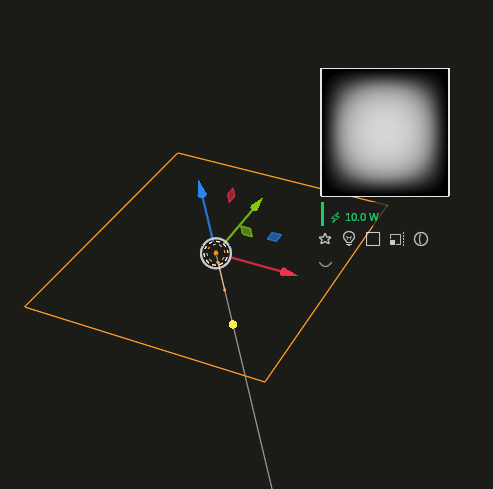
- Smart Buttons: Click interactive icons next to your selected light to cycle types, change area shapes, toggle solo mode, adjust spot beam spreads, or tweak sizes.
- Real-Time Value Overlay: Get beautiful, color-coded HUD feedback showing your precise parameter values as you drag. Choose to lock the HUD to your mouse or snap it cleanly below the gizmo cluster.
- Alt-Modifier Batch Control: Hold Alt while adjusting a viewport gizmo to propagate the change to all selected lights instantly.
2. High-Fidelity GPU Linking Highlights
Configure Blender’s powerful Light and Shadow Linking systems visually:
-
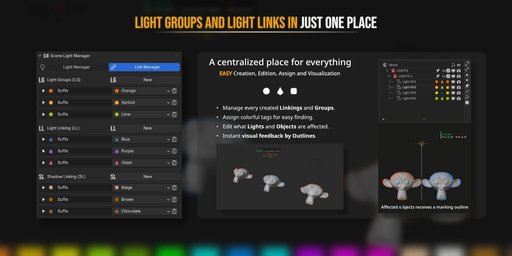
Visual Silhouette Outlines: Selecting any light instantly projects clean, anti-aliased wireframes and silhouette highlights over the linked receiver or blocker geometry.
-
Dynamic Customization: Choose from three outline modes (Silhouette, Wireframe, or Both), and customize line thickness and colors to match your scene style.
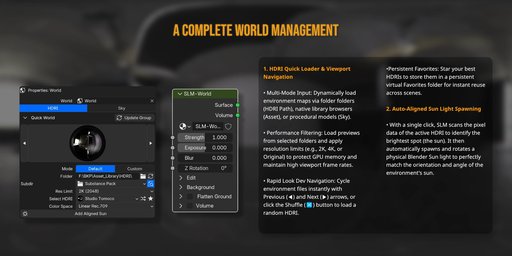
3. Interactive HDRI & Sky Rotation
Ditch the shader editor mapping node. Rotate your environment from any camera angle:
-
Auto-Detection Engine: Automatically detects and rotates the active background environment—whether it is Nishita Sky, a World Mapping node (Z Rotation), or Blender's built-in Viewport HDRI.
-
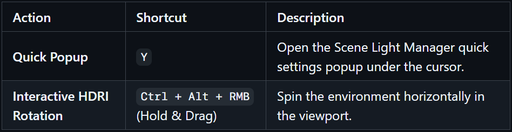
Instant Drag Gesture: Hold Ctrl + Alt + Right Mouse Button and drag horizontally to spin the dome. Release to commit, or cancel with a right click.
-
HUD Angle Readout: A clean digital compass at the bottom of the viewport displays the exact rotation angle in real time.
4. HDR Studio Light Textures & Gobos
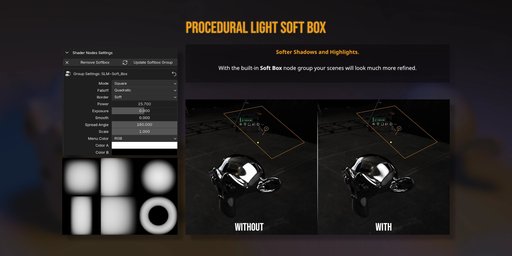
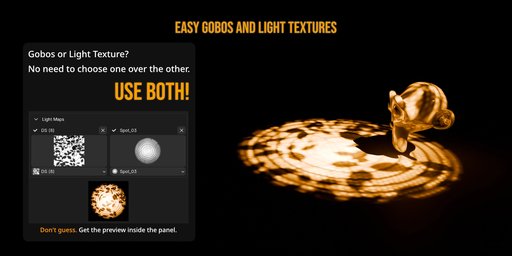
Project real-world high-dynamic-range softboxes and patterns directly from Blender Area Lights:
-
Photographic Realism: Map photographic softbox reflection textures and studio Gobos with a single click.
-
Integrated Node Automation: Behind the scenes, SLM handles shader setups, texture mapping coordinate projections, and strength balance.
-
Interactive Tweaks: Adjust Gobo rotation, scale, and softness directly from viewport operators.
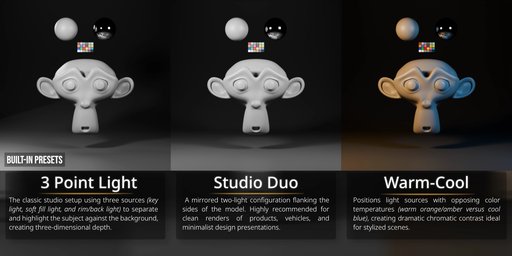
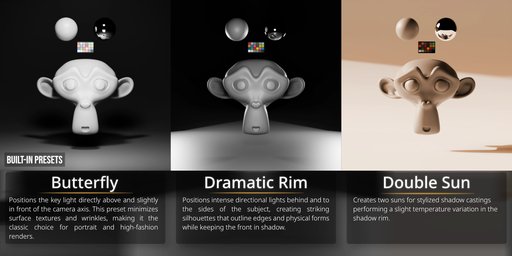
5. Cinematic Presets & Custom Lighting Rigs
Build master lighting setups in seconds using built-in rigs and saving custom presets:
-
Instant Rig Spawning: Spawn standard 3-point rigs, butterfly setups, or backlighting rings aligned to your active viewport camera.
-
Preset Library Manager: Save complete scene lighting states to the global asset library and restore them instantly.
-
Non-Destructive Mixing: Test different lighting directions, colors, and intensities by saving snapshots as presets.
6. Smart Light Isolation (Solo Mode)
Isolate a single light source to judge its contribution, shadows, and bounce:
*** Synchronized Soloing:** Solo any light via the viewport gizmo button or the sidebar list.
-
Automatic Restores: Un-soloing returns your scene to the exact previous visibility layout.
-
World Muting Option: Automatically disable the World background shader while soloing to isolate light color contributions in pure darkness.
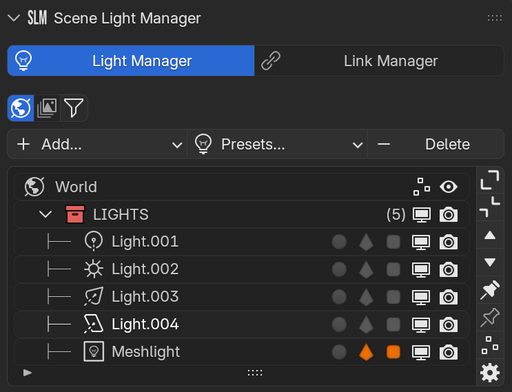
7. Unified Light Manager Sidebar
A beautiful, tabbed panel consolidating every light source, emissive mesh, and setting in your project:
-
Properties Tab: Grouped list control over name, power, color, and visibility of all scene lights.
-
Synchronization Tab: Seamlessly synchronize viewport selections, automatically activate collections, or sync visibility parameters.
-
Light List Tab: Customize which property columns are visible (including icons for Light Groups, Light Linking, Shadow Linking, and Exposure Overrides).
-
Mesh Emitters Detection: Automatically scan and list mesh objects acting as lights via emissive shaders (using configurable search terms like led, emit, glow).
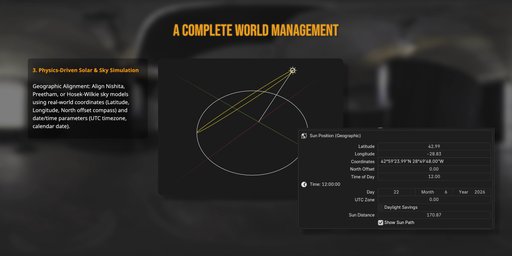
8. Geographic Sun & Sky Positioning
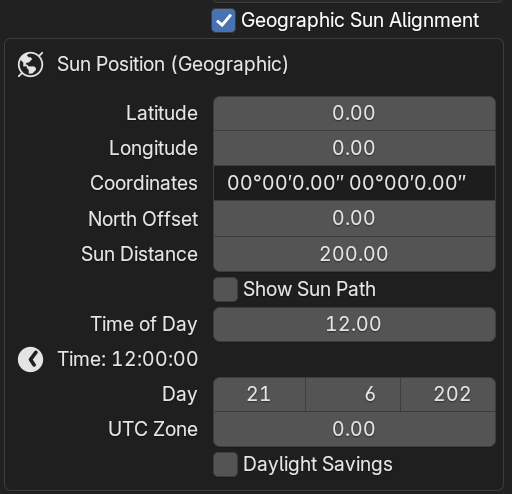
Align your Nishita sky or solar directional lights using real-world geographic coordinates:
-
Latitude/Longitude Inputs: Enter standard coordinates in Decimal format or degrees/minutes/seconds (e.g., 48°51'30.2"N 02°17'40.2"E).
-
3D Solar Path Overlay: Projects a beautiful daily solar path arc and cardinal direction compass (North-South, East-West) inside the 3D viewport.
Viewport Control & Shortcut Guide
Global Hotkeys
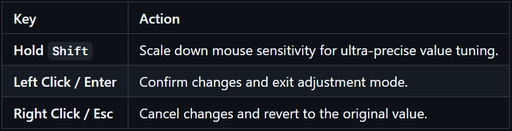
Modal Navigation
Modular Preferences
Tailor every detail of the interface to match your personal pipeline inside Edit > Preferences > Add-ons > K-tools: Scene Light Manager:
-
Customize Gizmos: Choose which buttons (Type, Shape, Size, Beam, Isolate) show up in the viewport.
-
Clean Tabs Grid: Choose between a grid or column layout for the preference panels.
-
Custom Emissive Keywords: Add your own terms to scan materials and automatically detect custom Mesh Lights.


