
 Add-ons
 Models
 Materials
 HDRIs
HDRIs
 Scenes
 Brushes
 Node Groups
 Printables
 Creators
 Creations
TMEASURE | Blender Measurement & Scale Add-on (v1.1.3)
OVERVIEW
TMeasure is a professional technical tool designed to meet instant measurement needs during the modeling stage in Blender and to prevent object transformation errors. Whether you need to calculate the total length of straight or curved selected edges, analyze complex surface areas, or track the dimensions of your active object, it handles them instantly. You can fix incorrect scaling with a single click and take precise measurements. It offers a seamless workflow for 3D artists and hard-surface modelers.
CORE FUNCTIONS
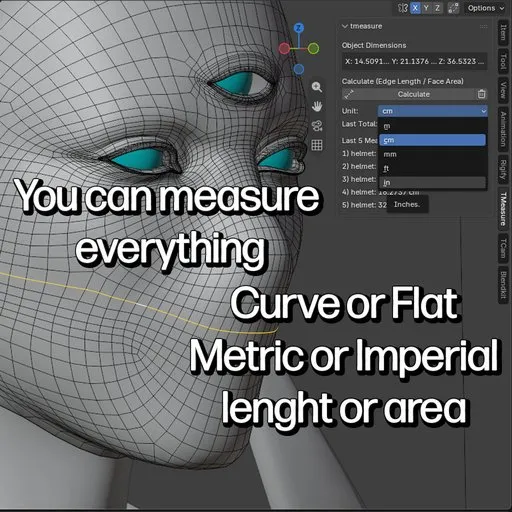
Dimensions, Measurement, and Scale: Instantly lists the bounding box dimensions of the selected mesh object along the X, Y, and Z axes in the panel. Automatically adapts to the active selection mode. In Edge mode, it calculates the total length of selected edges; in Face mode, it calculates the total surface area of selected faces without requiring manual adjustments. If the object's scale value is incorrect, it creates a visual warning and provides a fast correction via the integrated "Apply Scale" button.
Dynamic Unit System: Offers instant switching between Meters (m), Centimeters (cm), Millimeters (mm), Feet (ft), and Inches (in). Length and area metrics update automatically in the interface based on the selected unit.
Named Measurement History: Stores the last 5 measurements made, along with the name of the object they belong to, the measured value, and the unit format, listing them in the panel.
Clipboard Copy: Allows you to take any calculated measurement result to your system clipboard with a single click using the copy button next to the value, enabling quick sharing or transfer to documents.
HOW TO USE?
Object Dimensions: When you select a mesh object, the X, Y, and Z dimensions are displayed at the top of the tmeasure panel (N-Panel > Measure).
Edge and Surface Measurement:
Switch to Edit Mode (TAB).
Select the items you want to measure (Edges for length, Faces for area calculation).
Click the Calculate button.
History and Clipboard: Access your last 5 named measurements directly from the panel. Use the copy button to copy results to the clipboard, and the trash icon to clear the history.
MEASURE & SCALE FIX
Critical Warning: If your object's scale is not 1,1,1, the panel displays a red "Scale not applied!" error.
One-Click Fix: Instead of dealing with manual shortcuts, simply click the "Apply Scale" button that appears next to the warning. The tool performs the mode switching and correction process automatically and non-destructively.
KEY FEATURES
Advanced Path and Surface Analysis: Precise length and area calculation with bmesh accuracy.
Multi-Unit Support: Complete flexibility between metric and imperial systems (m, cm, mm, ft, in).
Object-Named History Log: Past measurement tracking paired with specific objects.
Fast Clipboard Integration: One-click copy functionality for workflow efficiency.
TECHNICAL SPECIFICATIONS
Blender Version: 4.2 and above (100% compatible with the Blender Extension system).
Precision: High-precision calculation synchronized with Blender's internal unit system.
Functional Interface: A clean and focused design integrated into the side menu (N-Panel > Measure) tab.
USE CASES
Character Design: Calculation of seam allowances, determining the lengths of belts, straps, or accessories.
Hard Surface & Architecture: Checking tolerances, aligning technical parts with each other, and performing precise dimensioning.
3D Printing: Final verification of object dimensions, scale, and surface metrics before output. You can make precise measurements for spare parts production.
Jewelry Design: Allows you to quickly obtain millimeter-accurate measurements of especially curved or round objects such as rings, bracelets, and necklaces.
DEVELOPER & SUPPORT
Developed by Otonkart. For technical feedback or feature requests, you can get in touch via Otonkart or the BlenderKit portal.
What questions does tmeasure answer?
How to measure curve length in Blender
Blender total edge length calculator
Blender calculate face area add-on
How to calculate surface area in Blender
Blender check object dimensions
Blender fix scale non-destructive
Blender imperial and metric measuring tool


