
 Add-ons
 Models
 Materials
 HDRIs
HDRIs
 Scenes
 Brushes
 Node Groups
 Printables
 Creators
 Creations
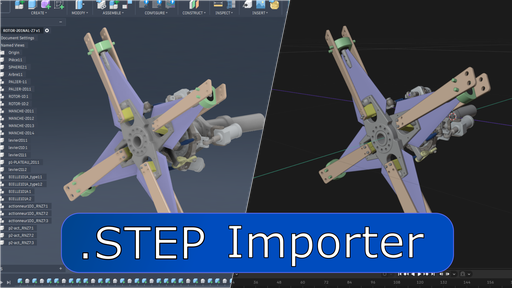
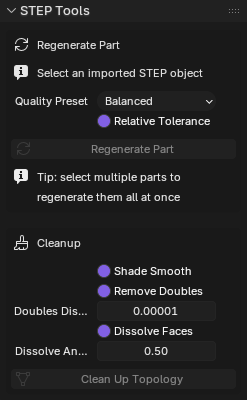
- Regenerate Part - re-tessellate any previously imported body straight from its source file with new quality settings, one part or many at once, right from the STEP sidebar tab.
- Tessellation quality presets - Choose from Draft / Balanced / Fine / Ultra Fine, or custom for full manual control over linear and angular tolerance.
- Topology cleanup - operator to re-run it later on any STEP object without a full re-import.
- Assembly Collections - organize imported STEP assemblies into nested Blender collections that mirror the CAD assembly hierarchy.
- Import Filters - Filter out non-solid STEP entities such as sketches, construction lines, parametric history, and more.
- Material Import - for now colors will import correctly, when cascadio supports more material data I will add mappings for pbr materials.
- Drag and Drop - Drag one or more files directly into blender to import.
This addon uses the Python library Cascadio to perform all STEP-to-mesh conversion. Cascadio converts STEP geometry into glTF data, which is then passed directly to Blender's built-in glTF importer. Mesh generation, object creation, and material assignment are therefore handled through Blender's existing glTF import pipeline.
FAQ The geometry looks messy after import. Can this be improved?It can! The import menu exposes a selection of quality presets under "Topology Tessellation Quality." If your model looks blocky, try a higher preset, or choose "Custom" and enter your own values.
If you choose "Clean Up Topology" on import, the addon also runs a few safe operations to weld surfaces together and reduce over-tessellation.
Already imported something and don't want to start over? Open the STEP tab in the viewport sidebar (N-panel) — Regenerate Part re-converts the selected object(s) from their original file at new quality settings, and Cleanup Selected re-runs topology cleanup on any selection, both without touching the rest of your scene.
Can I export STEP files as well?No. STEP files store precise CAD geometry (B-Rep/NURBS surfaces), while Blender primarily works with polygon meshes. Once CAD data has been converted into triangles, the information required to recreate an accurate STEP model is no longer available. As a result, STEP export is outside the scope of this addon.


