
 Models
 Materials
 HDRIs
HDRIs
 Scenes
 Brushes
 Node Groups
 Printables
 Creators
 Creations
Save My Work — Smart Save Reminder & Automatic Backup
 add-on
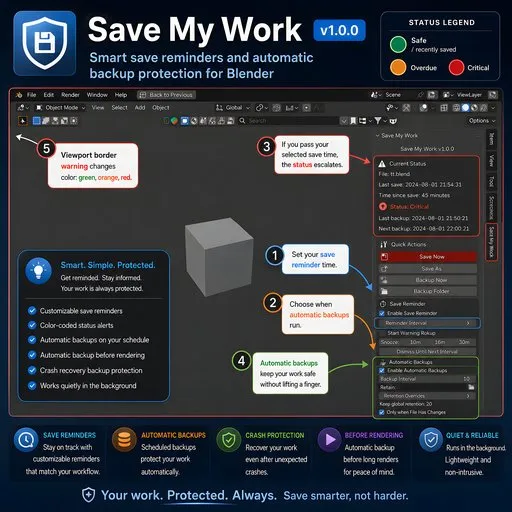
Smart Save Reminder & Crash BackupProtect your Blender projects with customizable save reminders, automatic backups, crash recovery, color-coded warnings, and optional backups before rendering.
Never lose hours of Blender work again
Save My Work protects your Blender projects with smart save reminders and automatic backup copies while you work.
Save status colors:
• Green: Recently saved and safe
• Yellow: Your selected reminder time has been reached
• Orange: Your project is overdue for saving
• Red: Your work is at critical risk
Main features:
• Custom save reminders: Choose when Blender should remind you to save
• Automatic backups: Create timestamped backup files on your schedule
• Backup before rendering: Protect your project before long renders
• Crash recovery: Keep recent backup copies ready after unexpected crashes
• Manual backup button: Create a backup instantly whenever needed
• Retention controls: Choose how many backups to keep
• Custom backup folder: Select where backup files are stored
• Only backup changed files: Avoid unnecessary duplicate backups
• Pause during rendering or playback: Prevent interruptions while Blender is busy
• Viewport warning border: See green, orange, or red visual warnings
• Snooze and dismiss: Control when reminders appear
• Recovery list: Find and open recent backups directly inside Blender
Safe backup system:
• Separate copies: Backups never replace your active project
• Timestamped filenames: Every backup receives a unique name
• Integrity checks: Backup files are verified after creation
• Automatic cleanup: Only old Save My Work backups are removed
• Offline protection: No internet connection is required
How to use:
- Install and enable the add-on
- Open the 3D Viewport
- Press N
- Open the Save My Work tab
- Set your reminder and backup intervals
- Continue working normally
Important:
Render and file-opening protection works when using the protected buttons inside the add-on.
Blender’s native shortcuts, native Render menu, and native File > Open actions may not be intercepted.
Compatibility:
• Blender 4.2 and newer
• Tested on Windows
• Designed for Windows, macOS, and Linux
Privacy:
• No telemetry
• No analytics
• No file uploads
• No personal data collection
• Works fully offline


