
 Models
 Materials
 HDRIs
 Scenes
 Brushes
 Node Groups
 Printables
 Creators
 Creations
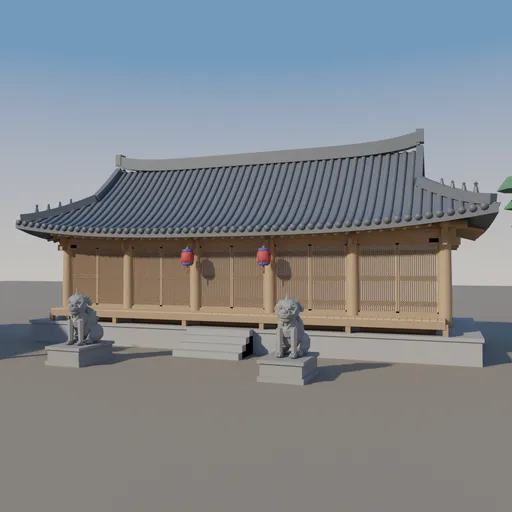
HanokCraft Pro - Korean Hanok Buildings with Curved Tiled Roofs
 add-on
Build a Korean hanok with sliders. Press Add Hanok, change the bays, the roof type or the eave curve, and the whole building rebuilds.
$14
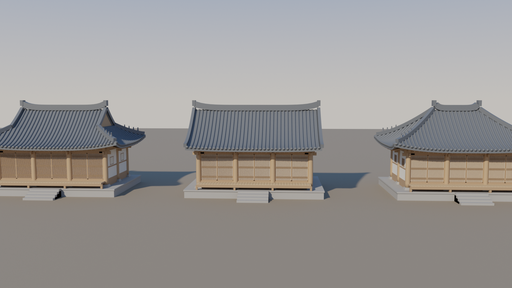
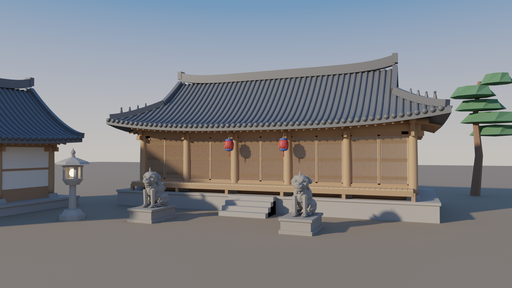
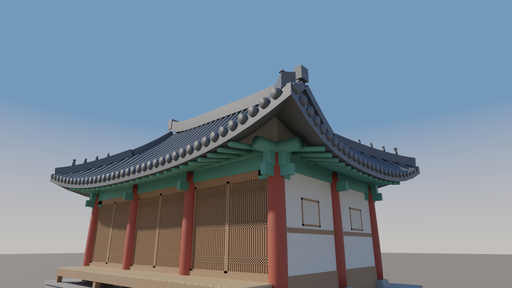
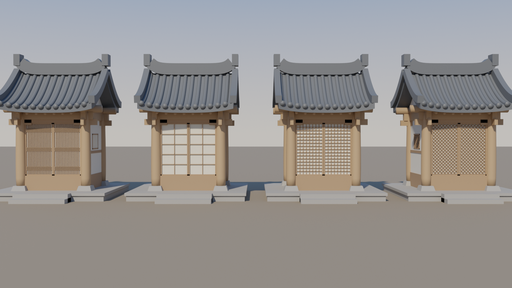
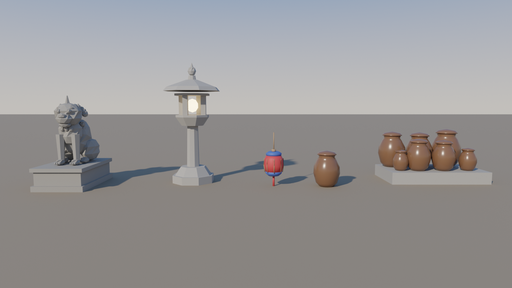
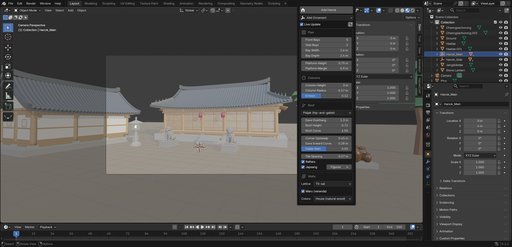
Press Add Hanok, move a slider
Press Add Hanok, then change the bays, the roof type or the eave curve and the whole building rebuilds. Every building and ornament in the pictures came out of HanokCraft. Only the pine trees and the ground were made separately.
What it builds- Stone platform with steps, plinth stones, columns with entasis (baeheullim), lintels, purlins and ikgong brackets.
- Three roofs: Paljak (hip-and-gable), Matbae (gable) and Ujingak (hip). Sliders for eave overhang, roof height, roof curve, corner upsweep (anggok) and the inward eave curve in plan (anheori).
- Tile rows with round end tiles, ridges, japsang figures on the hip ridges, and rafters under the eaves.
- Lattice doors with hanji paper in four patterns: Tti-sal, Yongja-sal, Jeongja-sal and Bit-sal. Plaster walls, side windows and a wooden maru veranda.
- Two color sets: natural wood (house) and palace colors (red columns, green-blue beams).
- Five ornaments from Add Ornament: a low-poly haetae guardian, a stone lantern with a glowing fire chamber, a cheongsachorong lantern, an onggi jar and a jangdokdae jar terrace.
- The building is an Empty with six mesh children (base, columns, frame, walls, roof, ornaments). Select it, move a slider, and it rebuilds live.
- The meshes are ordinary meshes, so the scene opens and renders on a computer without the add-on.
- Front bays 1 to 7, side bays 1 to 4, from a one-bay pavilion to a long hall.
- Blender 4.2.23 LTS and 5.2.2 LTS: 23 headless checks each (closed roof for all three roof types and an extreme setting, corner upsweep height, roof underside never below the purlins, column count, same settings give the same mesh, live rebuild keeps one set of parts, save and reopen without the add-on).
- Installed into a clean Blender profile in both versions and built a hanok right away.
- Default 3 x 2 bay building: about 30k vertices, built in about 0.1 s.
- Need Korean traditional buildings for renders, animation, webtoon or game backgrounds, or previs.
- Want to try many layouts quickly. Bays, roof shape and colors are sliders.
- Need a measured historical model of a real building. HanokCraft makes a stylized, simplified hanok: brackets are simple ikgong blocks (no dapo sets) and palace colors are flat colors, not dancheong patterns.
- Plan to edit the generated meshes by hand and keep rebuilding. A rebuild replaces the meshes, so duplicate the parts before hand edits.
- In the 3D Viewport, choose Add > Mesh > Hanok (HanokCraft), or open the sidebar (N), click the HanokCraft tab and press Add Hanok.
- Change Front Bays and Side Bays.
- Pick a roof (Paljak, Matbae or Ujingak) and drag Corner Upsweep or Eave Inward Curve.
- Add Ornament places a haetae, lantern or jars next to the building.
Made with AI assistance. The add-on code was written with Claude (Anthropic). Feature design, test cases, render checks and fixes were done by a person.
Code license: GPL-3.0-or-later.
Bug reports: message Aisol Studio through Blendkit. Fixes for confirmed bugs in supported Blender versions for 12 months from purchase.
By


