
 Models
 Materials
 HDRIs
 Scenes
 Brushes
 Node Groups
 Printables
 Creators
 Creations
Asset Export Guard
 add-on
Preflight static mesh assets, batch export self-contained GLBs and deliver an offline file-verification report.
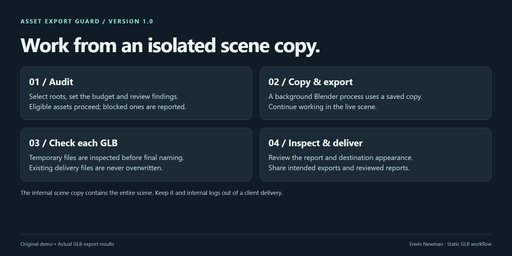
Exporting a prop kit should leave you with a clear inventory of what passed, what
failed and which files are ready to inspect. Asset Export Guard audits selected
static mesh hierarchies, runs Blender's native glTF exporter in a background scene
copy, and checks each GLB before giving it its final filename.
- One GLB per selected hierarchy or one combined selection.
- Evaluated triangle budgets, missing texture checks and strict-warning mode.
- Explicit blocks for rigs, animation, shape keys, collection instances, geometry
nodes and simulation/cache modifiers that need preparation in a project copy. - Missing UV, mirrored-transform and procedural-material warnings.
- Background export from a scene copy while you keep working in Blender.
- GLB header/chunk, embedded-resource, accessor-range and triangle-index checks.
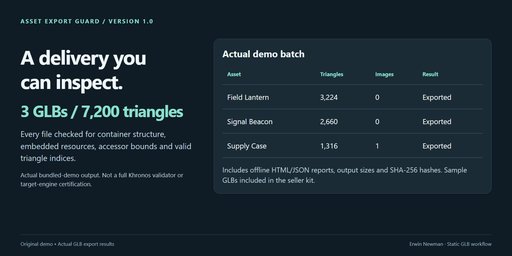
- Offline HTML/JSON reports, file sizes, exported counts and SHA-256 hashes.
- Cancellation between assets and a separate force-stop control.
- Original three-prop example scene, packed artwork and complete written guide.
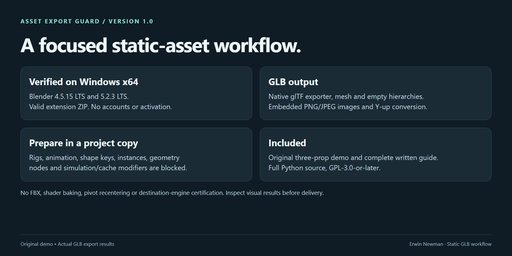
- Windows x64; Blender 4.5.15 LTS and 5.2.3 LTS verification records in the kit.
This is a static GLB delivery workflow using the native exporter. It does not
replace the conversion engine, export FBX, bake procedural shaders, repair topology,
recenter pivots or certify a game engine. The structure checks are not the full
Khronos glTF Validator. Always inspect appearance in your destination application.
The worker uses a saved scene copy and leaves the source project file and textures
untouched. Work files include a copy of the entire scene, not only the selection;
share the intended GLBs and reviewed reports, not internal scene copies or logs.
Asset Export Guard 1.0.0
Preflight static mesh assets and export one self-contained GLB per selected
hierarchy, or combine your selection. Work continues in your live scene while an
isolated Blender process exports a saved copy and writes a delivery report.
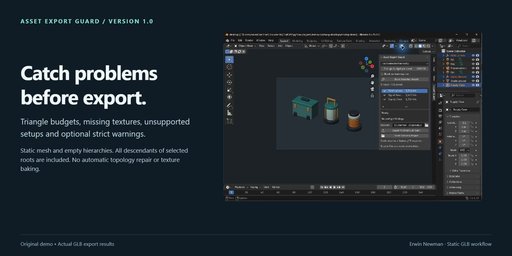
On Windows x64, in Blender 4.5.15 LTS or 5.2.3 LTS, open Edit → Preferences →
Get Extensions → menu → Install from Disk. Select asset_export_guard-1.0.0.zip
without extracting it, and enable the extension. In the 3D Viewport, press N
and open Export Guard. There are no accounts, activation, pip installs or
network services. Blender's bundled native glTF exporter does the conversion.
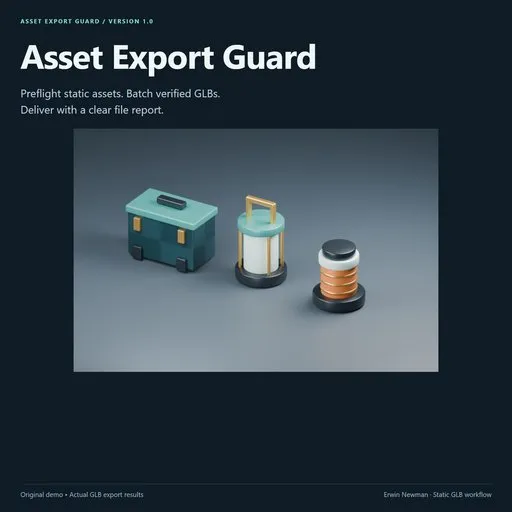
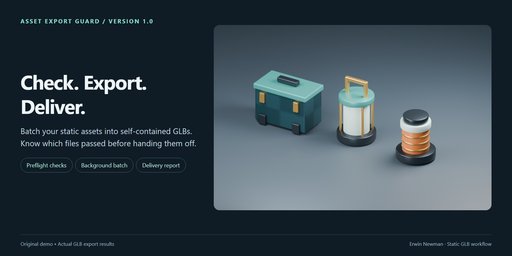
- Open the included examples/demo.blend for practice. Its three selected empty
roots group an original supply case, lantern and beacon; all their mesh children
are included even though the children are not selected. - Work in Object Mode. Select the roots of the static assets you want to export.
- Choose Each selected hierarchy for a GLB per root, or Selection together
for a single GLB. A selected descendant of another selected root is not a second
export. All descendants are included, including unselected children. - Set Triangle budget per asset. The audit counts evaluated mesh triangles,
including supported modifiers. The exported vertex count may increase at UV,
material or normal boundaries. - Enable Block on warnings too if warnings must also prevent an export.
- Click Scan Selected Assets, inspect the list and fix blocking findings.
Scan reads the scene; it does not change meshes, materials or paths. - Choose a short output folder. A relative // folder requires a saved scene;
an unsaved scene can use an absolute output folder. - Click Export Verified GLB Batch. The selection is audited again at start.
Eligible assets export; blocked assets remain in the report. One unique delivery
folder is created per batch and existing exports are never overwritten. - Open Delivery Report to see progress and the final result. Open each GLB in
your destination application and inspect its appearance before client delivery.
Preflight blocks missing or undecodable texture files, unsaved image pixel edits,
unsupported image sources, linked data, collection/vertex instances, singular or
non-finite transforms, non-finite mesh vertices, absent mesh faces, over-budget
assets, hidden objects, and descendants outside the active view layer.
Version 1.0 is a static mesh and empty hierarchy workflow. Apply/bake constraints,
rigs, animation, shape keys, geometry nodes and simulation/cache modifiers in a
separate project copy before using it. These are blocked rather than silently dropped.
Other object types, such as lights, cameras, curves and text inside a selected
hierarchy, also block it. Convert wanted geometry to meshes in a project copy first.
Missing UV maps, mirrored transforms and procedural/group shader nodes are warnings.
The material audit is conservative: even an unused image node is checked. It is not
a complete shader-compatibility analysis. A ready status does not prove a material
will look the same in a game engine or viewer. Bake complex shaders to standard
image-based Principled materials when necessary.
Supported images are clean, local or packed, 8-bit FILE images. HDR/float, generated,
UDIM/tiled, movie and image-sequence sources must be converted in your project copy.
Blender may convert/re-encode images while exporting. This is not a lossless texture
copy tool. Textures used by the native exporter are embedded in the GLB.
Before a temporary export receives its final .glb filename, the extension checks:
- GLB version, declared file size, chunk ordering, alignment and bounds.
- One embedded binary buffer; embedded PNG/JPEG image references, with no external URIs.
- Buffer-view/accessor ranges and matching vertex-attribute counts.
- Triangle primitives, index counts and index values within the position arrays.
- At least one triangle and a streaming SHA-256 hash of the finished file.
These are structure checks for the uncompressed static subset produced by this
tool. They are not the complete Khronos glTF Validator, a full visual comparison,
or a test in Unity, Unreal, Godot, Three.js or any other destination. No target-engine
compatibility certification is claimed. Compression, morph targets and animation
are disabled in this workflow; the native exporter may use supported material
extensions. Materials, colors, unit interpretation and rendering can differ outside
Blender. Transform and axis conversion use the native exporter's Y-up convention.
Root placement is preserved; this tool does not recenter pivots or normalize scale.
Export runs in a factory-startup background Blender process with Python auto-execution
disabled. Your scene is copied using Save Copy; the original project file, source
textures, mesh transforms, selection and materials are not overwritten by the worker.
Edits made in the live scene after the copy do not enter the running batch.
The output folder contains GLBs, delivery.html, delivery.json, worker.log,
job.json, and source-copy.blend. The scene copy contains the entire scene,
including objects outside the export selection. It is a work file, not a customer
deliverable. Share only the intended GLBs and reviewed reports, and keep internal
scene copies/logs private when required. Reports include names and findings; logs
may include local file paths.
The copied scene can still reference original external dependencies. It is not a
self-contained archival blend. Keep source images and linked dependencies available
until the background batch finishes. Do not move or overwrite them during export.
The final verified GLBs are self-contained according to the embedded-resource checks.
After completing delivery, remove internal work files yourself if you do not want
to keep them. The extension does not automatically delete files or source data.
Cancel After Current Asset writes a cancellation request. A running native
export finishes and verifies before the next asset is skipped. For a stalled job,
Stop Worker Now terminates only the task's background process. Incomplete files
may remain with .partial.glb in their filename and must not be delivered.
Disabling the extension stops its running worker. Keep Blender open while exporting;
survival after closing Blender is not a supported feature. Changing scenes during
an export is allowed, but the job belongs to the scene that started it.
Statuses: complete means every asset exported; complete with issues means
some were blocked or failed; cancelled, interrupted or failed means the
batch did not complete normally. Earlier verified exports can remain in the folder.
Always inspect the final report. A failed asset does not stop other eligible assets.
- All blocked: inspect the report and fix errors. Strict mode also blocks warnings.
- Folder too long: use a folder with at most 140 UTF-16 characters. Short paths
leave room for Windows filenames and unique batch subfolders. - Missing UV: add a UV map if the material needs one, or accept the warning for
an intentionally untextured mesh. Strict mode requires resolving the warning. - Missing image: relink it or pack a valid still image, then rescan.
- Export failed: read the asset error and worker log. Test the same asset with
Blender's normal glTF exporter to distinguish source/exporter limitations. - Report seems stale: reopen or refresh the local HTML page after completion.
- Different appearance: inspect supported Principled inputs, UVs, color spaces
and destination material-extension support. No automatic texture baking is provided.
GPL-3.0-or-later, full Python source included. The original example models and pattern
are included under the same license. Blender itself is not bundled.
Use your purchase platform's creator messaging channel for support. Include Blender
version, exact error and reproduction steps, and use a minimal non-confidential scene.
The included verification notes describe actual tested scope. Sales are not guaranteed.


