
 Models
 Materials
 HDRIs
HDRIs
 Scenes
 Brushes
 Node Groups
 Printables
 Creators
 Creations
Theme Pro
 add-on
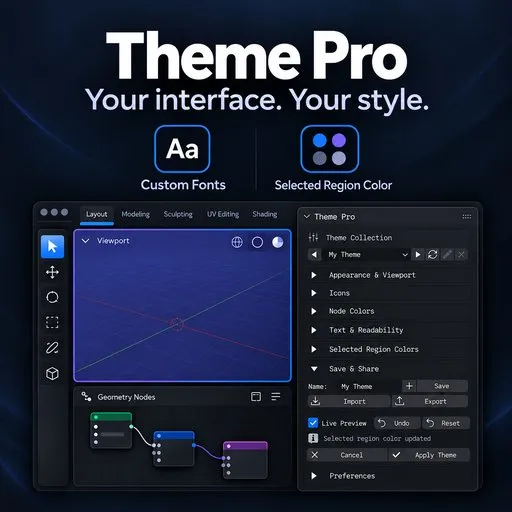
Customize Blender with 15 built-in themes, six bundled fonts, and controls for interface, viewport, and node colors. Preview changes live, undo edits, and save or share your own theme presets.
Theme Pro — Blender Theme Designer
Included
- 15 built-in choices: Blender Dark/Light, seven software-inspired palettes,Atelier Carbon, Cobalt Draft, Sage Workshop, Graphite, Linen and Night.
- Six bundled OFL fonts, plus linking to your own local font folder or file.
- Vertex size, edge width, widget roundness and automatic highlight text contrast.
- Region picker for inspecting related Blender theme colors.
- Named user presets with rename/delete and JSON import/export.
- Up to 32 Theme Pro undo steps within the current editing session.
Requirements and installation
Minimum API target: Blender 4.3. Automated Windows tests passed on Blender 5.0.1, 5.1.2 and 5.2.1 LTS. Blender 4.3–4.5, macOS and Linux are unverified.
Graphical acceptance review is pending for version 1.0.0.
Install the ZIP through Preferences > Get Extensions > Install from Disk, enable Theme Pro, then open the 3D Viewport sidebar (N) > Theme Pro.
Works offline; no separate account, activation, downloads or paid dependencies are required to run Theme Pro. Filesystem access is used for fonts and presets.
Scope
Theme changes affect Blender preferences globally. Some editors share theme fields. Custom node colors and third-party UI drawing can override Blender's theme settings. Font weight and other version-dependent fields affect only what the running Blender exposes. JSON presets contain font paths, not font files; the receiving computer needs those fonts at usable paths. Save preset does not replace Apply Theme or Save Blender Preferences. Software-inspired palettes are adaptations, not official application themes or endorsements. Source is included under GPL-3.0-or-later with original MIT notices; bundled fonts retain SIL OFL 1.1.
Frequently asked questions
Does Theme Pro change my models or materials?
Theme Pro edits Blender's interface theme and typography. It does not edit scene geometry or material data.
How do I keep the theme after restarting Blender?
Click Apply Theme, then expand Preferences in the Theme Pro sidebar and click Save Blender Preferences.
Can I share a custom theme?
Yes. Export a Theme Pro JSON preset. Fonts are not embedded; a recipient may need to link the font again on their own machine.
Are the software-inspired palettes official themes?
No. They are Blender adaptations inspired by other applications.
Can I undo changes?
Undo steps through edits within the current Theme Pro session. Cancel restores the opening theme. Applying or cancelling ends that session's undo history.
Support and author
Created and maintained by Trinh Kien. Email: [email protected] For support, include your Blender version, operating system, reproduction steps and screenshots if relevant. You can also contact the seller on BlendKit. Copyright (c) 2026 Trinh Kien.


