
 Models
 Materials
 HDRIs
HDRIs
 Scenes
 Brushes
 Node Groups
 Printables
 Creators
 Creations
VSE-DAW FX
 add-on
Transform Blender's VSE into a powerful DAW. VSE-DAW FX brings 34 non-destructive audio effects to your workflow. Recording feature, real-time previews and pristine 64-bit final mixdowns without leaving the software.
VSE-DAW FX
Professional Audio Production Suite for Blender
Turn Blender's Video Sequence Editor into a full-fledged digital audio workstation. VSE-DAW FX brings a complete professional mixing and mastering toolkit directly inside Blender — record, edit, process, and master broadcast-quality audio without ever leaving your creative environment.
Built for studio professionals, post-production engineers, podcasters, and film composers who demand precision, speed, and zero-compromise audio quality.
Why VSE-DAW FX?
In professional studios, every minute counts. VSE-DAW FX eliminates the round-trip between your video editor and external DAWs — capture performances, sculpt your sound, and deliver final mixes in one seamless workflow. From tracking to mastering, everything happens on the Blender timeline you already know.
Authentic Studio Experience
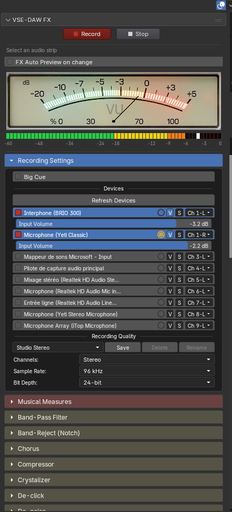
Step into a faithfully redesigned studio console right inside Blender. The custom UI delivers the tactile feel of real studio gear:
Classic round transport buttons — Record and Stop, professional and responsive
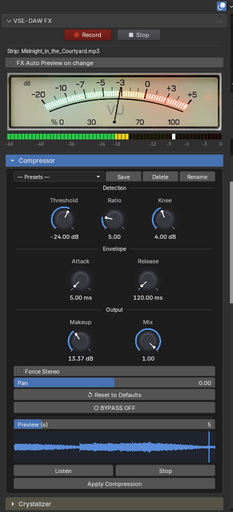
Analog VU meter — real-time ballistic RMS metering during playback and recording
Precision peak meter — catch every transient, prevent every clip
Live input monitoring — see your levels before you hit Record
Waveform display on every effect module — visualize your source before committing to a process
Direct Multi-Track & Multi-Source Recording
Capture performances directly onto the VSE timeline — no external recorder.
Single-source recording — voiceovers, instruments, and external line inputs with a single click
Multi-Source recording — simultaneously capture multiple microphones or inputs for podcasts, band rehearsals, interviews, and multi-mic sessions
Intelligent Stereo Pairing — when Stereo mode is selected with multiple sources, inputs are automatically paired into L/R stereo files (mic 1+2 → stereo, 3+4 → stereo, …). Odd remainders are preserved as mono
Per-device channel assignment — route each input to its own VSE channel automatically
Per-device input volume — adjust gain per microphone (-18 to 0 dB), applied live during recording
Punch-In mode — DAW-style overwrite recording: when enabled, the new recording replaces any existing strip on the target channel where they overlap in time
Real-time contextual warnings — the UI alerts you before recording if your source count doesn't match your stereo setup, so you never discover a tracking mistake after the take
Recording presets — Podcast Mono, CD Stereo, Broadcast Stereo, and Studio Stereo — one-click setup for common scenarios
Big Cue Countdown — Beat-Synchronized
Big Cue is a beat-synced visual countdown locked to your tempo. Get every performer in the pocket for the perfect first note.
Stretchable Musical Bars
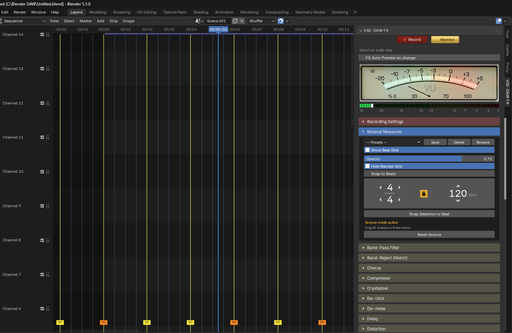
Overlay true musical bars on your VSE timeline. Simply stretch them to perfectly follow the natural groove of your track.
BPM and Time Signature — define your project's tempo and meter
Visual measures overlay — see bars and beats directly over your audio
Beat Lock — enforce snap alignment on beat boundaries
Groove Mode — drag measure markers freely to match performances that weren't cut to a click, then capture the resulting groove
Snap to Beat — instantly align strips or the playhead to musical boundaries
Measure presets with intelligent auto-naming (e.g., "4/4 — 120 BPM India")
Find Tempo — effortlessly match the tempo to any song by simply dragging two on-screen bars.
Grid opacity control — dial down the overlay so it doesn't compete with your waveforms
Option to hide Blender's native grid — declutter the timeline when the beat grid is active
Perfect for film scorers, sound designers working to picture, and any project that blends music with video.
Non-Destructive Auto Preview
Work fearlessly with an intelligent preview system that never touches your source files.
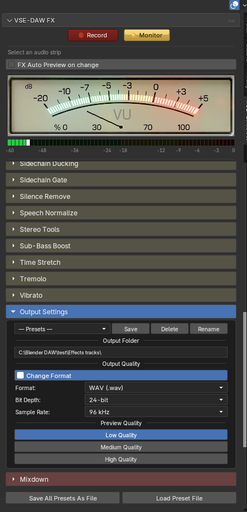
As you navigate the timeline, VSE-DAW FX automatically generates and updates a short preview, displaying a graphical representation directly within each effect module. This simulates real-time processing while keeping your original audio completely pristine. All previews are rendered in 64-bit floating-point internal precision — only the output file bit depth changes to balance disk speed: 16-bit (Low/Medium) or 24-bit (High).
Studio-Grade Non-Destructive Mixdown
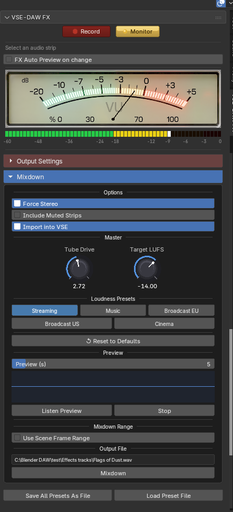
Your final mixdown deserves studio math. VSE-DAW FX processes the final render in 64-bit floating-point internal precision at a minimum 96 kHz internal bus rate (or higher when sources exceed 96 kHz), with SoX Very-High-Quality resampling — the same headroom used by top-tier mastering tools — guaranteeing zero quantization artifacts, inter-sample peaks properly handled, and true reference-quality output.
Integrated two-pass EBU R128 loudness normalization for a polished, broadcast-ready final result, with loudness presets (EBU R128 Broadcast, ATSC A/85, Streaming Music, Podcast, Cinema)
Tube Drive saturation — analog-modeled tanh soft-clipper with asymmetric clipping for even-order harmonic warmth, parallel "dirty mix" blend, and optional 2x oversampling
Mixdown Preview — audition the final mix before committing to a full render
Use Scene Range — limit the mixdown to Blender's timeline frame range, or render the full span from first strip to last
Non-destructive workflow — the mixdown lands on a new track above the original
Full format control on the output
Output presets — CD Quality, Broadcast 48 kHz, Studio Master, High-Res Float, and Original Format
Effect Chain — Multi-Effect Processing
Stack multiple effects on a single strip in any order. Reorder, add, or remove effects in the chain — each module is rendered in sequence, feeding its output into the next. The entire chain is non-destructive and applied as a single operation.
Per-Effect Bypass
Every effect module includes a Bypass toggle. When active, the preview plays the original unprocessed audio and the Apply operation leaves the source untouched — perfect for instant A/B comparison while dialing in your settings.
34 Professional FFmpeg-Powered Effects
A complete mixing, mastering and restoration chain, each module with waveform display, live preview, non-destructive apply, factory presets, user presets, and reset-to-defaults:
Dynamics & Loudness
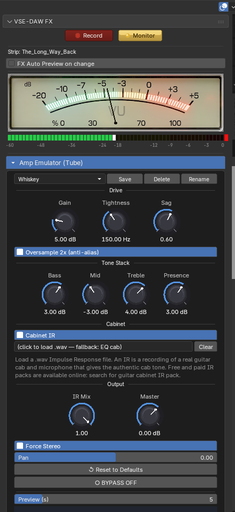
Amp Emulator (Tube) — 3-stage tube preamp, 4-band passive tone stack, power-supply sag, cabinet simulation (built-in EQ or custom Impulse Response files), Oversample 2x
Compressor
Sidechain Ducking
Sidechain Gate
Noise Gate
Limiter
Loudness Normalizer (EBU R128)
Speech Normalize
De-esser — frequency-conscious sibilance control with Output / Input / Ess-only listen modes to precisely audition what is being removed
Equalization & Filtering
Equalizer (5-Band parametric)
Low-Pass Filter
High-Pass Filter
Band-Pass Filter (Hz / Q-Factor / Octave width modes)
Band-Reject (Notch)
Time-Based Effects
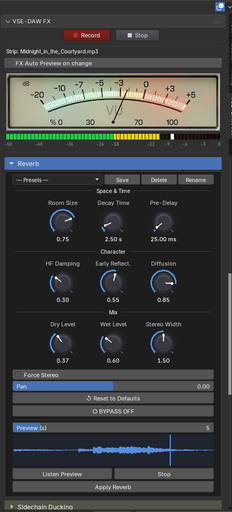
Reverb (Algorithmic: Small Room → Cathedral, plus Convolution IR loading for true real-world spaces)
Delay
Chorus
Flanger
Phaser
Tremolo
Vibrato
Pitch & Time
Pitch Shift
Time Stretch
Frequency Shift
Restoration
De-noise — dual-algorithm engine: NLM (Non-Local Means) for transient-safe cleanup on light stationary noise, and FFT (Spectral) for stronger reduction on broadband/tonal noise such as HVAC, hum, tape hiss, and vinyl/shellac surface noise (white / vinyl / shellac noise profiles)
De-click / De-clip — unified restoration module with Mode selector: Clicks (adeclick) removes impulsive clicks and pops (vinyl, mouth clicks, electrical glitches); Clipping (adeclip) reconstructs digitally clipped peaks
Silence Remove
Stereo & Creative
Stereo Tools (Mid/Side encoding/decoding, channel swap, stereo base, phase invert)
Extra Stereo
Sub-Bass Boost — Oversample 2x (optional)
Crystalizer — Oversample 2x (optional)
Harmonic Exciter — synthesises high-frequency harmonics to restore "air" and brilliance without EQ boost. Adjustable band (Frequency / Ceiling), Drive, and odd/even Harmonics Blend (tube-like vs. tape-like character), with a Listen button to solo the excited band
Lo-fi Distortion (Bitcrusher) — bit-depth reduction, sample-rate reduction (the classic SP-1200 / 8-bit lo-fi sound), Linear or Logarithmic crushing curve, Oversample 2x
Fade In / Out (12 curve types: Linear, Quarter Sine, Exp Sine, Half Sine, Logarithmic, Inv Parabola, Parabola, Quartic, Cubic, Square Root, Cube Root, Exponential)
Oversample 2x (Anti-Alias)
Modules with nonlinear processing (Amp Emulator, Lo-fi Distortion, Mixdown Tube Drive, and optionally Sub-Bass Boost and Crystalizer) offer a one-click Oversample 2x toggle. When enabled, the signal is upsampled to 96 kHz (or 2× the current rate) before the distortion stage and downsampled back afterwards using a high-quality SoX resampler — eliminating the "digital fizz" caused by aliasing when clipping harmonics fold back below Nyquist. Enabled by default on modules where the benefit is most audible.
Impulse Response (IR) Loading for Amps & Reverb
Bring the sound of real-world spaces and studio gear into Blender using FFmpeg's afir convolution engine.
Amp Emulator Cabinet IRs: Load external cabinet impulse response WAV files (20–500 ms) for realistic speaker simulation (compatible with standard IR formats from Kemper, Neural DSP, Line 6 Helix, and other platforms). Includes wet/dry IR mix control. When no IR is loaded, a built-in 6-band EQ-based cabinet fallback is used. The IR file picker is always visible in the panel, so loading a new cab takes a single click.
Convolution Reverb IRs: Load reverb impulse responses to place your audio in faithfully captured real-world rooms, halls, plates, or springs. When a WAV IR is loaded, the module seamlessly swaps from its algorithmic engine to pure convolution, retaining precise control over Pre-Delay, Stereo Width, and Wet/Dry levels. All IR files are loaded locally from your disk.
Preset System — Built for Studios
Every effect ships with professionally tuned factory presets (Vocal Leveler, Drum Bus Punch, Concert Hall, Telephone, Parallel Crush, Air & Shimmer, Warmth, SP-1200 Crunch, Sibilance Hunter, Tube Sparkle, FFT Voice, and many more), ready to drop onto any source.
Per-effect factory presets — proven starting points crafted by audio engineers
Unlimited user presets — save, rename, delete your own sounds per effect
One-click library export/import — "Save All Presets As File" and "Load Preset File" let you archive, share, or deploy your entire preset library across sessions and machines
Protected factory presets — never accidentally overwrite your shipped sounds
Output format presets — CD Quality, Broadcast, Studio Master, High-Res Float, Original Format
Recording presets — Podcast Mono, CD Stereo, Broadcast Stereo, Studio Stereo
Flexible Output Settings
Master to any format your delivery spec requires:
Formats — WAV · AIFF · W64
Bit Depth — 16-bit · 24-bit · 32-bit float
Sample Rate — 44.1 kHz · 48 kHz · 88.2 kHz · 96 kHz · 192 kHz
Custom Output Directory — full control over where rendered files land
"Keep Original Format" — bypass conversion and preserve source format/quality when desired
System Requirements
Component Minimum
Blender 4.2.0 or later
Operating System Windows 10/11 · macOS 12+ · Linux (Ubuntu 20.04+)
Internet Required on first launch (FFmpeg auto-install, ~70 MB)
Zero-friction setup: FFmpeg is downloaded and installed automatically on first use. No manual configuration required in most cases.
Important Notice Regarding FFmpeg
This add-on acts as an interface that leverages FFmpeg for audio processing. FFmpeg is automatically installed on first use — when you launch Blender with VSE-DAW FX for the first time, the add-on will download and set up FFmpeg for you (~70 MB one-time download).
If automatic installation fails (e.g., no internet connection), install FFmpeg manually:
macOS: brew install ffmpeg
Windows: winget install ffmpeg or download from https://ffmpeg.org/download.html
Linux: sudo apt install ffmpeg (or your distribution's equivalent)
Then restart Blender.
This software utilizes commands sent to FFmpeg, a free and open-source software project belonging to its respective authors. For more information or to view its source code, please visit http://ffmpeg.org.
Third-Party Software Notices
This add-on uses the following third-party software components, which are automatically installed on first use:
FFmpeg (LGPL 2.1+ / GPL) — Audio processing engine https://ffmpeg.org — Source: https://github.com/FFmpeg/FFmpeg
static-ffmpeg (MIT License — Zack Voase) — Auto-downloads FFmpeg binaries https://github.com/zackees/static-ffmpeg
sounddevice (MIT License — Matthias Geier) — Audio recording https://python-sounddevice.readthedocs.io — Source: https://github.com/spatialaudio/python-sounddevice
PortAudio (MIT License) — Audio I/O backend http://www.portaudio.com — Source: https://github.com/PortAudio/portaudio
VSE-DAW FX — Studio power. Blender workflow. Zero compromise.


