
 Models
 Materials
 HDRIs
HDRIs
 Scenes
 Brushes
 Node Groups
 Printables
 Creators
 Creations
Align Tools XYZ
 add-on
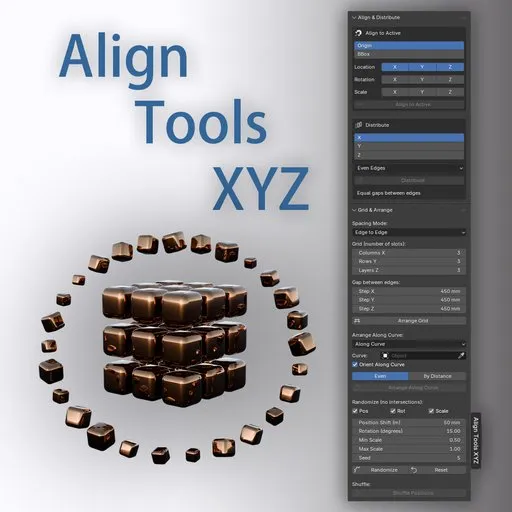
Align Tools XYZ is a powerful set of tools for precise object positioning in Blender: it will help you quickly build a grid, distribute elements with the right gap, arrange them along a curve, and add light randomness or shuffle positions.
Align & Distribute
Alignment to the asset — objects are aligned to the active object or to the active vertex (in Edit Mode). You can align the position, rotation, and scale to the selected axes. The reference point is Origin or BBox (Min/Center /Max).
Distribution is a uniform distribution of objects or vertices along the X/Y/Z axis. Two modes: Even (evenly between the extremes) and By Gap (with a fixed gap). It works using Origin or BBox.
Grid & Arrange
Grid Arrangement — arrangement of objects into a three-dimensional grid (columns × rows × layers). Step modes: Edge to Edge (the gap between the faces) and Center to Center (the distance between the centers).
Curve (Arrange Along Curve) — the arrangement of objects along the curve. Even mode — evenly, By Distance — with a set step. The step along the curve also has an Edge to Edge / Center to Center switch. The Orient Along Curve option rotates objects tangentially.
Grid on Curve is a combined mode: columns run along a curve, rows run perpendicular, and layers run vertically. Uses the same pitch and orientation settings.
Randomize — random shift, rotation, and scale with intersection checking (AABB collision). Adjustable ranges, LEDs for reproducibility.
Shuffle — shuffling the positions and rotations of objects among themselves.
Reset — returns to the base positions saved after the last alignment (grid or curve). The scale is reset to 1, and the rotation is reset to the original one.


