
 Models
 Materials
 HDRIs
 Scenes
 Brushes
 Node Groups
 Printables
 Creators
 Creations
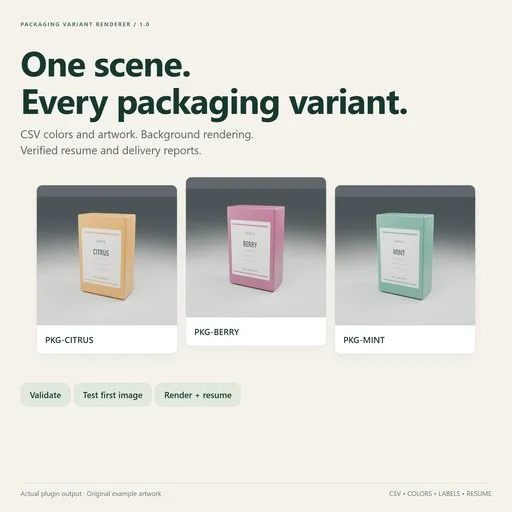
Packaging Variant Renderer
 add-on
Render packaging colors and label variations from a CSV, verify completed images, and resume interrupted batches from a stored scene snapshot.
Build your packaging scene once, then render your SKU list without manually changing a material and saving each camera view.
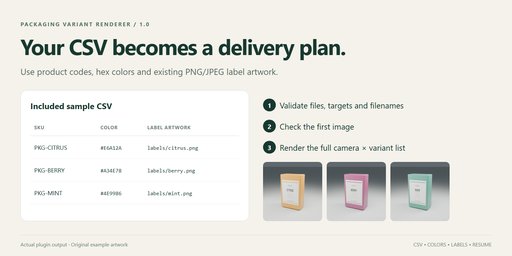
Choose an existing color material and Principled node, optionally choose a separate label material and Image Texture node, and load a UTF-8 CSV. Validate the inputs, test the first image, then render the full batch from the active camera or every scene camera.
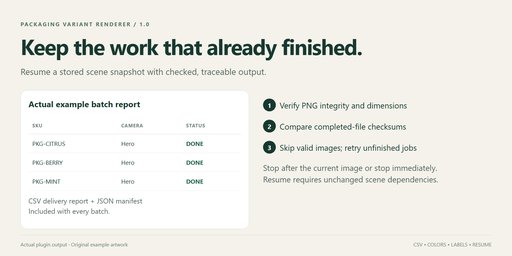
Each batch uses a separate saved scene snapshot and background Blender process. Labels are copied into the batch folder. An interrupted batch can be resumed; completed PNGs are checked before they are skipped. You also receive a delivery CSV, manifest and worker log.
Included: original example scene, sample CSV and label artwork, offline illustrated guide, Python source and GPL-3.0-or-later license.
Windows x64; automated render/install testing on Blender 4.5.15 LTS and 5.2.3 LTS, with desktop acceptance on 4.5.15. Supports Cycles CPU, automatic GPU selection with CPU fallback, and Eevee. Verification notes are included in the download.
Requires your existing models, UV mapping, node materials, lighting and cameras. One color input plus one label-image input per batch, using the same or separate materials. Outputs PNG RGBA 8-bit stills at the current frame. No animation, model generation, geometry switching, third-party render engines or render-farm integration. Factory-setting workers do not load installed add-ons or execute scene scripts.
The guardrails allow up to 1,000 CSV variants and 5,000 image jobs. Resume uses the stored snapshot, not new scene edits, and requires the same Blender version and unchanged external scene dependencies. Rendering speed depends on the scene and hardware; the extension automates repetition rather than accelerating individual renders.
No API key, account, subscription, activation or network connection is required by the extension. For support, contact the creator through the purchase platform and include the exact error, Blender version and reproduction steps.
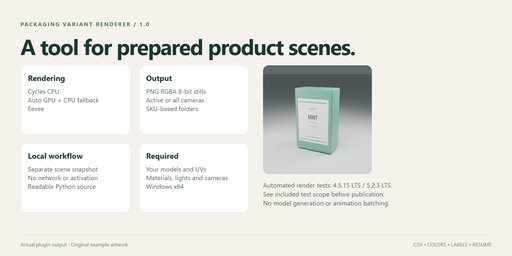
Turn a list of packaging colors and label artworks into named product images.
This release creates PNG stills from an existing scene. It does not
create models, UV layouts, labels, lighting, or cameras.
- On Windows, in Blender 4.5.15 LTS or 5.2.3 LTS, open Edit > Preferences > Get Extensions.
- Open the top-right menu, choose Install from Disk, and select the extension ZIP.
- Enable the extension. In the 3D Viewport press N and select Variant Render.
The Windows release is tested on those two versions. Other versions and operating
systems are not advertised as verified. Review the verification notes included in the download for the exact test scope.
- Save your prepared scene. The extension uses the current in-memory scene for a
new batch, including unsaved edits, and writes a separate snapshot. - Choose your UTF-8 CSV and the output parent folder. Each batch gets a unique subfolder.
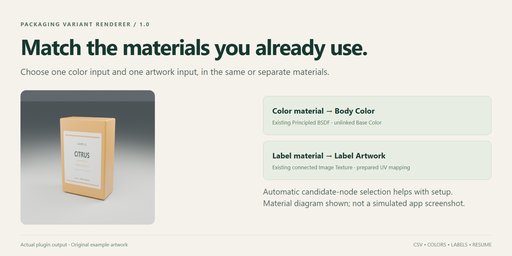
- Choose the node-based Color material assigned to your product, or use Use Active Material.
- Set Color node to the name of a Principled BSDF node with an unlinked Base Color.
Color targets are ignored for label-only CSVs. - Choose a Label material, or leave it empty to use the color material. Set Label node
to the name of a connected Image Texture node in that material.
The node must already be connected in your shader, with appropriate UV coordinates. - Choose the active camera or all cameras in the scene. Set the CPU thread budget.
- Click Validate Inputs, fix reported issues, then Render First Image to check the result.
Click Create Batch and Render to render the full list. - Open Batch Folder opens renders, report.csv, manifest.json and worker.log.
If report.csv was open in Excel while rendering, close it and use Refresh Delivery Report.
A locked report does not stop the render queue; the manifest remains the durable job record.
Use the Example button to copy the example into a writable user folder and open it.
Save your current project first. Its color material is Packaging, color node Body Color,
and label node Label Artwork; the optional label material can be left empty.
An example variants.csv and three label PNGs are supplied beside it.
csv sku,color,label BOX-RED,#D04040,labels/red.png BOX-BLUE,#4080D0,labels/blue.png BOX-ORIGINAL,,labels/other.png
- Required header: sku, plus color, label, or both. Headers are case insensitive.
- color accepts #RRGGBB (sRGB). It is converted to scene-linear values for the shader.
- Artwork paths are relative to the CSV directory, or absolute. PNG and JPEG are supported.
- An empty color/label cell keeps that property from the original snapshot for that row.
- Each row must change at least one property. Up to 1,000 variants / 5,000 images per batch.
- SKU and camera names become portable ASCII filenames. Conflicts are rejected, not overwritten.
- Output: renders/<sanitized-SKU>/<sanitized-camera>.png.
- Stop After Current Image completes the current render and stops before the next one.
- Stop Now terminates only the batch's background process. Its incomplete image is retried.
- To recover after restarting Blender, choose the existing batch folder and Resume Stored Batch.
- If a worker survived closing Blender, it can finish independently. Choose its batch folder
and Request Stop for Stored Batch to stop it after its current image; while it owns the
run lock, starting a second worker for that batch is refused. - Resume uses the immutable stored scene, labels and configuration. Current scene edits are ignored.
Create a new batch to include edits. - Resume requires the same Blender version. It verifies snapshot/artwork hashes and external
dependency hashes. Changed external files require a new batch; do not mix revisions. - Completed outputs must pass PNG structure, checksum, pixel-stream, dimensions and hash checks
before they are skipped. Corrupt or edited images are rendered again. - An OS file lock prevents two workers writing one batch at the same time and releases on crashes.
Rendering happens in a separate background Blender with factory settings and automatic
Python execution disabled. The worker changes only its loaded snapshot. The extension
does not save over your source .blend or edit your original artwork. It has no network
requests, telemetry, accounts, API keys or activation requirement.
The snapshot includes your scene. Do not share batch folders unless you intend to share
that project. External scene dependencies remain referenced, with hashes recorded;
the batch is not a fully portable project archive. Variant label artworks are copied.
- One color material and Principled color input; one label material and Image Texture node.
These may be the same material or separate materials. - Static images at the current scene frame; PNG RGBA 8-bit, existing resolution and color management.
- Cycles and Eevee. Choose CPU or Auto GPU / CPU fallback for Cycles. Auto detects an
available compute backend in the worker and uses CPU when none is available or a GPU
render reports an error. A driver-level process crash still requires resuming the batch.
Eevee requires a usable graphics context/driver. The actual device is recorded in the manifest. - No third-party render engines or add-ons required by the scene. Factory-startup workers do not
load your installed add-ons or execute scene scripts. Scripted drivers may not evaluate. - Animated/driven target material nodes, render borders, multiview and compositor File Output
nodes are rejected. The video sequencer is bypassed to render the chosen scene cameras. - External dependencies must resolve to regular files. UDIM/sequence patterns and complex
simulation-cache workflows are not supported in this release. - Input hashing can take time for large scenes/textures. Background rendering uses additional RAM.
- Stop/resume, hashes and PNG checks detect incomplete output; they do not judge artistic correctness.
- Edited image datablocks must be saved or packed before taking a snapshot.
- Keep output paths short (preflight enforces a portable 240-character output-path budget).
- This release does not promise compatibility with every Blender version or marketplace approval.
- Pink renders: check that scene dependencies existed when the snapshot was made.
- Unchanged product color: choose the correct unlinked Principled Base Color; verify which faces use it.
- Unchanged artwork: connect the chosen Image Texture into the shader and verify its UV mapping.
- Worker exited / failed images: open worker.log and the error column in report.csv.
- Resume refused after a dependency changed: create a new batch for the updated project.
- After restarting Blender, select the batch's own folder, not its parent output folder.
Contact the creator through the marketplace where you purchased the extension. Include
the product version, Blender version, operating system, the exact error and a minimal
reproduction where possible. Do not send confidential project files or the complete batch
folder unless you intend to share the included scene snapshot and artwork.
GPL-3.0-or-later. See LICENSE. Source is included. No third-party Python dependencies.
The example scene and label artwork are original materials supplied with this extension.


