Blendkit logo
  • Download Blendkit
  • Subscribe
  • Mission
  • Users
    • FAQ
    • Terms & conditions
      • Terms and Conditions
      • Privacy Policy
      • Refund Policy
    • Get Blender add-ons
    • Blendkit beyond Blender
      • Blendkit for Godot
      • Blendkit for Rhino
      • Blendkit for Maya
      • Blendkit for Unreal
    • Add-on troubleshooting
    • Licenses
      • Lincenses info
      • Linceses FAQ
    • Service status
    • Cookies
      • Cookie Policy
      • Cookie settings
  • Creators
    • FAQ
    • Overview
    • Terms and Conditions for creators
    • General Uploading info
    • Upload Models
    • Upload Materials
    • Upload Brushes
    • Upload Add-ons
    • Guidelines for add-on creators
    • Upload Scenes
    • Upload HDRs
    • Upload Printables
    • Blender Tutorials
    • Validation Statuses
    • Fair Share Redistributions
    • Affiliate program
    • Most common upload issues
  • News
  • About
    • Our team
    • Contact
    • Press Kit
    • Blender 3D Training
    • Job positions
  • Models
  • Materials
  • HDRI
  • Scenes
  • Brushes
  • PrintablesNEW
  • Add-onsNEW
  • Log In
  • Register

BK BD 25

Blender 3D Object Blender Add-Ons

Free Plan

Get 74,958 free assets

Full Plan 33% off

Access the full library & enjoy 153,826 assets

Blender add-ons 33% off

Find free & paid Blender add-ons

Become creator

Share & sell your assets

Built by 3D artists, for 3D artists. Meet Blendkit โ†’

All assets

Add-ons icon Add-ons

  • Models icon Models
    • Architecture
      • Building
        • Commercial Historic Private Sci-fi
        • Other building
        Door Exterior element
        • Bench Facade element Fence Fountain Playground Swimming pool Urban Environment
        • Other exterior element
        Floor Covering Molding / Carving Scenes Stairs Structure Wall Panel
        • 3D Panel Stone Panel Upholstery Panel Wood Panel
        • Other wall panel
        Window
      • Other architecture
      Character
      • Anatomy
        • Full Body Head Internal organ Limbs Skeleton
        • Other anatomy
        Animal
        • Bird Dinosaur Fish Insect Mammal Reptile
        • Other animal
        Clothing
        • Accessories Footwear Headwear Lingerie Man Clothing Woman Clothing
        • Other clothing
        Humanoids
        • Child Fantasy Hero/ Heroines Medical Men Military Police Sci-Fi Sports Women
        • Other humanoids
        Monster / Creature Robot
      • Other character
      Decoration
      • Bag / Suitcase Blanket Book Carpets Clock / Watch Curtain Decoration Set Fabrics Fireplace Food / Drinks
        • Beverage Food Fruit / Vegetable Kitchenware Sweets / Dessert Tableware set
        • Other food / drinks
        Holiday Decoration Mirror Money Picture Pillow Sculpture Textile Vase Miscellaneous
      • Other decoration
      Effects / Simulations
      • Modifier Motion design Simulations Technical
      • Other effects / simulations
      Industrial
      • Container Equipment Machinery Parts Sign Tools
        • Handtools Powertools
        • Other tools
      • Other industrial
      Interior
      • Armchair Bathroom furniture
        • Accessories Bathhub Faucet Furniture Set Laundry Shower Toilet / Bidet Towel rail Wash Basin
        • Other bathroom furniture
        Bed Cabinets
        • Bookcase Commode Shelving TV Cabinets
        • Other cabinets
        Chair
        • Bar Chair Regular Chair
        • Other chair
        Console Dressing Table Kids furniture
        • Bed Chair Furniture Set Miscellaneous Table Toy Wardrobe
        • Other kids furniture
        Kitchen Furniture
        • Faucet Kitchen Appliance Kitchen Set Sink Storage
        • Other kitchen furniture
        Lights
        • Ceiling Light Floor Lamp IES Light Industrial Light Outdoor Light Table Lamp Wall Light
        • Other lights
        Office Furniture
        • Chair Desk Stationery Storage Table
        • Other office furniture
        Outdoor Furniture Pouf Restaurant / Bar Seating Set
        • Chair-table Set Sofa-table Set
        • Other seating set
        Shopping / Retail Sideboard / Drawers Chest Sofa Table Wardrobe
      • Other interior
      Military
      • Aircraft Vehicles Watercraft Weapon / Armor
        • Historic Modern Sci-Fi
        • Other weapon / armor
      • Other military
      Nature
      • Atmosphere
        • Cloud Fog Smoke / Fire Wind Setup
        • Other atmosphere
        Grass Landscape
        • Environment Elements Terrain
        • Other landscape
        Plant
        • Bouquet Fitowall Indoor Outdoor
        • Other plant
        Tree
      • Other nature
      Science
      • Lab Equipment Medical Equipment Microbiology Miscellaneous Pharmacy
      • Other science
      Space
      • Miscellaneous Planet Satellite Spacecraft Station
      • Other space
      Sport / Hobby
      • Fishing Gym Hobby Accessories Miscellaneous Music
        • Accessories Instruments Stage Studio
        • Other music
        Sport
      • Other sport / hobby
      Technology
      • Audio Devices Computer
        • Components / Hardware Desktop Game Console Keyboard Laptop Monitor Mouse Peripheral
        • Other computer
        Device
        • Cellular Phone Corded Phone Smartphone Smart Watch Tablet
        • Other device
        Home Appliance Miscellaneous Photography Robotics Video devices
      • Other technology
      Transport
      • Aircraft
        • Accessories / Part Air Baloon Airplane Drone Glider Helicopter Historic Plane Private Jet Seaplane
        • Other aircraft
        Bicycle Car
        • Buggy Concept Historical Luxury / Supercar Modern Racing Sci-Fi
        • Other car
        Emergency
        • Ambulance Fire trucks Police
        • Other emergency
        Heavy Vehicle
        • Industrial Trailer Truck Van
        • Other heavy vehicle
        Motocycle
        • Historical Race Standard
        • Other motocycle
        Public Transport
        • Bus Taxi
        • Other public transport
        Railed vehicle
        • Cargo Passenger
        • Other railed vehicle
        Small Electric Vehicles Vehicle Parts Watercraft
        • Accessories / Part Boat Hovercraft Ship Submarine Yacht
        • Other watercraft
      • Other transport
    • Other models
  • Materials icon Materials
    • Animal Asphalt Bricks Ceramic Concrete Dirt Fabric
      • Blackout Chenille Dimout Embroidery Flat weave Jacquard Print Sheer Suede Texture Velvet Vinyl / Imitation leather
      • Other fabric
      Floor Food Fx Glass Grass Ground Human Ice Leather Liquid Marble Metal Organic Ornaments Paper Paving Plaster Plastic Rock Roofing Rubber Rust Sand Soil Stone Tech Tiles Wood
    • Other materials
  • HDRIs icon HDRIs
    • Indoor
      • Abstract Futuristic Environments Holiday Industrial Interiors Nighttime Environments Public Residential Rural Sports Studio
      • Other indoor
      Outdoor
      • Abstract Architectural Cityscapes Futuristic Environments Holiday Landscapes Nature Nighttime Environments Sports Urban Water Environments
      • Other outdoor
    • Other hdris
  • Scenes icon Scenes
    • Abstract Cartoon Exterior
      • Architectural Nature Post-apocalyptic Private Public Rural Urban
      • Other exterior
      Gaming Industrial Interior
      • Creative studios
        • Photography Studios TV Studios YouTube/Podcast Studios
        • Other creative studios
        Interior Isometric Private Public
      • Other interior
      Product visualization
      • Cloth viz Mockup Studio
      • Other product visualization
      Science Templates
      • Background Brush templates Magazine cover Typography Validation scenes
      • Other templates
      Thematic Scenes
      • Fantasy Historical Holiday Sci-fi Space Underwater
      • Other thematic scenes
    • Other scenes
  • Brushes icon Brushes
    • Anatomy
      • Animal / creature
        • Claws Face / head Feather Fins Fur Limbs Organs Scales Scars & wounds Skeleton Skin Spikes Tails & horns
        • Other animal / creature
        Human
        • Body Face Hair & nails Muscles Organs Scars & wounds Skeleton Skin
        • Other human
      • Other anatomy
      Art
      • Pattern Sculpture
      • Other art
      Clothing
      • Accessories Fabric Stitches
      • Other clothing
      Damage
      • Concrete Crack Cut Dirt Glass Metal Plaster Rust Wood
      • Other damage
      Geometric Industrial
      • Hard surface Sci-fi
      • Other industrial
      Misc Nature
      • Crater Fire Ice Landscape Organic Plant Rock Soil Stone Wood
      • Other nature
    • Other brushes
  • Node Groups icon Node Groups
    • Compositing Nodes Geometry Nodes
      • Curves
        • Curve Deformers Curve Optimizers Curve Shapes
        • Other curves
        Distribution
        • Arrays Distribution Transform Surface Distribution Volumetric Distribution
        • Other distribution
        Generators
        • Animations Curve Generators Measurements Mesh Generators Voxel Generators
        • Other generators
        Material
        • Colors
        Math
        • Functions Interpolations
        Selection
        • Falloffs Select by
        • Other selection
        Simulation
        • Diffusions Particle Physics
        • Other simulation
        Tools
        • Edit / Object mode
        • Other tools
        Topology
        • Mesh Deformers Mesh Primitives Remeshers Tessellate Mesh
        • Other topology
        Utilities
        • Rotation Switches Text / String Tools UV Vector Fields Visualizers
        • Other utilities
      • Other geometry nodes
      Shading Nodes
      • Effects Procedural Textures
      • Other shading nodes
  • Printables icon Printables
    • Containers Fashion Games Holders Instruments Mechanics Misc Organics
    • Other printables
  • Add-ons icon Add-ons
    • 3D View Add Mesh Animation Development General Import - Export Material Mesh Modeling Node Object Paint Render Rigging Scene System Tools User Interface UV
  • Creators icon Creators
  • Creations icon Creations
YouTube Facebook Instagram GitHub TikTok BlueSky Mastodon
  • Trending  
  • Most bookmarked  
  • Highest asset score  
  • Highest complexity  
  • Highest quality  
  • Asset count  
  • Asset score sum
  • Newest
  • Most relevant
  • All
  • Free
  • Full
  • Paid
  • All assets
  • My bookmarked assets
  • All
  • 0 - 999
  • 1,000 - 9,999
  • 10,000 - 99,999
  • 100,000 - 999,999
  • 1,000,000 and more
  • All
  • Less than 256
  • 256
  • 512
  • 1K
  • 2K
  • 4K
  • 8K
  • 16K and more
  • All
  • Sculpt
  • Texture paint
  • All
  • Procedural
  • Texture based
  • All
  • Realistic
  • Non photorealistic
  • Other
  • All
  • Yes
  • No
  • All
  • Geometry nodes
  • All
  • Yes
  • No
  • All
  • Yes
  • No
  • All
  • No Sexualized Content
  • Sexualized Content
  • All
  • Yes
  • No
  • All
  • Windows
  • MacOS
  • Linux
  Bookmarks
The asset was added to your bookmarks.
Now you can filter it in Blendkit add-on.
  Bookmarks
The asset was removed from your bookmarks
  Bookmarks
Your rating could not be saved. Please try again.

Object Distributor

add-on add-on

Distribute objects and collections on mesh and curve paths
$15 $10.05
Share on Twitter Share on Facebook Share on Reddit Share link
Image 1
Image 2
Image 3
Image 4
Object Distributor

Place anchors. Fill the path.

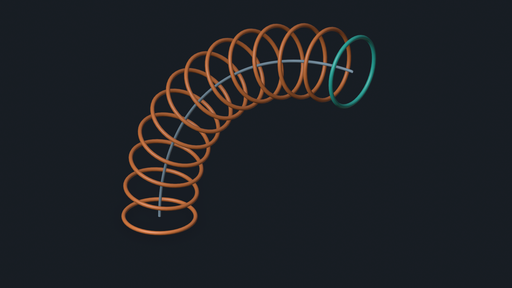
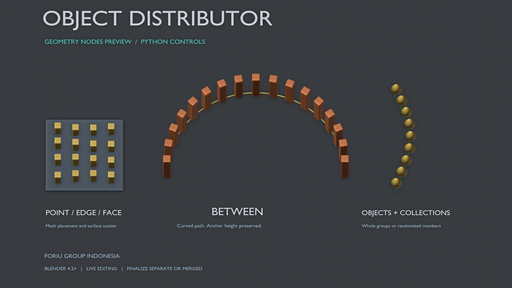
Object Distributor helps you repeat objects and collection members across meshes and along curves from one Blender panel. Fill between two existing anchor objects, or fit repeated connectors between lower and upper paths.

Build layouts for posts, fences, lights, fixtures and other repeated elements, with live controls for placement, orientation and final output.

Follow the path and match your anchors

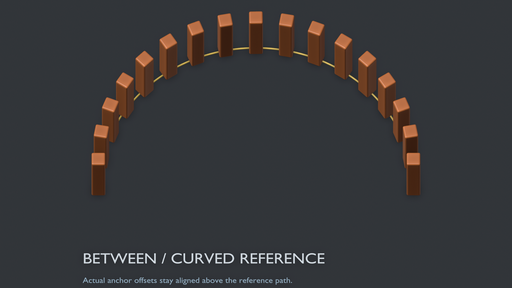
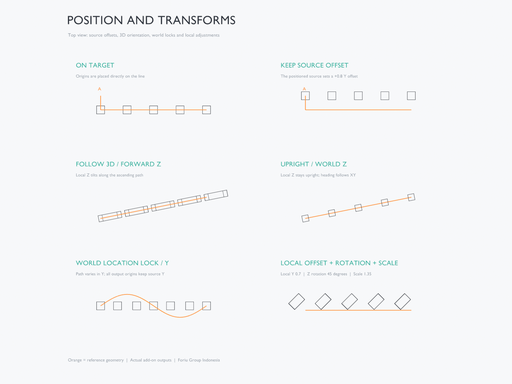
Between mode preserves your existing start and end objects. Keep their offsets above a reference, blend their rotations, or follow the curve while matching both endpoint orientations. For upright posts and fixtures, keep world Z upright while changing the horizontal heading.

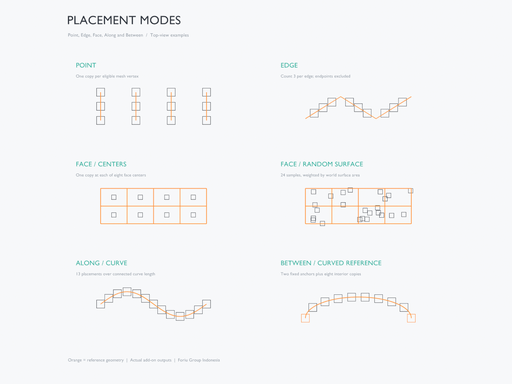
Choose Point, Edge, Face, Along, Between or Between Paths. Place copies at mesh vertices, distribute across individual edges, use face centers or random surface scatter, follow connected paths, fill between two anchors, or span two rails.

Fit posts and connectors between paths

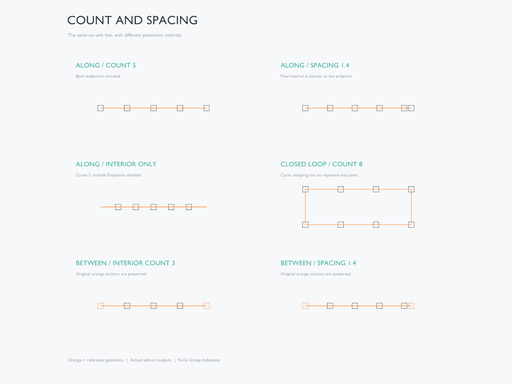
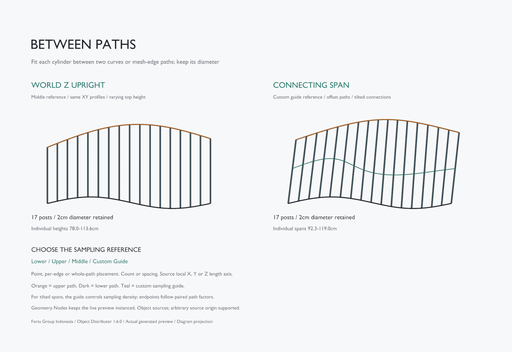
Between Paths fits a source Object between a Lower Path and Upper Path, each a curve or unbranched mesh edge chain. Choose Points, per-edge Count/Spacing, or continuous Along Path placement. Sampling Reference selects Lower Path, Upper Path, an interpolated Between Paths reference, or a third Projection Guide. Collection sources remain available in the other modes.

Keep posts vertical with Upright (World Z): reference XY positions must project onto both rails within tolerance, with the upper path above the lower at every post. Use Connecting Span for tilted connectors paired by normalized arc-length fraction. Select local X, Y or Z as the Length Axis; evaluated endpoint bounds fit the original rail pair independently of the source origin before the chosen offsets are applied. Cross-section Scale and seeded Cross-section Variation control width/depth while retaining that fitted length. Upper-path reversal and loop phase help match direction and starts.

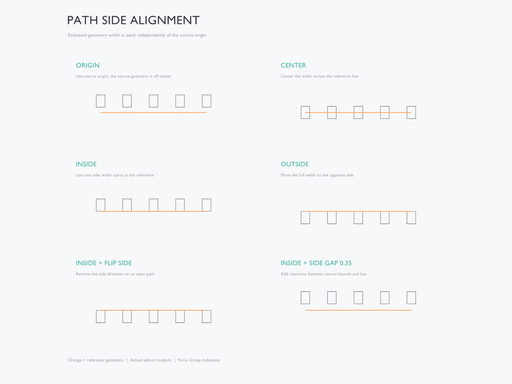
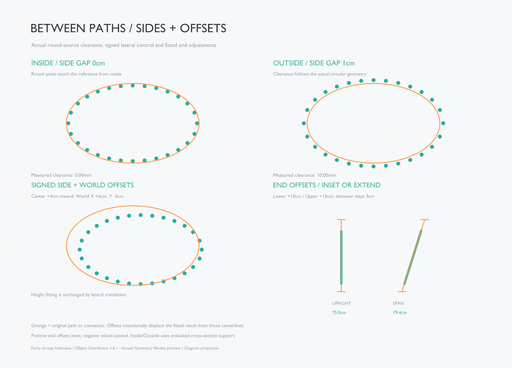
Use the mode's own Path Side Alignment: Center / Inside / Outside, Side Gap, signed Side Offset, and World Offset to position the evaluated cross-section against local tangent planes. Lower End Offset and Upper End Offset inset the ends with positive values or extend them with negative values. The default Center and zero offsets preserve the original fitted layout. Lateral shifts do not change the fitted length; end offsets do. Projection Tolerance checks the original references, so shifted connector centerlines need not stay on those curves.

The lower, upper and optional Projection Guide remain live inputs. Points uses mesh vertices or evaluated curve centerline vertices; Edges works per segment, so Curve Resolution affects density in those curve workflows. In Connecting Span, the reference controls sampling density and phase; the connector is not guaranteed to pass through a Guide. Multiple paths pair by spline/path order and require matching counts and open/closed status, including the Guide. The source must produce evaluated mesh geometry, with nonzero length/scale and no sheared world transform; mirrored source scales are supported. Fitting scales one axis without bending or trimming the source. Ordinary offsets from other modes, world locks and random rotations do not apply here. The dedicated side/corner controls fit the cross-section locally; they do not guarantee whole-polygon containment, generate corner profiles or provide collision avoidance.

Control where the geometry sits

Keep Source Offset lets you position the source before distributing it. On Target places origins directly on the target geometry.

On supported edge/curve paths and wire vertices, choose Path Side Alignment:

  • Origin: use the source origin.
  • Center: center the evaluated geometry width across the line.
  • Inside / Outside: place that width on the chosen side.

Closed planar loops determine their inside automatically. Open Path Up and Flip Side let you choose the side of an open path; Side Gap adds clearance. Adjust forward/normal axes, local and normal offsets, rotation, scale and world XYZ locks independently.

Handle corners and T/X junctions

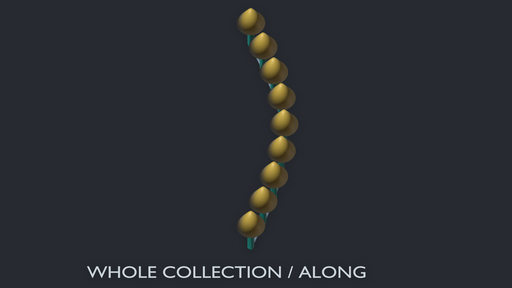
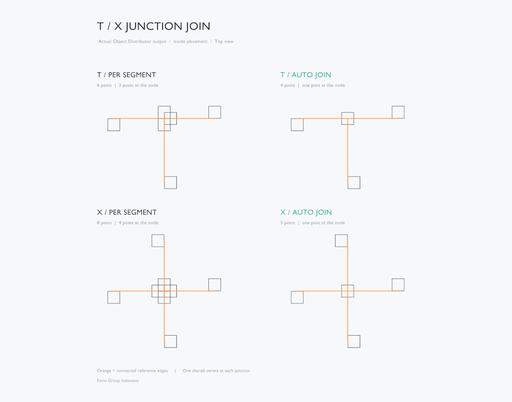
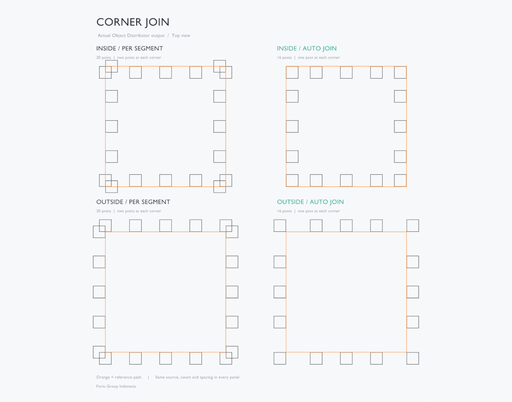
For side-aligned layouts, Auto Join fits connected two-edge corners against both adjoining sides. Shared T/X nodes receive one placement; Center, Inside and Outside center the source bounds on the junction. Whole Collection keeps its members together at that placement.

Use Per Segment for the earlier independent-edge behavior. Miter Limit bounds extensions on very sharp corners. Junction joining requires a shared vertex; crossings without a shared vertex remain separate.

Fit the layout and see the actual distance

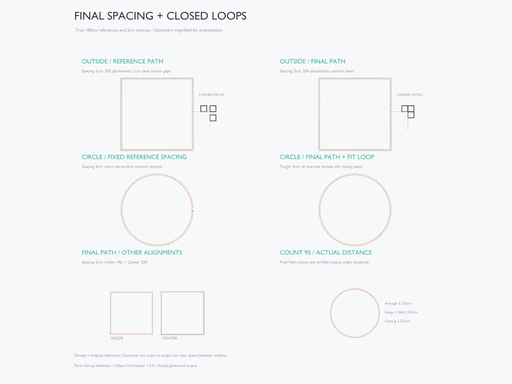
In Edge and Along, choose Reference Path to retain the earlier sampling or Final Path to sample the nominal placement path after side alignment. Final Path helps keep an Inside/Outside layout consistent through its corners. Gentle-turn smoothing handles sampled circles without treating every small turn as a sharp miter.

For closed Along paths, Fit Closed Loop distributes a whole number of intervals around the loop, including the closing interval. The entered spacing becomes a target and may be adjusted slightly. Keep Spacing retains the requested value and allows a shorter closing interval.

Measured Spacing displays the last built average, range and loop closing distance in three fixed rows, including when using Count. It follows scene units and measures straight-line origin/placement-pivot distances. Reference Path and Keep Spacing remain the defaults, so existing layouts stay available.

Use an object or a collection
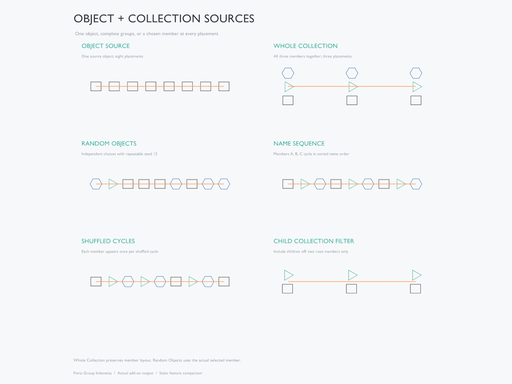
  • Object: repeat one source.
  • Whole Collection: repeat the group while keeping its member layout.
  • Random Objects: choose one member at each placement.
  • Choose repeatable random selection, name sequences or shuffled cycles.
  • Control pivots, child collections, visibility filters, member offsets, rotation, scale and layout spread.
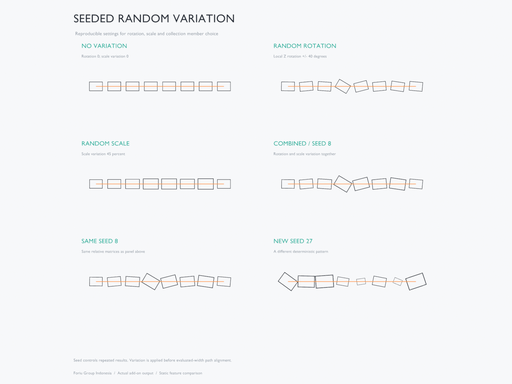
  • Add seeded rotation and scale variation.
Preview live, then choose your output

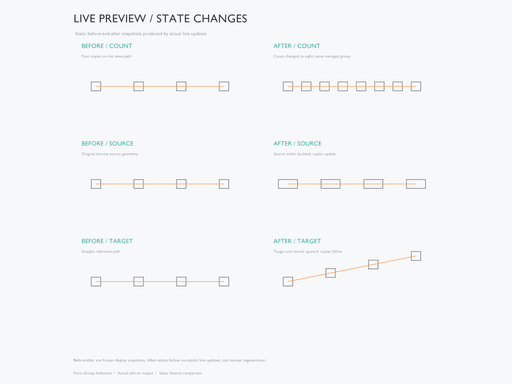
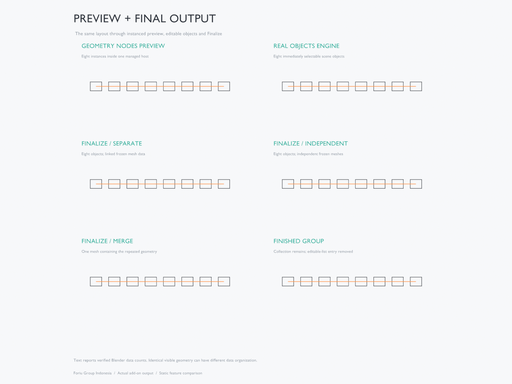
The default hybrid engine displays lightweight Geometry Nodes instances. Change count, spacing, transforms, source geometry or the target and let Live Preview update the distribution. The optional Real Objects engine creates individually selectable copies immediately.

Finalize to separate real objects or one merged mesh. Separate output supports shared or independent geometry and optional geometry freezing/modifier baking. Finished collections remain in the Outliner and leave the editable result list, keeping the panel focused on active work.

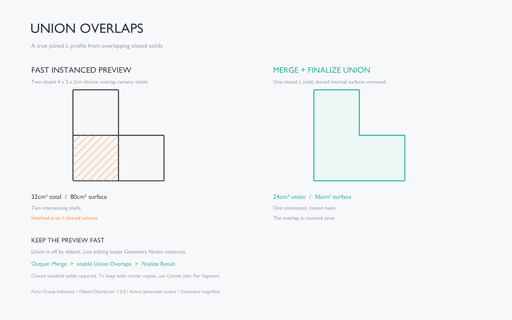
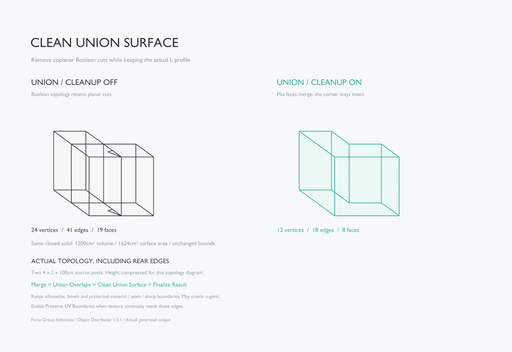
For a merged solid, enable Union Overlaps before Finalize. Blender's exact Boolean union combines overlapping generated closed mesh solids. Live Preview stays instanced and leaves the Boolean work until Finalize. To form an L profile from two overlapping Edge endpoint copies, use Include Endpoints + Corner Join: Per Segment, then Merge + Union Overlaps + Finalize Result. Auto Join keeps one corner placement instead.

Clean Union Surface is enabled by default for Union finalization. It removes redundant coplanar Boolean cuts while keeping the silhouette, curved/bevel edges, material boundaries, marked seams/sharp edges and smooth/flat shading boundaries. Disable it for raw Boolean topology. Preserve UV Boundaries is optional and off by default; enabling it retains discontinuous UV borders and may leave more planar edges. UV layers remain, but dissolving across UV borders can change corner interpolation. This cleanup runs only on Finalize and leaves preview unchanged.

Included
  • Object Distributor add-on, version 1.6.1.
  • Editable demo scene and English/Indonesian quick-start guides inside the installable ZIP.
  • Full readable runtime Python source and GPL license.
  • English interface and native Indonesian translation through Blender's language preferences.
Requirements and workflow notes

Requires Blender 4.2 or newer. Tested on Windows with Blender 4.2.0 and 5.2.2 LTS. Other operating systems have not been individually tested. The add-on works offline and needs no external Python packages, downloaded node assets, license key or additional account.

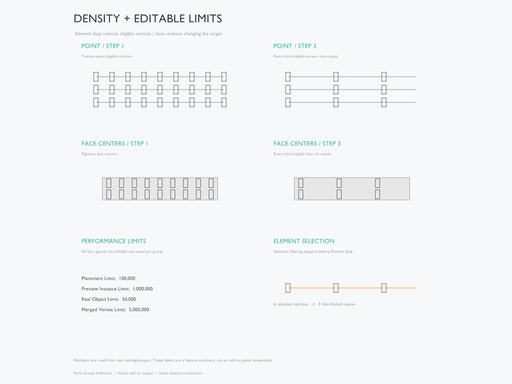
Performance Limits are editable in the panel and saved per group. Defaults are 100,000 sampled placements, 1,000,000 preview instances, 50,000 real output objects and 5,000,000 merged vertices. Raise the relevant limit to suit your scene and available memory. Point and Face Centers also provide Element Step for density control. These values are adjustable allocation guards; practical capacity depends on source geometry and hardware.

Python placement resampling waits for Object Mode during Edit/Sculpt work. Live Preview has its own Undo step. Finalize before animation rendering/export when placements must be independent of the viewport timer.

Spacing is measured between origins. By default, Merge joins geometry without automatic welding. Optional Union Overlaps is off by default, runs only on Merge finalization and requires closed manifold solids. It combines overlaps throughout the generated result while retaining non-overlapping solids as mesh islands in the same object. It does not fill gaps or bend copies and may take longer on dense geometry. Inspect the final Boolean mesh and its surface attributes. Between Paths scales the selected length axis; copies are not bent along curves, and general collision avoidance is not included. Collection sources use geometric members. Realize source Geometry Nodes containing only nested instances before Freeze/Merge.

Clean Union Surface uses planar edge dissolution, not quad retopology or remeshing. A concave L-shaped cap can be an n-gon. Choose UV boundary preservation when those borders matter for your textures, and inspect the finalized mesh.

Final Path uses a nominal source/collection profile in Edge and Along; random transforms or differently sized members can change actual clearances. Its measured readout is not a clear surface gap or curve arc length. Between retains its existing anchor/reference sampling. For dense profiles, raise Final Path Control Limit in Performance Limits (default 20,000), lower Curve Resolution, or use Reference Path.

Maintainer: Foriu Group Indonesia. License: GPL-3.0-or-later. For an issue report, include your Blender/add-on versions and the steps needed to reproduce it.

Features
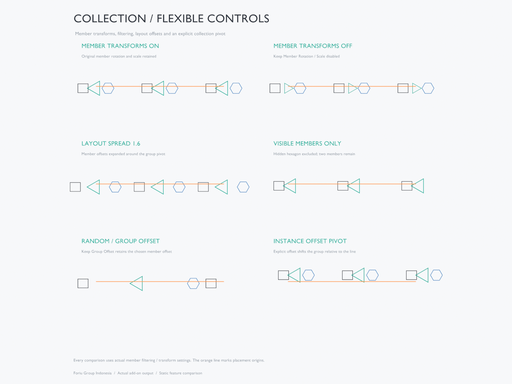
Image 1
Image 2
Image 3
Image 4
Image 5
Image 6
Image 7
Image 8
Image 9
Image 10
Image 11
Image 12
Image 13
Image 14
Image 15
Image 16
Image 17
By

Author avatar Foriu Group Indonesia

File size

41.6 MiB

Version

1.6.1

Platforms

windows-x64, macos-arm64, linux-x64, macos-x64, windows-arm64

Minimal required Blender version

4.2.0

Object Cleaner
Free

add-on Object Cleaner

25
Arrange objects evenly in a circle
Free

add-on Arrange objects evenly in a circle

22
SceneCleanupPro v.01 (BETA)
Free

add-on SceneCleanupPro v.01 (BETA)

12
Object Mode v1.2 โ€“ Hierarchy Selection
Free

add-on Object Mode v1.2 โ€“ Hierarchy Selection

10
XCut
Free

add-on XCut

5
Number Generator
Free

add-on Number Generator

4
ReScale Easy โ€” One Click, Perfect Scale

add-on ReScale Easy โ€” One Click, Perfect Scale

4
JiggleGen

add-on JiggleGen

3
Quick Origin Power Suite: Ultimate Pivot & Alignment Tools
Free

add-on Quick Origin Power Suite: Ultimate Pivot & Alignment Tools

3
Random objects Transform

add-on Random objects Transform

3
Align Tools XYZ

add-on Align Tools XYZ

3
Origin to Bottom
Free

add-on Origin to Bottom

3
Stairs Maker

add-on Stairs Maker

2
Multi Objects Workflow

add-on Multi Objects Workflow

2
Quick Replace

add-on Quick Replace

1
Object Disperser

add-on Object Disperser

1
Batch Rename & Replace Pro Blender addon

add-on Batch Rename & Replace Pro Blender addon

1
Green Wall โ€“ Artificial Vertical Garden Generator

add-on Green Wall โ€“ Artificial Vertical Garden Generator

1
๐ŸŒ€ Product Aura - Reactive Product Scatter for Blender

add-on ๐ŸŒ€ Product Aura - Reactive Product Scatter for Blender

1
Green Vine - Artifical Vine Generator

add-on Green Vine - Artifical Vine Generator

1
Green Plant - Artifical Plant Generator

add-on Green Plant - Artifical Plant Generator

1
Smart Shelf Books

add-on Smart Shelf Books

1
Surface Damage Generator

add-on Surface Damage Generator

1
N-Gone Pro 1.5.1

add-on N-Gone Pro 1.5.1

  • ยซ
  • 1
  • 2
  • 3
  • โ€ฆ
  • 18
  • 19
  • 20
  • ยป
Added To Cart
To complete your purchase or update it, please go to cart. If you want to find more awesome add-ons, continue to explore.
Go to Cart
Already Purchased
You already purchased this item. It is impossible to buy it again. Continue to explore and enjoy :-)
My Orders