Models
 Materials
 HDRIs
 Scenes
 Brushes
 Node Groups
 Printables
 Creators
 Creations
Object Distributor
 add-on
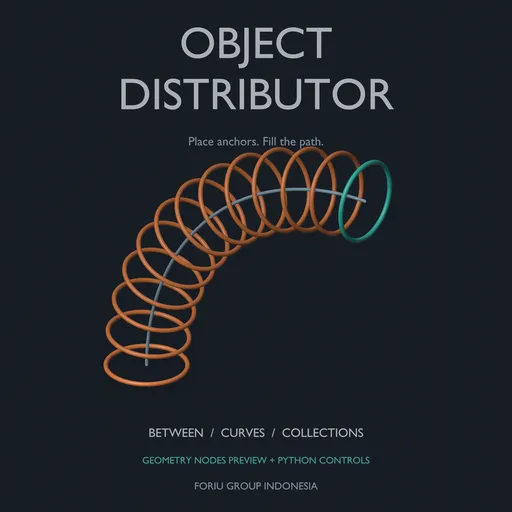
Distribute objects and collections on mesh and curve paths
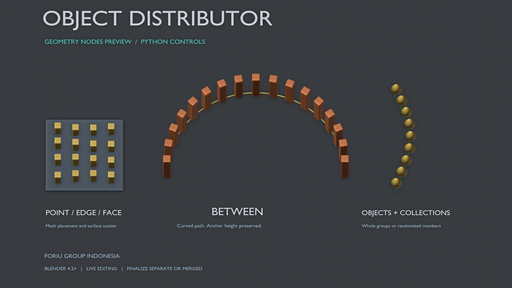
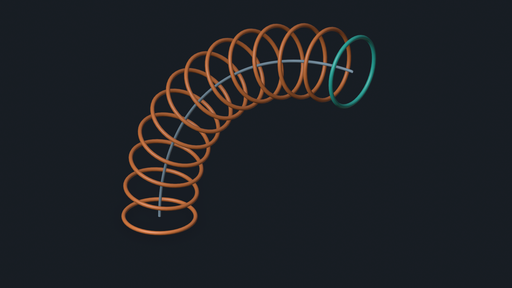
Place anchors. Fill the path.
Object Distributor helps you repeat objects and collection members across meshes and along curves from one Blender panel. Fill between two existing anchor objects, or fit repeated connectors between lower and upper paths.
Build layouts for posts, fences, lights, fixtures and other repeated elements, with live controls for placement, orientation and final output.
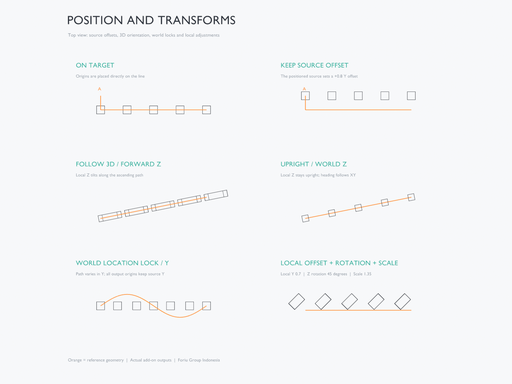
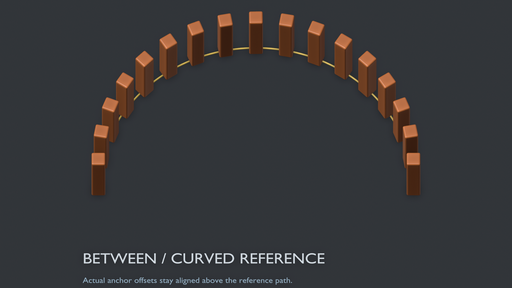
Follow the path and match your anchorsBetween mode preserves your existing start and end objects. Keep their offsets above a reference, blend their rotations, or follow the curve while matching both endpoint orientations. For upright posts and fixtures, keep world Z upright while changing the horizontal heading.
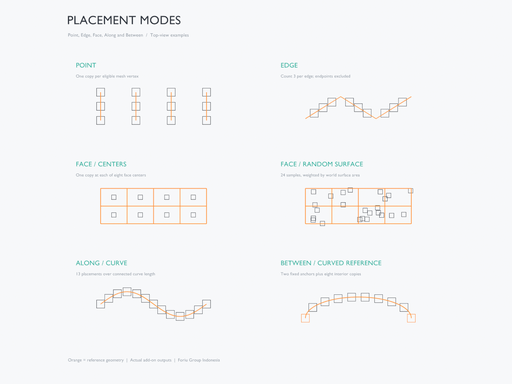
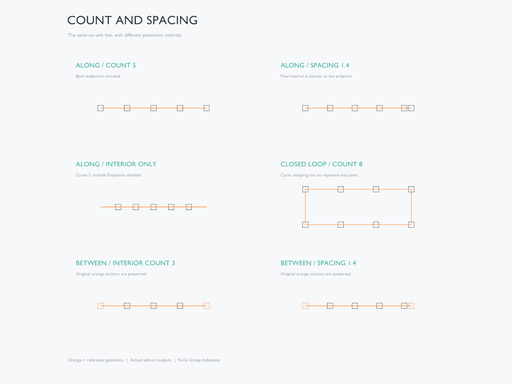
Choose Point, Edge, Face, Along, Between or Between Paths. Place copies at mesh vertices, distribute across individual edges, use face centers or random surface scatter, follow connected paths, fill between two anchors, or span two rails.
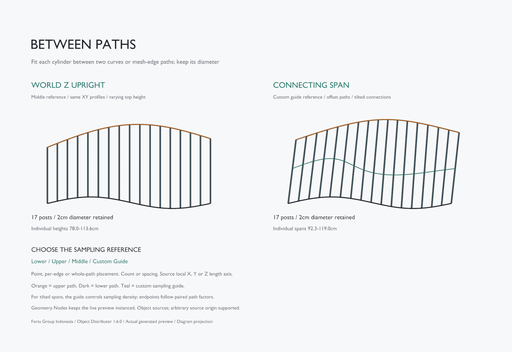
Fit posts and connectors between pathsBetween Paths fits a source Object between a Lower Path and Upper Path, each a curve or unbranched mesh edge chain. Choose Points, per-edge Count/Spacing, or continuous Along Path placement. Sampling Reference selects Lower Path, Upper Path, an interpolated Between Paths reference, or a third Projection Guide. Collection sources remain available in the other modes.
Keep posts vertical with Upright (World Z): reference XY positions must project onto both rails within tolerance, with the upper path above the lower at every post. Use Connecting Span for tilted connectors paired by normalized arc-length fraction. Select local X, Y or Z as the Length Axis; evaluated endpoint bounds fit the original rail pair independently of the source origin before the chosen offsets are applied. Cross-section Scale and seeded Cross-section Variation control width/depth while retaining that fitted length. Upper-path reversal and loop phase help match direction and starts.
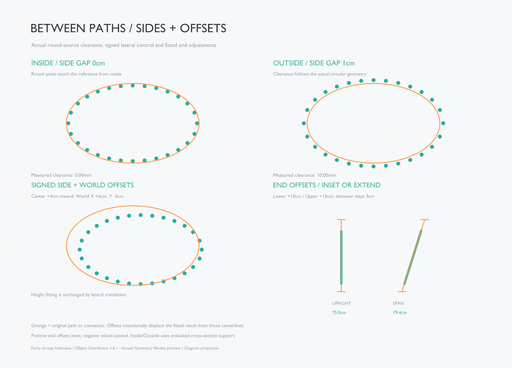
Use the mode's own Path Side Alignment: Center / Inside / Outside, Side Gap, signed Side Offset, and World Offset to position the evaluated cross-section against local tangent planes. Lower End Offset and Upper End Offset inset the ends with positive values or extend them with negative values. The default Center and zero offsets preserve the original fitted layout. Lateral shifts do not change the fitted length; end offsets do. Projection Tolerance checks the original references, so shifted connector centerlines need not stay on those curves.
The lower, upper and optional Projection Guide remain live inputs. Points uses mesh vertices or evaluated curve centerline vertices; Edges works per segment, so Curve Resolution affects density in those curve workflows. In Connecting Span, the reference controls sampling density and phase; the connector is not guaranteed to pass through a Guide. Multiple paths pair by spline/path order and require matching counts and open/closed status, including the Guide. The source must produce evaluated mesh geometry, with nonzero length/scale and no sheared world transform; mirrored source scales are supported. Fitting scales one axis without bending or trimming the source. Ordinary offsets from other modes, world locks and random rotations do not apply here. The dedicated side/corner controls fit the cross-section locally; they do not guarantee whole-polygon containment, generate corner profiles or provide collision avoidance.
Control where the geometry sitsKeep Source Offset lets you position the source before distributing it. On Target places origins directly on the target geometry.
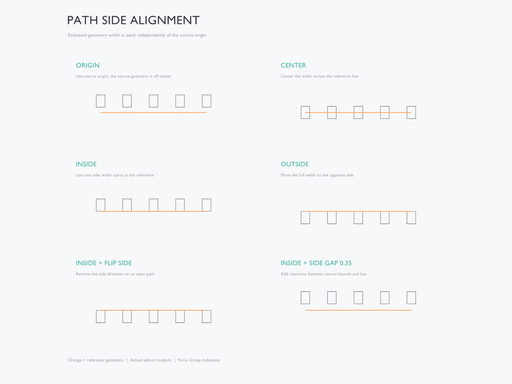
On supported edge/curve paths and wire vertices, choose Path Side Alignment:
- Origin: use the source origin.
- Center: center the evaluated geometry width across the line.
- Inside / Outside: place that width on the chosen side.
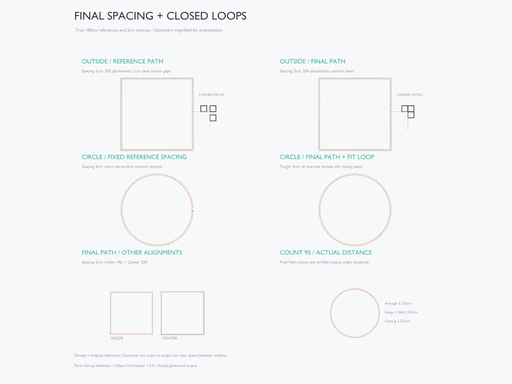
Closed planar loops determine their inside automatically. Open Path Up and Flip Side let you choose the side of an open path; Side Gap adds clearance. Adjust forward/normal axes, local and normal offsets, rotation, scale and world XYZ locks independently.
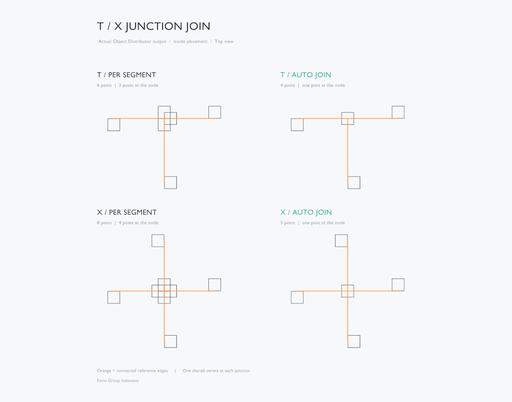
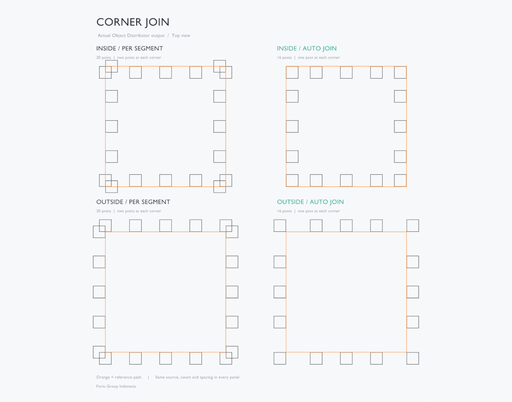
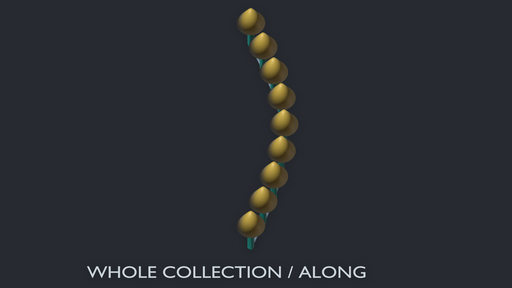
Handle corners and T/X junctionsFor side-aligned layouts, Auto Join fits connected two-edge corners against both adjoining sides. Shared T/X nodes receive one placement; Center, Inside and Outside center the source bounds on the junction. Whole Collection keeps its members together at that placement.
Use Per Segment for the earlier independent-edge behavior. Miter Limit bounds extensions on very sharp corners. Junction joining requires a shared vertex; crossings without a shared vertex remain separate.
Fit the layout and see the actual distanceIn Edge and Along, choose Reference Path to retain the earlier sampling or Final Path to sample the nominal placement path after side alignment. Final Path helps keep an Inside/Outside layout consistent through its corners. Gentle-turn smoothing handles sampled circles without treating every small turn as a sharp miter.
For closed Along paths, Fit Closed Loop distributes a whole number of intervals around the loop, including the closing interval. The entered spacing becomes a target and may be adjusted slightly. Keep Spacing retains the requested value and allows a shorter closing interval.
Measured Spacing displays the last built average, range and loop closing distance in three fixed rows, including when using Count. It follows scene units and measures straight-line origin/placement-pivot distances. Reference Path and Keep Spacing remain the defaults, so existing layouts stay available.
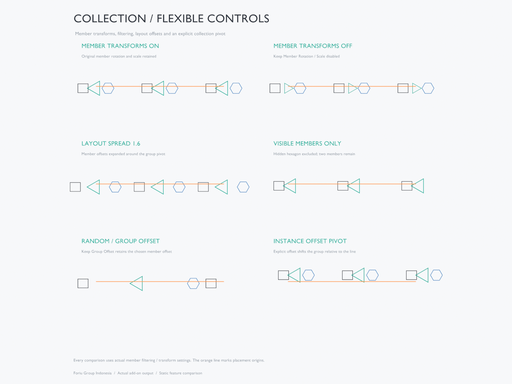
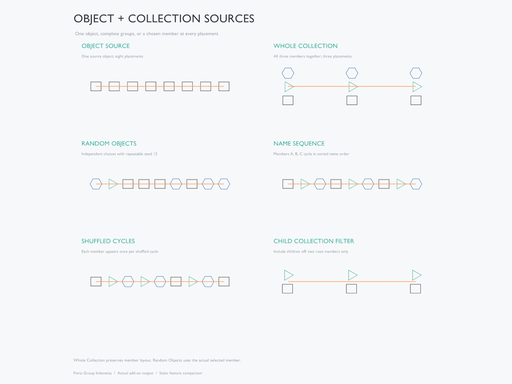
Use an object or a collection- Object: repeat one source.
- Whole Collection: repeat the group while keeping its member layout.
- Random Objects: choose one member at each placement.
- Choose repeatable random selection, name sequences or shuffled cycles.
- Control pivots, child collections, visibility filters, member offsets, rotation, scale and layout spread.
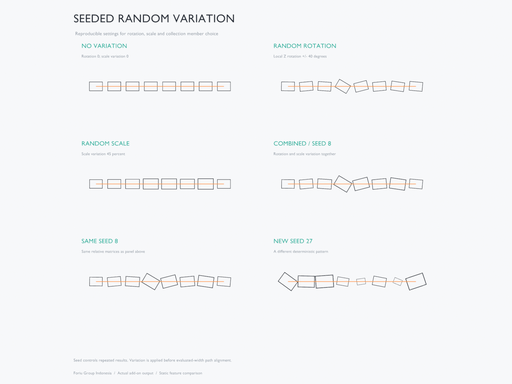
- Add seeded rotation and scale variation.
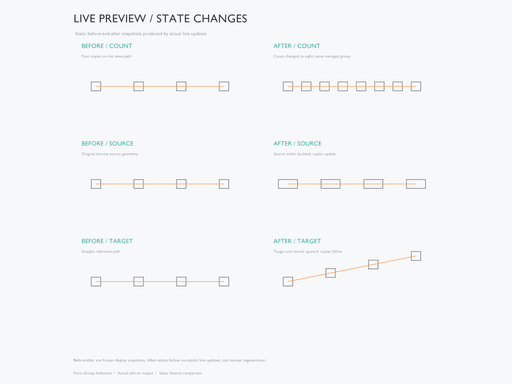
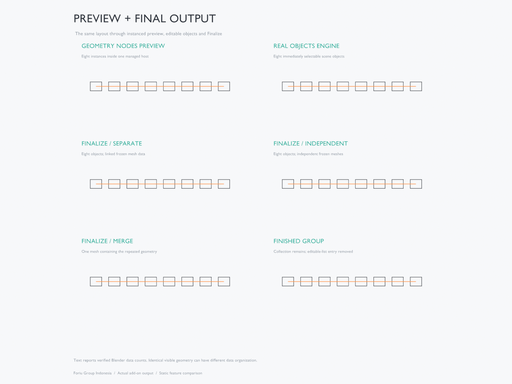
The default hybrid engine displays lightweight Geometry Nodes instances. Change count, spacing, transforms, source geometry or the target and let Live Preview update the distribution. The optional Real Objects engine creates individually selectable copies immediately.
Finalize to separate real objects or one merged mesh. Separate output supports shared or independent geometry and optional geometry freezing/modifier baking. Finished collections remain in the Outliner and leave the editable result list, keeping the panel focused on active work.
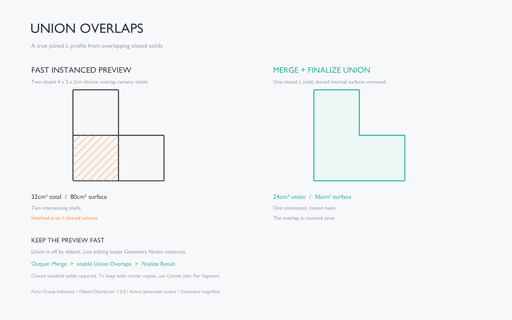
For a merged solid, enable Union Overlaps before Finalize. Blender's exact Boolean union combines overlapping generated closed mesh solids. Live Preview stays instanced and leaves the Boolean work until Finalize. To form an L profile from two overlapping Edge endpoint copies, use Include Endpoints + Corner Join: Per Segment, then Merge + Union Overlaps + Finalize Result. Auto Join keeps one corner placement instead.
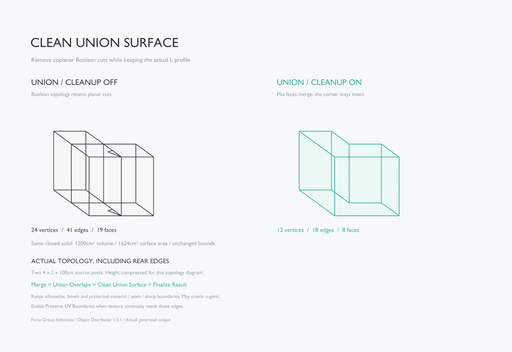
Clean Union Surface is enabled by default for Union finalization. It removes redundant coplanar Boolean cuts while keeping the silhouette, curved/bevel edges, material boundaries, marked seams/sharp edges and smooth/flat shading boundaries. Disable it for raw Boolean topology. Preserve UV Boundaries is optional and off by default; enabling it retains discontinuous UV borders and may leave more planar edges. UV layers remain, but dissolving across UV borders can change corner interpolation. This cleanup runs only on Finalize and leaves preview unchanged.
Included- Object Distributor add-on, version 1.6.1.
- Editable demo scene and English/Indonesian quick-start guides inside the installable ZIP.
- Full readable runtime Python source and GPL license.
- English interface and native Indonesian translation through Blender's language preferences.
Requires Blender 4.2 or newer. Tested on Windows with Blender 4.2.0 and 5.2.2 LTS. Other operating systems have not been individually tested. The add-on works offline and needs no external Python packages, downloaded node assets, license key or additional account.
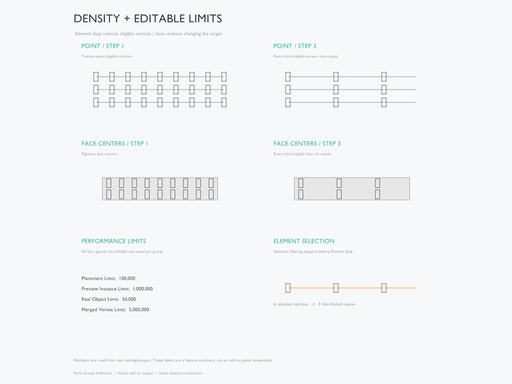
Performance Limits are editable in the panel and saved per group. Defaults are 100,000 sampled placements, 1,000,000 preview instances, 50,000 real output objects and 5,000,000 merged vertices. Raise the relevant limit to suit your scene and available memory. Point and Face Centers also provide Element Step for density control. These values are adjustable allocation guards; practical capacity depends on source geometry and hardware.
Python placement resampling waits for Object Mode during Edit/Sculpt work. Live Preview has its own Undo step. Finalize before animation rendering/export when placements must be independent of the viewport timer.
Spacing is measured between origins. By default, Merge joins geometry without automatic welding. Optional Union Overlaps is off by default, runs only on Merge finalization and requires closed manifold solids. It combines overlaps throughout the generated result while retaining non-overlapping solids as mesh islands in the same object. It does not fill gaps or bend copies and may take longer on dense geometry. Inspect the final Boolean mesh and its surface attributes. Between Paths scales the selected length axis; copies are not bent along curves, and general collision avoidance is not included. Collection sources use geometric members. Realize source Geometry Nodes containing only nested instances before Freeze/Merge.
Clean Union Surface uses planar edge dissolution, not quad retopology or remeshing. A concave L-shaped cap can be an n-gon. Choose UV boundary preservation when those borders matter for your textures, and inspect the finalized mesh.
Final Path uses a nominal source/collection profile in Edge and Along; random transforms or differently sized members can change actual clearances. Its measured readout is not a clear surface gap or curve arc length. Between retains its existing anchor/reference sampling. For dense profiles, raise Final Path Control Limit in Performance Limits (default 20,000), lower Curve Resolution, or use Reference Path.
Maintainer: Foriu Group Indonesia. License: GPL-3.0-or-later. For an issue report, include your Blender/add-on versions and the steps needed to reproduce it.
Features