
 Add-ons
 Models
 Materials
 HDRIs
HDRIs
 Scenes
 Brushes
 Node Groups
 Printables
 Creators
 Creations
What it is
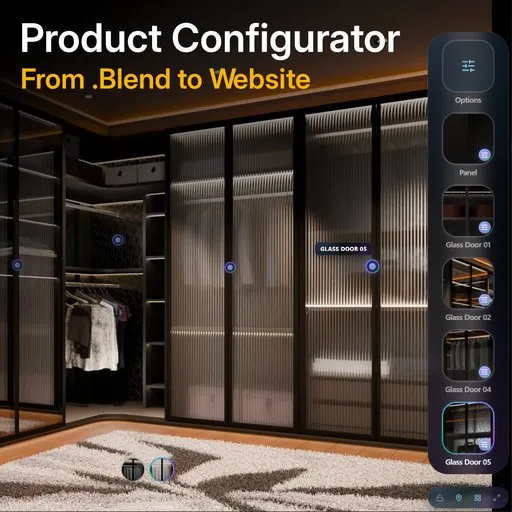
VisibleIO is a Blender add-on for 3D artists. It turns one product scene into a live web configurator you can put in front of a client.
One artist can ship 100,000 variants from a single .blend — without a separate web rebuild.
What you can do
- Set up product structure with View Components and Material Variants, including combination groups that cut noise (for example 27 looks down to the 2 that matter)
- Auto-count combinations (looks × cameras), then load rendering tasks so the batch matches the configurator
- Batch-render many still-frame combinations from one scene — Load Rendering Tasks / Resume — for configurator frames (for example 1,080 images). This is combination stills for the Viewer, not a Shot Manager or animation batch, and not Video media type
- Re-render with filters and use Render Mask when you only need part of the set again
- Spread one render queue across several Blender clients (distributed / smart idle rendering)
- Configure the Viewer after render: options, hotspots, and shareable link or iframe
- Publish a configurator as a 3D artist deliverable — Add-on to CMS to Viewer — without handing the file to a separate web rebuild or waiting on a development team
Three steps
VisibleIO moves a Blender scene to a web configurator in three steps: render, set options, publish.
Render — capture the product stills the Viewer needs (one camera × one material look per frame). Combination batch rendering, not an animation or Shot Manager job.
Set options — define choices, variants, combination groups, and hotspots so the product is interactive.
Publish — send the configurator to a live Viewer you can share.
Who it is for
3D artists who already work in Blender: freelancers, agency makers, and in-house 3D teams.
If you model products — furniture and other multi-option scenes especially — and the next ask is “can the client click through the options,” this is the publish step after the scene is done.
Install and login
- Download the VisibleIO zip from BlendKit.
- In Blender, install the zip like any other add-on and enable it.
- Sign in with a free visibleio.com account.
- Open your product .blend, then render → set options → publish for your first Viewer.
Publishing needs an internet connection.
Free vs paid
The VisibleIO add-on zip on BlendKit is free to install.
To publish a Viewer, create a free visibleio.com account. You can stay on the free tier. Optional plans, if you need them, are listed on visibleio.com.
Requirements
- Internet connection to publish a Viewer
- A free visibleio.com account to sign in and publish


