
 Models
 Materials
 HDRIs
HDRIs
 Scenes
 Brushes
 Node Groups
 Printables
 Creators
 Creations
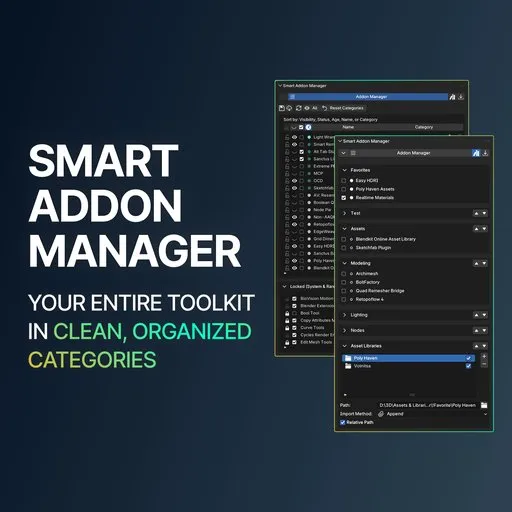
Smart Addon Manager
 add-on
Quick access to manage, organize, and toggle addons in the N-Panel bypassing Preferences. Features smart auto-categories, custom categories, installation date sorting, Favorites, and Asset Library control. Perfect order for your 3D workspace.
Smart Addon Manager for Blender
🟢 Blender 4.2 – 5.2 Ready | Modern Extensions Ecosystem
Built for those who value perfect order. A clean interface frees your mind for creativity, and perfect order saves your time.
If you demand total control — where every tool is neatly organized on its own shelf, and your workspace brings you calm and focus — Smart Addon Manager brings full control over your entire addon library directly into the 3D Viewport N-Panel.
⚠️ What Was Desperately Missing in Standard Blender
Managing a growing toolkit inside the default Preferences window creates constant friction:
- Endless Alphabetical Wall of Text: Scrolling through dozens of addons with abstract names wastes time and energy.
- Forgotten Tools Don't Work for You: Spending 40 minutes doing tedious work manually, only to realize you already bought an addon built for that exact task.
- Zero Installation Date Sorting: Testing new tools and losing track of them the next day because you can't sort by "Recently Installed".
- Constant Viewport Interruption: Breaking your creative flow and stopping work just to toggle a tool in the Preferences window.
⚡ The Solution: Everything Right in Your N-Panel
- AUTO Category Sorting: Automatically distributes tools into 19 logical categories via a smart built-in database.
- ONE-CLICK Time Sorting: Find fresh downloads from yesterday in a single click.
- 100% Total Control: Rename, reorder, hide, and customize your folders to fit your exact pipeline.
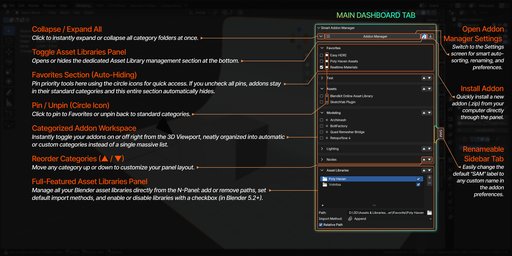
🖥️ Workspace 1: The 3D Viewport Dashboard (Daily Work)
Your daily cockpit in the 3D Viewport — built purely for fast creation:
- 📂 Organized Categories: Addons are neatly grouped into logical folders right in the N-Panel.
- ⚡ 1-Click Toggles: Instantly enable or disable addons with simple checkboxes without leaving your scene.
- ↕️ Customizable Layout Order: Move priority categories up or down with arrow buttons to suit your workflow.
- ↕️ Bulk Expand / Collapse: Open or close all folders simultaneously with a single button in the header.
- ⭐ Favorites Panel (Auto-Hiding): Pin your most critical tools (like heavy asset libraries) to the very top with one click on the circle icon. The panel automatically hides itself when empty.
- 📦 Native Asset Library Control: Add new library paths, remove folders, and set import methods (Append / Link) directly from the N-Panel.
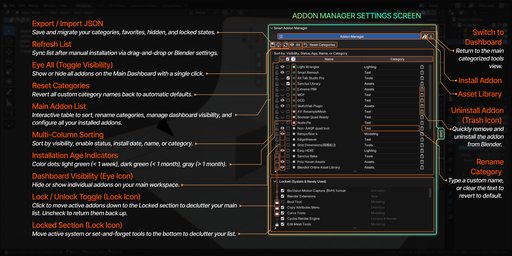
⚙️ Workspace 2: Settings Screen (Deep Library Control)
The control center for surgical management and organization:
- 📊 1-Click Column Sorting: Click any column header to sort your library by Name, Active Status, Visibility, or Category.
- 🕒 Chronological Sorting (The Clock Icon): Sort your entire library by installation date — newest tools jump straight to the top.
- 🟢 Freshness Color Indicators:
- Bright Green: Freshly installed (within the last 7 days)
- Dark Green: Recent (less than 1 month old)
- Gray: Established (older than 1 month)
- ✏️ Inline Renaming & Instant Reset: Click any category field to give it a custom name. Clear the field to revert to default, or click Reset Categories to restore all factory defaults.
- 👁️ Focus Mode (The Eye Icon): Hide specific addons from the main Dashboard while keeping them active in Blender. Keep your daily workspace completely distraction-free.
- 🔒 Locked Drawer (Noise Reduction): Blender's built-in system modules are automatically tucked away. Lock your own "set-and-forget" tools (like Node Wrangler) so they run in the background without taking up space.
- 📥 Direct Toolkit Management: Install any .zip addon directly from the N-Panel header, or use the Trash icon to cleanly remove tools.
💾 Workspace Portability & Crash-Proof Backup
Moving to a new Blender version or setting up a new PC?
- Single JSON Export: Save your custom category names, Favorites, hidden Eye states, and Locked tools in one lightweight config file.
- Instant Restore: Load your .json file on any machine and restore your personalized setup in seconds.
- 🛡️ Safe by Design: The export intentionally skips saving active on/off states. This prevents Blender from freezing or crashing when attempting to load dozens of heavy addons at once on a new machine.
📦 What's Included in Your Download
- Smart Addon Manager (.zip): Clean, lightweight extension. One-click install.
- Direct Creator Support: Responsive assistance, direct feature request channel, and continuous updates.
Compatibility: Blender 4.2 LTS, 4.3, 5.0, 5.1, 5.2+ (Modern Extensions System).


