
 Models
 Materials
 HDRIs
HDRIs
 Scenes
 Brushes
 Node Groups
 Printables
 Creators
 Creations
Collection Zones
 add-on
Collection Zones automatically organizes your Blender scene by spatial location. Define zones and objects inside them move to their assigned collection in real-time. Perfect for game levels, character assets, and VFX workflows.
Version 1.1.0
Compatibility and reliability update, tested with Blender 5.2.2 LTS.
- Fixed zone detection for parented objects, rotated zones, negative scale, and applied scale.
- Improved restoration of original collection memberships when objects leave zones, including renamed or deleted collections.
- Fixed World Zone naming conflicts and improved support for multiple scenes.
- Corrected grid boundaries when world dimensions are not evenly divisible by chunk size.
- Made grid removal and regeneration preserve objects and user-created nested collections.
- Improved automatic detection, timer cleanup, and behavior after loading files or using undo/redo.
- Fixed overlay labels, colors, visibility controls, and GPU state handling.
- Improved handling of excluded objects, excluded collections, and hidden zone helpers.
- Updated documentation and extension packaging.
Why I Created Collection Zones
I was deep in building a large-scale kingdom scene in Blender. The workflow involved modeling hundreds of architectural components: doors, roofs, chimneys, windows, and decorative elements. Then assembling them into multiple building variants: houses, shops, bazaar stands, and more.
Every time I duplicated a component to use in a new model, I had to manually move it to the correct collection. Dozens of times a day. It was a painstaking task that didn't contribute to the actual creative work, just outliner navigation.
After weeks of this, I realized there had to be a better way. So I built Collection Zones to automate it completely.
The result: My workflow time dropped dramatically, and I eliminated a tedious manual task that was killing my productivity. What started as a personal solution became an essential tool that completely changed how I organize complex scenes.
How It Works
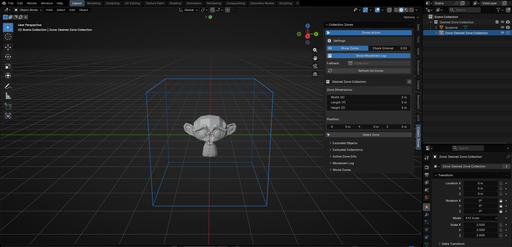
Define a zone (a simple visual cube) and objects that enter that space automatically move into their assigned collection. No manual sorting. No searching. Just intuitive, space-based organization.
What You Get
Real-time object detection and automatic reassignment based on spatial location. Visual wireframe zone cubes for clarity. Full control: exclude specific objects or collections, customize zone dimensions, and track movements with built-in logging.
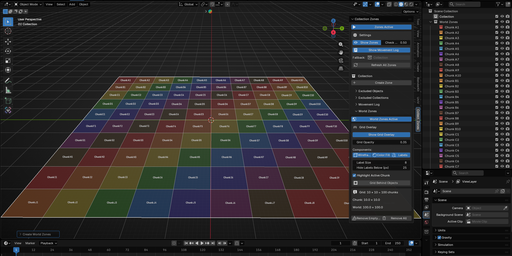
For large scenes, use World Zones to generate an automatic grid that organizes objects by region.
Works with Blender 5.0 and later.
Full Documentation
For detailed guides, step-by-step tutorials, and animated walkthroughs, visit the complete documentation:
https://samukashvili.ge/products/collection-zones-docs.html
The docs include visual guides with GIFs showing how to set up zones, use World Zones, manage exclusions, and optimize your workflow.


