
 Models
 Materials
 HDRIs
 Scenes
 Brushes
 Node Groups
 Printables
 Creators
 Creations
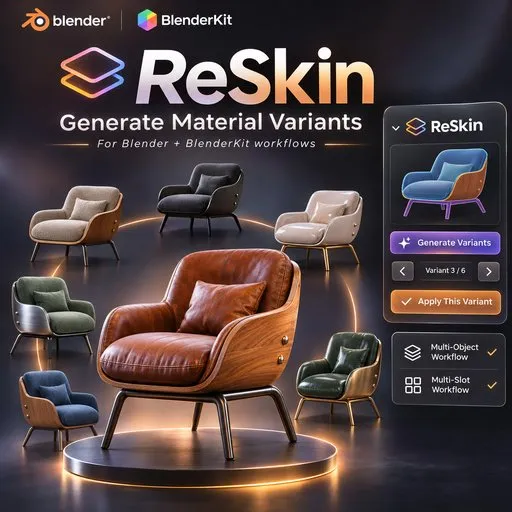
ReSkin — Material Variant Generator
 add-on
ReSkin is a Blender add-on that simplifies material variation workflows. Generate, preview, and apply material variants across multiple objects and material slots, saving time and reducing repetitive work.
ReSkin 2.0 — Material Variant Generator
Explore more material combinations. Find the perfect look.
ReSkin is a Blender add-on designed to help artists, designers, and 3D creators generate, preview, and apply material variations using BlenderKit materials.
Instead of manually swapping materials repeatedly, ReSkin lets you configure material options, generate combinations, browse the results, and apply your preferred look.
Key FeaturesMulti-Object Workflow
Work with models made from multiple separate objects. Assign BlenderKit material options to individual parts and explore different material combinations.
Multi-Slot Workflow
Work with a single mesh containing multiple material slots. Manage material options independently for each slot without separating the mesh.
Generate Material Variants
Create several material combinations from your configured BlenderKit material asset IDs.
Preview and Apply
Navigate between generated variants using previous and next controls, then apply your preferred combination.
Lock Materials
Keep selected material slots unchanged while exploring variations for other parts.
Material Slot Focus
Identify and select the faces belonging to a specific material slot directly from the ReSkin interface.
BlenderKit Integration
Use BlenderKit material asset IDs, with automatic asset ID capture supported in both workflows.
Perfect For- Architectural visualization and interior design
- Furniture and product visualization
- Game assets and props
- Material exploration and look development
- Artists working with multi-material 3D models
- Blender 4.2 or newer
- BlenderKit add-on installed and enabled
- Active BlenderKit login
- Access to the selected BlenderKit material assets
- Select your model or its component objects.
- Add the relevant objects or material slots to ReSkin.
- Assign BlenderKit material asset IDs.
- Choose the number of variants to generate.
- Browse the material combinations.
- Apply your favorite result.
ReSkin 2.0 — Explore materials without repetitive manual swapping.


