Profiler: new add-on by Mike Radjabov 🔗
Overview
Profiler add-on greatly improves the workflow for any artist, especially for architectural visualizations. You can create beautifully shaped profiles just in a few clicks.
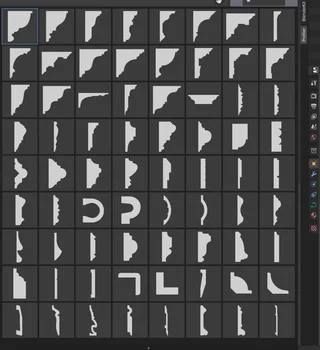
We created 70+ custom profiles - easy to use and easy to tweak. So it will be a really good solution for your interior and exterior projects.
You can install Profiler like any other add-on inside Blender and start using it.
Just go to the add-ns section on Blendkit (formerly BlenderKit) and download Profiler.
Once you have installed the add-on you will get the gallery with unique profiles for crowns, wall moldings and skirting so you can select any profile, apply it to the curve object and start tweaking various parameters.
Gallery of Profiles
These ready profiles will save you tons of time in various type of projects.
Also you can use your own profiles (but you have to apply them manually in Curve Parameters) and still be able to use tweaking options of the add-on.
Specifications
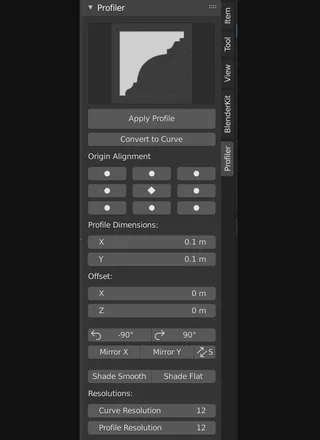
Profiler allows you to play with different parameters for the selected curve and applied profile on same panel:
- Gamepad for profile origin alignment
- Profile dimensions
- Offset options for the curve
- Profile rotation
- Mirror by X and Y
- Swap normals of the profile
- Shading options
- Resolution for the curve and the profile
You can adjust these options anytime as you selected the corresponding curve.
If you want to learn more, please check out the video tutorial.
Profiler add-on has a command in it which enables it to report usages to our server. This enables part of your subscription to be redistributed to the author of the add-on. That's why we kindly ask you to also install Blendkit add-on, even if the Profiler add-on will work just fine without it.
Still have some questions or you need help with the add-on? Just drop me a few words on email - [email protected].