
 Models
 Materials
 HDRIs
 Scenes
 Brushes
 Node Groups
 Printables
 Creators
 Creations

Pink Fix – Find Missing Textures, Auto-Relink & Pack Projects
 add-on
Fix pink missing textures in a few clicks. Relink files across multiple folders, find renamed textures with confidence scores, preview changes with a dry run, and pack projects into a portable folder that opens with nothing missing.
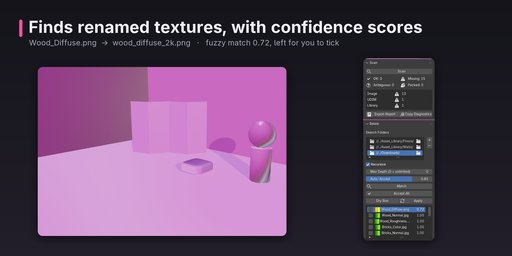
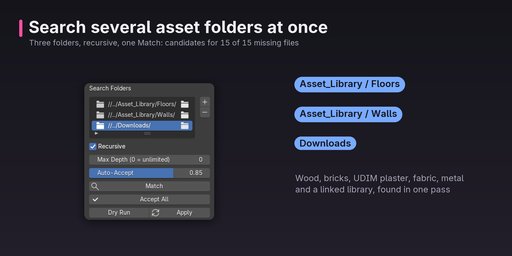
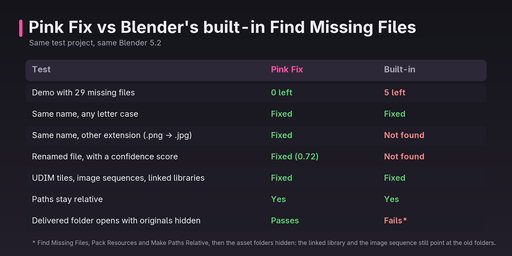
Opened a project and everything is pink? Pink Fix scans the file for every missing external file, finds where it went, and relinks it — including files that were renamed. Blender's built-in Find Missing Files only finds files with the same name (any letter case); Pink Fix also catches renamed and variant files.
What it doesScan — lists every missing image (incl. UDIM tiles and image sequences), movie clip, linked library, font and sound, and shows which material, node and object uses it.
Match — searches several folders at once, each with its own recursion depth. Matches in order: exact name, letter case, same name with another extension (e.g. .jpg → .png), then similar names with a confidence score. Similar-name matches are suggestions you tick yourself; ambiguous ones are flagged.
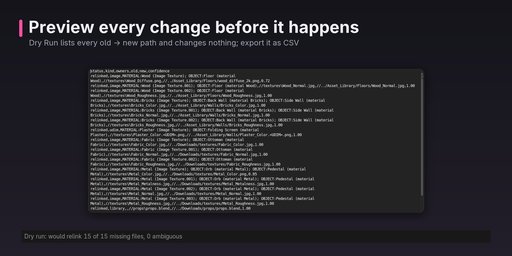
Dry Run — preview every change and export it as a CSV before anything is touched.
Apply — relinks with relative (//) paths kept. Ctrl+Z undoes it.
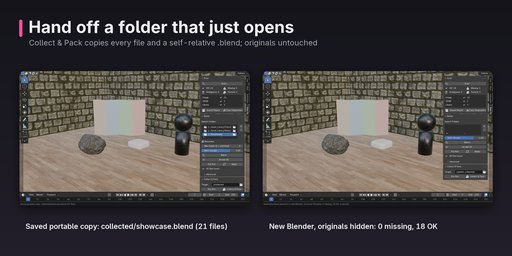
Collect & Pack — copies the project and everything it uses into one folder, with a self-contained .blend and rewritten library copies, so the folder opens with nothing missing on another computer. Your open file and the originals are never changed, and delivered files contain no Pink Fix data, search folders or home-folder paths.
Details- Blender 4.2 – 5.2, tested in CI on Windows, macOS and Linux
- Sidebar tab "Pink Fix" and File > External Data
- No network connections
- Documentation: https://itsnickp.github.io/pinkfix-docs/


