
 Add-ons
 Models
 Materials
 HDRIs
HDRIs
 Scenes
 Brushes
 Node Groups
 Printables
 Creators
 Creations
Why DRH - Add-on Manager & Audit
Take control of complex Blender add-on setups from one place.
DRH - Add-on Manager & Audit scans your Blender environment to help you find duplicates, review conflicts, check compatibility, compare changes, export reports, manage setup profiles, and perform safer maintenance actions across installations.
Instead of digging through folders and manually comparing configurations, you get a structured view of what is installed, what changed, and what may need attention.
Free for everyone on BlendKit.
Key Features
- Multi-install audit: scan the current Blender install, user paths, detected system installs, and extension locations.
- Legacy and extension review: inspect metadata, compatibility, structure, maintenance state, and enabled status.
- Conflict detection: surface duplicates, shadowed copies, version conflicts, operator conflicts, and hotkey conflicts.
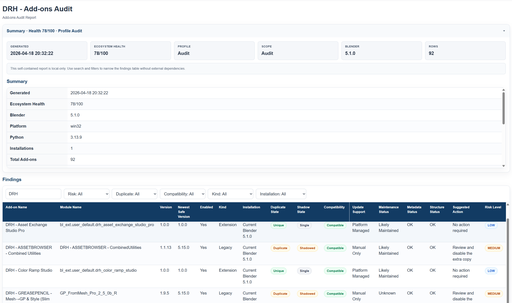
- Health scoring: identify low-health or problematic add-ons with suggested actions.
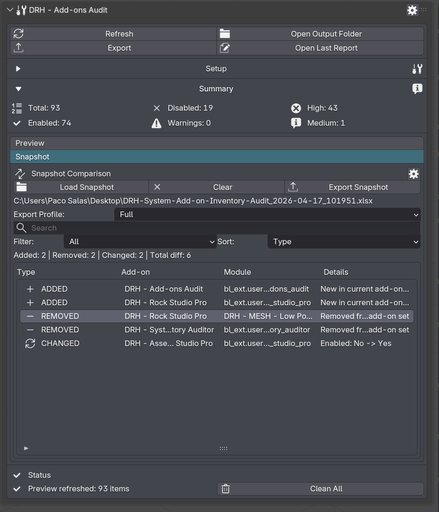
- Snapshot comparison: track added, removed, and changed add-ons over time.
- Flexible reports: export to Excel, CSV, TSV, JSON, XML, HTML, and Markdown.
- Setup profiles: export and import enabled states and supported preferences.
- Maintenance tools: use Smart Switch, duplicate cleanup, batch enable/disable, rollback, and packaging workflows.
See More Than a Simple Add-on List
DRH - Add-on Manager & Audit builds a broader inventory of your Blender add-on environment.
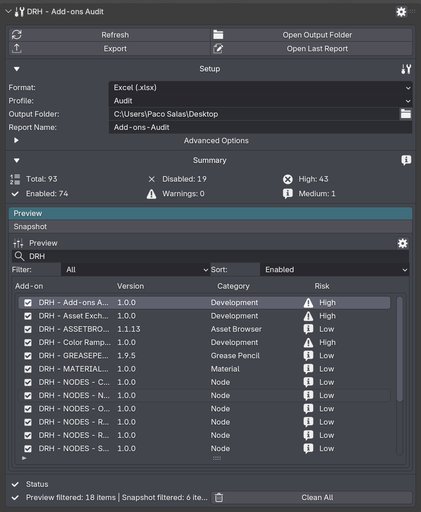
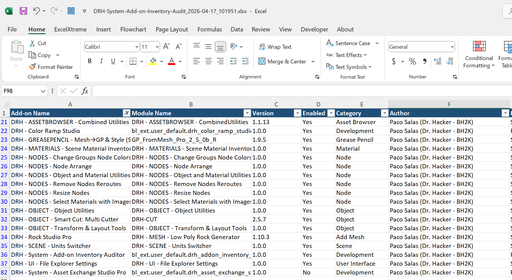
Review name, module, version, author, category, location, enabled state, installation scope, source path, last-modified data, legacy status, and extension status from a structured interface.
You can filter for broken, incompatible, duplicate, shadowed, low-health, extension, legacy, selected, and update-support rows, making troubleshooting substantially faster than manual folder inspection.
Compare Changes and Export Clean Reports
Use snapshots to compare the current environment against previous audits and identify exactly what changed.
Track changes in version, enabled state, installation, path, duplicate state, shadow state, compatibility, update support, and risk level.
Export clean reports for quick review, technical documentation, troubleshooting, or handoff using multiple formats and audit profiles.
Maintenance, Profiles, and Packaging
Beyond auditing, the add-on includes tools for repeatable maintenance workflows:
- Smart Switch with dry-run support for safe duplicate-version switching.
- Duplicate cleanup with dry-run support.
- Batch enable and disable for selected add-ons.
- Rollback for the last saved enable/disable transaction.
- Setup profile export and import for reusable Blender configurations.
- Add-on packaging into installable ZIP files when source files and archive structure validate correctly.
Useful for environment cleanup, setup reuse, troubleshooting, migration, and production maintenance.
Free on BlendKit
DRH - Add-on Manager & Audit is free for everyone on BlendKit.
Download the official current release directly from this BlendKit page.
GitHub is used for documentation, support, discussions, bug reports, and compatibility help. Official releases and downloads are distributed exclusively through BlendKit.
Requirements and Installation
- Use Blender 4.2 or newer.
- Download the ZIP from this BlendKit product page.
- In Blender, go to Edit > Preferences > Add-ons > Install...
- Choose the downloaded ZIP file.
- Enable DRH - Add-ons Audit.
- Open 3D Viewport > Sidebar > DRH - Add-ons Audit.
Compatibility
- Version: 1.0.0
- Blender: 4.2+
- Location: 3D Viewport > Sidebar > DRH - Add-ons Audit
- Platforms: Windows, macOS, Linux
This is a source-based add-on with no obfuscation, no binary-only content, and no external services. File access is used for installation scanning, manifest reading, snapshot comparison, report export, package creation, and setup-profile import/export.
Documentation and Support
GitHub Support:
https://github.com/pacosalasv/DRH_Addons_Audit-Support
User Manual (PDF):
https://raw.githubusercontent.com/pacosalasv/DRH_Addons_Audit-Support/main/docs/manual/user-manual.pdf
Use GitHub Discussions for support, guidance, bug reports, and compatibility help.
Official releases and downloads are available exclusively through BlendKit.


