
 Add-ons
 Models
 Materials
 HDRIs
HDRIs
 Scenes
 Brushes
 Node Groups
 Printables
 Creators
 Creations
Why DRH - Scene Material Inventory
Know what materials, textures, and shader data are actually in your Blender scene before delivery, cleanup, review, or handoff.
DRH - Scene Material Inventory scans the scene and creates a structured inventory of material usage, shader nodes, referenced images, PBR maps, file status, and related material data.
Instead of checking materials one by one, you can generate a report for the whole scene and review it in HTML, Excel, or CSV.
It is useful for production checks, asset reviews, material cleanup, texture verification, and project documentation.
Free for everyone on BlendKit.
Key Features
- Scene material inventory: see which materials are used and how they are referenced in the current scene.
- Material usage counts: review unique scene users, Blender datablock users, and material-slot references separately.
- Shader-node analysis: inspect node counts, reachable node trees, shader types, and Principled BSDF usage.
- Image audit: review referenced images, source type, resolution, packing status, alpha usage, file size, and missing-file status.
- PBR map detection: identify common material maps from shader connections and image naming.
- Nested node-group support: trace image usage through reachable shader node groups.
- Color-space review: flag common PBR color-space combinations that may need attention.
- Collection breakdown: optionally review material usage by collection.
- Multiple report formats: export to HTML, Excel, or CSV.
- Path sanitization: hide the local home-directory prefix in exported reports.
See Where Your Materials Are Used
A material can exist in the .blend file, appear in several material slots, or be used by multiple objects in the scene.
DRH keeps those counts separate so the report is easier to interpret.
The inventory can show:
- Users in the current scene
- Users in the Blender file
- Material-slot references
- First object using the material
- Whether the material is currently used in the scene
- Library path
- Asset status
- Fake User status
You can also limit the report to materials used in the current scene.
Shader and Node Inspection
Enable node statistics to include information about each material's shader setup.
DRH can report:
- Node-based material status
- Node count
- Reachable node-tree count
- Shader types
- Principled BSDF presence
Reachable nested node groups are scanned recursively, making the inventory more useful for materials that are built from reusable shader groups instead of a single flat node tree.
PBR Map Audit
Enable Include image info and Include PBR map breakdown to inspect the texture maps used by your materials.
DRH detects common roles including:
- Base Color / Albedo / Diffuse
- Ambient Occlusion
- Metallic / Metalness
- Roughness / Glossiness
- Normal
- Height / Bump / Displacement
- Alpha / Opacity
- Emission
- Specular
- Transmission
- Subsurface
- Coat / Clearcoat
- Sheen
- Anisotropy
- Thin Film
- Cavity
- Mask
Detection follows actual shader-node connections when possible and uses image or node naming as a fallback or additional hint.
Nested shader groups are traced across group boundaries instead of treating every image as an isolated texture.
Packed PBR Textures
DRH also recognizes common packed-map naming conventions such as:
- ORM: R = AO, G = Roughness, B = Metallic
- ARM: R = AO, G = Roughness, B = Metallic
- RMA: R = Roughness, G = Metallic, B = AO
- MRA: R = Metallic, G = Roughness, B = AO
The report keeps detected PBR roles, traced shader targets, naming hints, and channel-packing information separate so you can see how the result was interpreted instead of receiving only a single flattened label.
Image and Texture Checks
Referenced images are inspected according to their Blender source type.
DRH distinguishes between file-backed images, packed images, generated images, Viewer images, tiled or UDIM textures, movies, and image sequences.
Depending on the source, the report can include:
- Image name
- Source type
- Resolution
- Color space
- Blender packing status
- Alpha usage
- Missing-file status
- Referenced path
- Locally verifiable image size
UDIM paths using <UDIM> or <UVTILE> are resolved using the image tiles known to Blender.
PBR Color Space Review
DRH includes a conservative Color Space Check for common PBR texture workflows.
For example, it can highlight data maps that use sRGB or color maps that use Non-Color.
These are review hints, not hard errors. Custom shaders can intentionally use different color-space setups, so the report shows the condition without assuming the material is wrong.
Export Reports in the Format You Need
Choose the report format that fits the job.
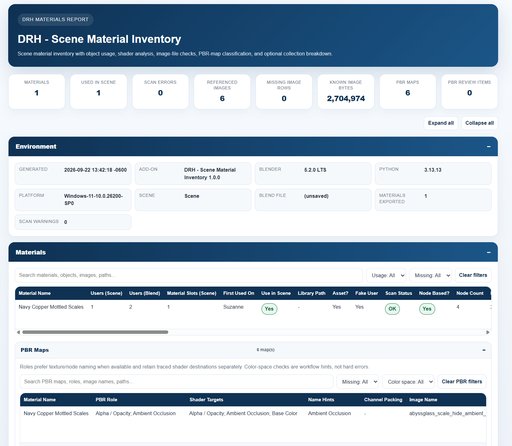
- HTML: self-contained interactive report with search, filters, sortable columns, environment information, material details, optional collection data, and a dedicated PBR Maps section.
- Excel (.xlsx): native workbook with typed numeric cells, frozen headers, Excel tables, optional PBR Maps sheet, and optional Collections sheet.
- CSV: UTF-8 material inventory for simple data exchange and processing.
When detailed PBR reporting is enabled with CSV, DRH creates a companion _PBR-Maps.csv file for the image-level PBR data.
Collection Material Breakdown
For HTML and Excel reports, you can optionally include a per-collection material breakdown.
This adds information such as:
- Collection path
- Collection name
- Material name
- Users in the collection
- Material-slot references in the collection
- First object using the material
This can be useful when a scene is organized into assets, departments, sets, products, or other collection-based groups.
Keep Local Paths Private
Sanitize paths is enabled by default.
When enabled, DRH replaces the local home-directory prefix in exported paths with:
- %USERPROFILE% on Windows
- ~ on macOS and Linux
The operating-system username is not exported as part of that home-directory path.
You can disable sanitization when an internal report needs the original local paths.
Flexible Report Options
Choose how much information goes into each report.
Available options include:
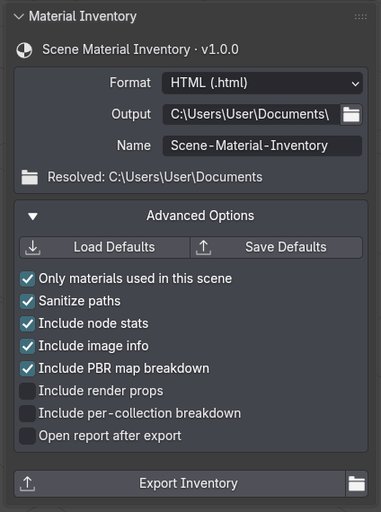
- Only materials used in this scene
- Sanitize paths
- Include node stats
- Include image info
- Include PBR map breakdown
- Include render properties
- Include per-collection breakdown
- Open report after export
Report choices can be saved as extension defaults and reused in later sessions.
Save Your Preferred Report Setup
Extension Preferences include the same main report options used in the Material Inventory panel.
Use Save Scene as Defaults to store your current report setup, or Apply to Scene to restore the saved profile.
The scene settings remain editable after the defaults are loaded, so you can keep a normal reporting setup and adjust individual exports when needed.
Perfect For
- Asset and scene audits
- Material cleanup
- Texture verification
- PBR workflow review
- Missing-image checks
- Asset handoff
- Production documentation
- Technical art and pipeline work
- Archviz scene review
- Product visualization
- Game and VFX asset review
- Teams receiving Blender files from other artists
Free on BlendKit
DRH - Scene Material Inventory is free for everyone on BlendKit.
Download the current release directly from this page.
If DRH is useful in your work, please leave a rating. Ratings help me continue development, improve the add-on, and work on future updates.
GitHub is used for documentation, support, bug reports, compatibility questions, and feature requests.
Official releases are distributed through BlendKit.
Requirements and Installation
- Download the DRH Scene Material Inventory 1.0.0 ZIP from this BlendKit page.
- Open Blender Preferences.
- Go to Get Extensions > Install from Disk.
- Select the downloaded ZIP.
- Enable DRH - Scene Material Inventory if required.
- Open the 3D Viewport Sidebar.
- Select DRH Tools > Material Inventory.
Compatibility
- Version: 1.0.0
- Blender: 4.2+
- Location: 3D Viewport > Sidebar > DRH Tools > Material Inventory
- Platforms: Windows, macOS, Linux
- Format: Blender Extension ZIP
- Dependencies: No third-party Python packages required
DRH - Scene Material Inventory is a source-based Blender extension for material inventory, shader inspection, image auditing, PBR map review, and report export.
Documentation and Support
GitHub:
https://github.com/pacosalasv
DRH on BlendKit:
https://www.blendkit.com/?query=author_id:205846
Use GitHub for installation help, compatibility questions, bug reports, feature requests, and workflow guidance.
Official releases are available through BlendKit.


