
 Models
 Materials
 HDRIs
 Scenes
 Brushes
 Node Groups
 Printables
 Creators
 Creations
Material Dock
 add-on
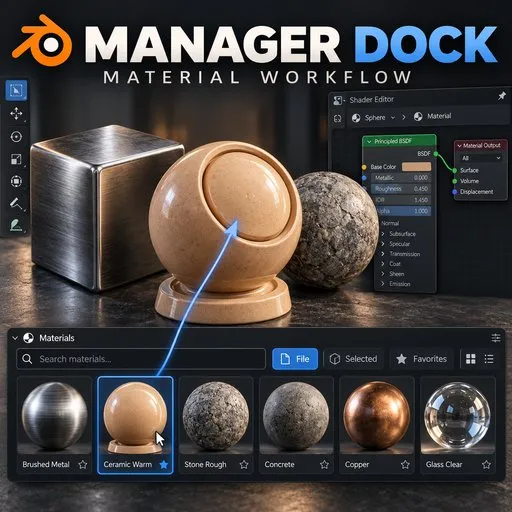
A visual material tray with drag assignment and shader editing

Product description
Keep your scene materials within reach. Material Dock adds a thumbnail tray to Blender's 3D Viewport so you can find materials, drag them onto objects, and jump into shader editing.
- Browse native Blender material previews directly in the viewport.
- Search by name and filter by File, Selected, or Favorites.
- Drag onto a surface to replace its material slot, or use Whole Object mode to replace all existing slots.
- Double-click to edit the chosen material in a pinned Shader Editor, even when it has not been assigned to an object.
- Create and duplicate materials, select objects using a material, and safely remove unused local materials.
- Adjust thumbnail size and row count, page with the mouse wheel, and undo material assignment.
Works with materials already in your blend file; no asset marking, external libraries, account, network access, or additional downloads required. This package is a workflow tool and does not include a material library.
This is version 0.1.0 Beta, requiring Blender 5.0 or newer. Existing functional QA covers Blender 5.0.1 on Linux; consult PACKAGING_REPORT.md for Windows checks performed during packaging. Other versions and platforms are not yet validated. Assignment requires Object Mode. Surface Slot replaces a shared slot, so every face using that slot changes. Preview refresh after node editing is manual. Quad View, Outliner drops, and assignment to collection/geometry instances are unsupported.
Includes full Python source, GPL license, English instructions, and Vietnamese instructions. For support, contact Daci Studio through this listing with your Blender version, OS, and reproduction steps.
Upload preparation
- Upload only Material_Dock_v0.1.0.zip as the installable add-on file. Do not upload the entire project or this release folder.
- Provide a square featured image showing the actual dock in Blender. Capture supporting screenshots or a short usage video; these are not included in this packaging pass.
- Set the price and support/profile details in your seller account. No price has been selected or submitted by this repack.
- Review the beta label and verified compatibility before submitting for sale.
- Keep Draft status until the product presentation is complete, then select For Sale when ready to submit for validation.


