
 Models
 Materials
 HDRIs
 Scenes
 Brushes
 Node Groups
 Printables
 Creators
 Creations
BlenderMCP Ultra
 add-on
Studio-grade AI pipeline orchestration for Blender via Model Context Protocol
BlenderMCP Ultra 3.3
AI for Blender that you can trust with a production file.
AI in Blender should save you hours, not cost you a scene. Most AI connectors are hard to set up, can't undo what they did, ignore your naming and poly budgets, and stop at "here's a mesh", leaving the baking, LODs, collision and engine export to you. BlenderMCP Ultra fixes all of that.
One-time purchase, no subscription. Blender 4.2 and newer. Use your own AI key or a free local model.
THE PROBLEMS IT SOLVES
"I spent an evening trying to get Claude to see Blender."
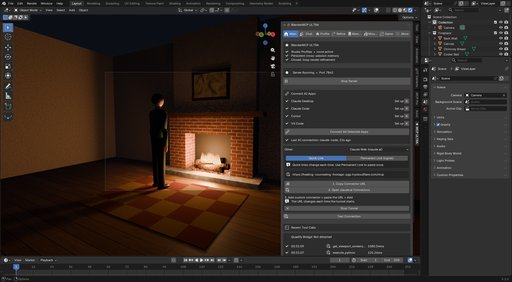
Ultra finds the AI apps on your computer and connects all of them with one button. There's nothing extra to install, the server starts with Blender, and connections keep working through restarts and Blender upgrades.
"The AI ran 200 operations and Ctrl+Z only goes back 32."
Every mission starts with a full-scene checkpoint. Revert Mission puts your file back exactly as it was.
"I don't want an agent loose in my scene."
Plan review shows every task and an estimated cost before anything runs. Edit, approve or reject. Mission History records every tool call afterwards.
"Making one prop game-ready takes longer than modelling it."
Prepare & Export runs the audit, auto-fix, bake, LODs, collision, lightmap UVs and export in one click, with no AI key needed.
"In Unreal it's 100x too small and the normals are inverted."
Ultra is engine-aware: DirectX normal maps for Unreal, OpenGL for Unity and Godot, unit scale and axes computed from your scene, ORM and Unity mask packing, and engine naming (SM_, UCX_, _LOD0).
"Every AI session I re-explain our naming and poly budgets."
Studio Profiles, written by hand or inferred from your existing scene, are enforced on every action. Project memory carries over across sessions and files.
GAME TAB: FROM MESH TO ENGINE-READY ASSET
- Texture baking: normal, AO, curvature, base color, roughness, metallic, emission, material ID and position maps, high-to-low or self-bake, with the cage distance set automatically
- Channel packing (ORM, Unity mask, metallic-smoothness) plus an auto-built material
- LOD chains that hit triangle targets and respect your poly budget
- Collision: box, convex hull, one hull per part, or a split into convex pieces for concave shapes
- Atlasing: merge many materials into one material and one draw call
- Texel density measurement and normalization, plus lightmap UVs
- A game-readiness audit (0-100 score, 17 checks) with Auto-Fix
- Export for Unreal, Unity and Godot, or Ship to Engine straight into a running Unreal or Unity editor
Every Game tab feature works from a button and as an AI tool.
SAFE BY DESIGN
- Full-scene checkpoints before every mission, restorable in one click
- Plan review with a cost estimate before anything runs
- The local server requires an access token, and websites can't control Blender
- You choose who may run Python: everyone, only the built-in AI, or no one
CONNECT ANY AI APP
- One click connects Claude Desktop, Claude Code, Cursor, Windsurf and VS Code
- claude.ai in the browser through a secure link, with an optional permanent link (free ngrok account) that you add once
- Open your AI app and Blender in any order
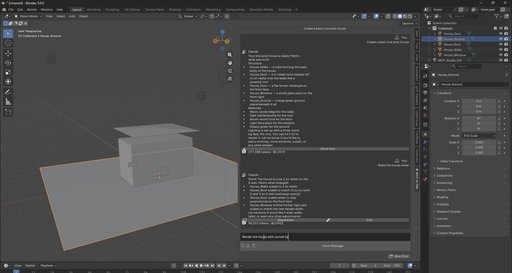
- Connected AI apps can see your viewport
- Or use the built-in chat with Claude, Gemini, OpenAI, Groq, DeepSeek, or a local model through Ollama, with cost shown per message
PIPELINE GOVERNANCE
- Studio Profiles: naming, poly budgets, material rules, engine target
- Project memory that persists across files in the same project folder
- Multi-agent missions: a planner splits a big goal across specialist agents, then validates the result and runs a fix pass
- Closed-loop render refinement: render, critique, fix, re-render until it reaches your target score
LICENSES
Personal: one artist or freelancer. Includes everything above.
Studio: everything in Personal, plus team usage rights, so one Studio Profile becomes the pipeline your whole team's AI follows.
MEASURED RESULTS (our own tests)
- Chat cost per message: 66,313 tokens ($1.01) down to 14,405 tokens ($0.06), about 94% cheaper
- MCP compatibility verified with the official MCP SDK
- Atlasing 3 materials: 3 draw calls down to 1, with each object's color and roughness checked in the atlas
- Unreal normal maps: the DirectX bake verified as the exact green-flipped OpenGL bake
- Blender to Unreal: 100x unit scale computed from your scene. Blender to Unity: 1x plus Y-up
- Every release runs 240+ automated checks inside Blender 4.2 and 5.2
WHAT IT WON'T DO
- Live import into an open Unreal or Unity editor needs UnrealMCP Pro or MCP Pro for Unity running. Without them, Ultra still exports engine-ready files and copies them into Unity and Godot projects.
- Blender doesn't respond while a bake runs, the same as Blender's own Bake button.
- claude.ai needs Blender open and the link running. Quick links change every session; the permanent link needs a free ngrok account.
- DeepSeek has no vision, so render refinement needs Claude, Gemini or OpenAI.
- It doesn't replace reviewing the result before you commit it to a shared file.
WORKS WITH
Claude Desktop, claude.ai, Claude Code, Cursor, Windsurf, VS Code. AI providers: Claude, Gemini, OpenAI, Groq, DeepSeek and Ollama. Engines: Unreal Engine, Unity and Godot. Blender 4.2 and newer on Windows, macOS and Linux.
SUPPORT
Send what happened, your Blender version and your AI app or provider to [email protected].
Anvil Interactive Solutions
quadify3d.com | theanvilstore.com


